
How to design a batch


Learn how to make a batch for the member of the unity, you can make same design by this example.
New File: Create a new document.
Circle: Draw a circle by the Ellipse tool (U key) with "42c623" color.

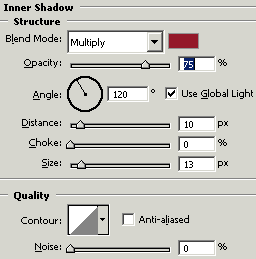
Effect: Go to Layer menu > Layer style > Apply Inner shadow.


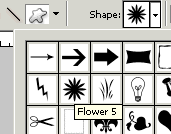
Flower shape: Choose Custom shape tool (U key) and select to draw inside the circle as I have done here.

Little circle: Choose Ellipse tool (U key) with red color and draw a circle middle of the flower shape.

Effect: Go to Layer menu > Layer style > Apply Bevel and Emboss.


Ribbon: Now draw ribbon by the Pen tool (P key) with red color as looking here.

Effect: Go to Layer menu > Layer style > Apply Inner shadow.
This is your final result.