
How to design a face of the lady.


In the Photoshop we can also make a cartoon lady, this tutorial you are going to learn how! I have tried here to making this with some simple steps, I hope you will enjoy it.
New File: Make a new file> new. Size is depends on your requirement. (I have taken here Width = 207 and Height = 151).

Hair: Firstly we are drawing hair. Select pen tool (P key) and point your pen tool to look like below hair shape.

Face: Now we have to make face, So select pen tool (P key) and point your pen tool and make adjustment with selected detect selection tool (A key) as a face shape.

Eye: We select Ellipse tool (U key) to make a ellipse shape, then select a Direct selection tool for given a perfect shape of eye (like below image). Then draw a circle inside the ellipse and fill with color("E6E5E4").

Use same step to make another eye.

Eyelid: Select pen tool (P key) and point your pen tool then select Direct selection tool (A key) and make adjustment as a eyelid.
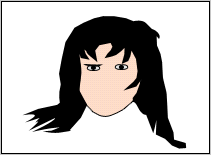
Use same step to make another eyelid.

Eyebrow: Let's go to make eyebrow, select pen tool and direct selection tool. Point on the made shape by the pen tool and make adjustment as a eyebrow. Your image will look like this.

Use same step to make another eyebrow.

Nose: Take "FDC6A7" color then select pen tool and point, you can adjust by the Direct selection tool as given below image.

Lips: You can also use pen tool here to make lips, take "EB0515" color. Select pen tool and point then select direct selection tool and make adjustment like a lips.

Right part of the body: First take "FDB790" color, select pen tool and make selection as I have done here.

Use same step to make another portion.

Middle Portion: Take "FDD9C5" color and make selection by the pen tool as given below.
 0
0
