
Java 26 HTTP Tutorial: HTTP 3 support in JDK 26 - How to use HTTP/3 in Java 26 application?
JDK 26 brings lots of advancement in Java 26 for the Java developers and HTTP/3 support in the HttpClient API in one of them. In this tutorial we are going to learn to use HTTP/3 support in the HttpClient API with the help of example code and scenarios. The HTTP/3 support in the HttpClient API is released as part of JEP 517.
The introduction of HTTP/3 support in the HttpClient API is a major change that uses QUIC protocol over UDP instead of the traditional TCP for communication. These days many of the servers started supporting HTTP/3, so with this Java API Java is ready to work with these servers without extra implementation. Developers will be able to work with the HTTP/3 servers with ease.
This update is aimed to provide efficiency for Java applications offering faster handshakes and reduced head-of-line blocking. This change will work well in the environment where there is an issue of high package loss.
This implementation comes with a powerful feature: if your server does not support HTTP/3 then the Java program will seamlessly switch back to HTTP/2 or HTTP/1.1. This feature is good and you won’t have to write your own code to switch back to HTTP/2 or HTTP/1.1 if the server does not support HTTP/3. This feature makes your application more robots and compatible across different server configurations.
In this tutorial, you'll learn:
- What HTTP/3 is
- How HTTP/3 differs from HTTP/2
- What changed in JDK 26
- How to create an HTTP/3 client in Java 26
- How to send GET and POST requests
- How to make asynchronous HTTP/3 requests
- How HTTP/3 discovery works
- How to verify which HTTP version was actually used
- How to debug HTTP/3 and QUIC
- HTTP/3 limitations in the JDK 26 implementation
- Best practices for production applications
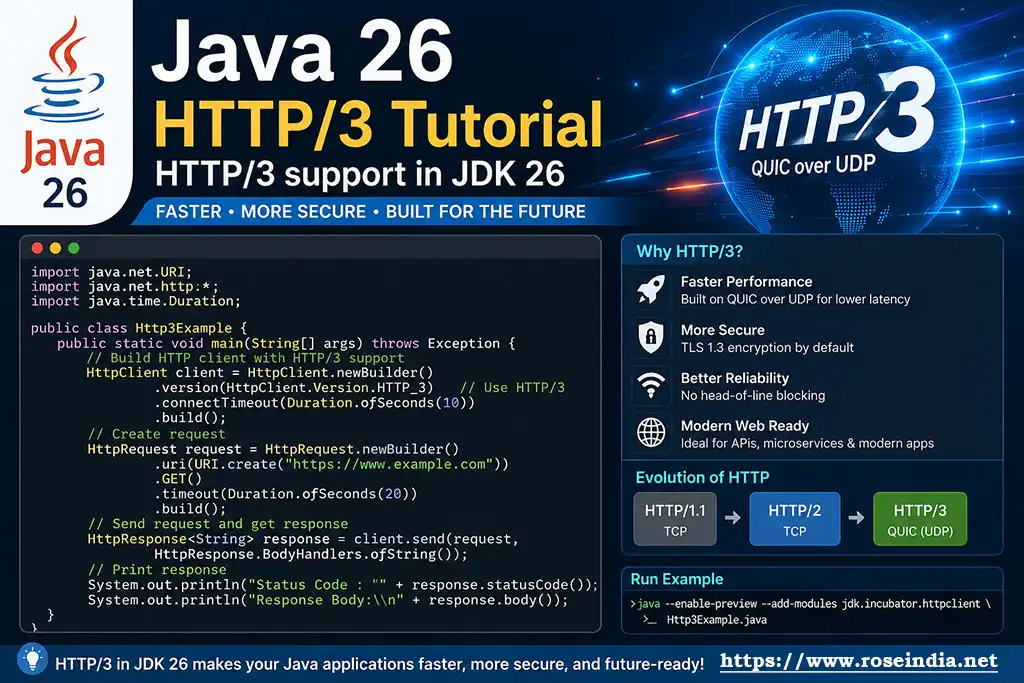
JDK 26 provided the support for HTTP/3 protocol in its HttpClient API, which makes it possible for the developers to write Java client programs that interact with the HTTP/3 servers. Earlier developers were using a third-part HTTP library to work with HTTP/3 servers. The HTTP/3 protocol is a major upgrade as it is built on QUIC protocol which uses modern transport protocol that runs on UDP. While HTTP/1.1 and HTTP/2 are using TCP as transport layer protocol. This feature provides developers an ability to choose the protocol of their choice while working with the HTTP servers.
1. What HTTP/3 is
HTTP/3 is the major release of the Hypertext Transfer Protocol (HTTP) protocol which is used on the Internet for data communication. HTTP/3 is based on a new protocol called QUIC, which uses UDP. The HTTP/2 or HTTP/1.1 is based on the TCP protocol. HTTP/3 is very powerful which fixes connection delays, also speeds up loading time, and it keeps mobile network switching smooth.
| HTTP/1.1 | HTTP/2 | HTTP/3 |
|
Application | HTTP/1.1 | TLS | TCP | Internet |
Application | HTTP/2 | TLS | TCP | Internet |
Application | HTTP/3 | QUIC | UDP | Internet |
Here is a quick breakdown of working of these Protocols:
- HTTP/1.1: Operates over TCP at the transport layer, with optional/standard encryption provided by TLS sitting between TCP and HTTP.
- HTTP/2: Keeps the exact same transport stack as HTTP/1.1 (TCP + TLS), but introduces binary framing and multiplexing at the application/HTTP layer.
- HTTP/3: Replaces TCP with UDP to eliminate head-of-line blocking. It integrates encryption directly via QUIC (which builds security using TLS 1.3 primitives natively into the transport mechanism).
QUIC protocol is a powerful protocol which works on UDP and it was designed to provide a modern, secure and multiplexed transport protocol. It also addresses the several limitations associated with TCP.
2. How HTTP/3 differs from HTTP/2
Now we will see the differences between HTTP/3 and HTTP/2. The most important architectural difference is the underlying transport.
| Feature | HTTP/1.1 | HTTP/2 | HTTP/3 |
| Transport | TCP | TCP | QUIC/UDP |
| Multiplexing | No | Yes | Yes |
| Header compression | No | HPACK | QPACK |
| Encryption | TLS | TLS | TLS integrated with QUIC |
| Connection establishment | TCP + TLS | TCP + TLS | QUIC |
| Java 26 support | Yes | Yes | Yes |
| Standard HttpClient | Yes | Yes | Yes |
HTTP/3 uses QUIC to provide multiplexed streams without depending on TCP's transport-level behavior, which makes it an ideal solution for today's needs.
3. What changed in JDK 26
Java's java.net.http.HttpClient has supported HTTP/1.1 and HTTP/2 for several releases. Now in JDK 26 this library has been updated to provide support for HTTP/3, which helps application developers in using HTTP/3 in their application without depending on the third-party APIs. We will see how to use the HTTP/3 API while using java.net.http.HttpClient class in your Java program. Here JDK 26 provided the option to use HTTP/3 with the help of HttpClient.Version.HTTP_3 version setting while creating the instance of HttpClient.
You can specify HTTP/3 when creating an HttpClient:
HttpClient client = HttpClient.newBuilder()
.version(HttpClient.Version.HTTP_3)
.build();
You can also specify HTTP/3 on an individual request:
HttpRequest request = HttpRequest.newBuilder()
.uri(URI.create("https://example.com"))
.version(HttpClient.Version.HTTP_3)
.GET()
.build();
This makes Java code compatible with HTTP/3 protocol and you can use this in your program with minimal changes in your existing Java program.
Prerequisites
Now we will understand the pre-requisites of using HTTP/3 client API in your Java program. You should fulfill these pre-requisites to use JDK 26 HTTP/2 API in Java client program. Before trying the examples in this tutorial, make sure you have:
- JDK 26 installed - Since this feature is introduced first in JDK 26, you should have JDK 26 or above installed on your computer.
- A Java IDE or command-line environment - You will be able to use Java IDE or simple command-line environment to run your sample application.
- An HTTPS endpoint that supports HTTP/3 - You should have an HTTP/3 server running some of the services to test our example.
- Network access that allows QUIC/UDP traffic - Your network should allow QUIC/UDP traffic so that we will be able to run our program and connect to the HTTP/3 server.
You should check the Java version installed on your computer with following command:
java -version
You should see Java 26 Or above if latest version of JDK is installation
You can also check the runtime from Java:
System.out.println(Runtime.version());
The above code will print the version Java on your system.
4. How to create an HTTP/3 client in Java 26
Now we will see how to create our first HTTP/3 client that interacts with the HTTP/3 server. Let's create a simple Java 26 application. Create a text file with the name Http3Example.java and add the following code.
import java.net.URI;
import java.net.http.HttpClient;
import java.net.http.HttpRequest;
import java.net.http.HttpResponse;

public class Http3Example {
	public static void main(String[] args) throws Exception {
		HttpClient client = HttpClient.newBuilder().version(HttpClient.Version.HTTP_3).build();
		HttpRequest request = HttpRequest.newBuilder().uri(URI.create("https://example.com"))
				.version(HttpClient.Version.HTTP_3).GET().build();
		HttpResponse response = client.send(request, HttpResponse.BodyHandlers.ofString());
		System.out.println("Status: " + response.statusCode());
		System.out.println("HTTP Version: " + response.version());
		System.out.println(response.body());
	}
}
The above program sends a get request to the HTTP/3 server and finally prints the status, HTTP version and response body on the console.
The important line is:
.version(HttpClient.Version.HTTP_3)
This tells the Java HTTP client that HTTP/3 is the preferred protocol. This is a very simple example that shows you how to use the HTTP/3 in your Java client program.
Now we will understand each code in detail. First of all we need to create an instance of HttpClient. The following code creates the HTTP client:
0
HttpClient client = HttpClient.newBuilder()
.version(HttpClient.Version.HTTP_3)
.build();
The next step is to create an HTTP request. In this sample we are creating HTTP GET requests. Here is the code for creating HTTP request:
HttpRequest request = HttpRequest.newBuilder()
.uri(URI.create("https://example.com"))
.version(HttpClient.Version.HTTP_3)
.GET()
.build();
The final step is to send the request on HTTP/3 server and return the response. Here is the code block of sending request:
HttpResponse response =
client.send(
request,
HttpResponse.BodyHandlers.ofString()
);
From the response object we can find out which protocol is used for the request. The response can tell us which protocol was actually used:
1System.out.println(response.version());
For example:
HTTP_3
2Why Does HTTP/3 Require HTTPS?
HTTP/3 is designed to work with QUIC, and QUIC incorporates TLS into its connection establishment. So, you need to use the https protocol for connecting to a HTTP/3 complaint server
You should use: https://example.com rather than: http://example.com
If you use an HTTP URI then the request won't be sent using HTTP/3. So, if you have used http in your domain url for accessing the server then you need to modify your code to use https.
3- How to send GET and POST requests
Sending GET Request
Now we will see how to send a GET Request Over HTTP/3. Here is sample example of sending GET request:
HttpRequest request = HttpRequest.newBuilder()
.uri(URI.create(
"https://api.example.com/customers"))
.version(HttpClient.Version.HTTP_3)
.header("Accept", "application/json")
.GET()
.build();
Send it using:
4
HttpResponse response =
client.send(
Request,
HttpResponse.BodyHandlers.ofString()
);
Then process the result:
System.out.println(response.statusCode());
System.out.println(response.body())
Sending POST request
Here is complete example of sending HTTP/3 POST request:
Here is a complete example:
5
import java.net.URI;
import java.net.http.HttpClient;
import java.net.http.HttpRequest;
import java.net.http.HttpResponse;

public class Http3PostExample {
	public static void main(String[] args) throws Exception {
		String json = """
				{
				"name": "John",
				"email": "[email protected]"
				}
				""";
		HttpClient client = HttpClient.newBuilder().version(HttpClient.Version.HTTP_3).build();
		HttpRequest request = HttpRequest.newBuilder().uri(URI.create("https://api.example.com/users"))
				.version(HttpClient.Version.HTTP_3).header("Content-Type", "application/json")
				.header("Accept", "application/json").POST(HttpRequest.BodyPublishers.ofString(json)).build();
		HttpResponse response = client.send(Request, HttpResponse.BodyHandlers.ofString());
		System.out.println("HTTP Version: " + response.version());
		System.out.println("Status Code: " + response.statusCode());
		System.out.println(response.body());
	}
}
6. How to make asynchronous HTTP/3 requests
The Java HTTP Client also supports asynchronous operations through sendAsync(). In this example I will show you how to make asynchronous call to the HTTP/3 server. This is useful when an application needs to make multiple API requests without blocking the current thread. You can make multiple requests at a time and then wait for each request to complete in parallel.
Example:
import java.net.URI;
import java.net.http.HttpClient;
import java.net.http.HttpRequest;
import java.net.http.HttpResponse;

public class AsyncHttp3Example {
	public static void main(String[] args) {
		HttpClient client = HttpClient.newBuilder().version(HttpClient.Version.HTTP_3).build();
		HttpRequest request = HttpRequest.newBuilder().uri(URI.create("https://example.com"))
				.version(HttpClient.Version.HTTP_3).GET().build();
		client.sendAsync(request, HttpResponse.BodyHandlers.ofString()).thenAccept(response -> {
			System.out.println("HTTP Version: " + response.version());
			System.out.println("Status: " + response.statusCode());
			System.out.println(response.body());
		}).join();
	}
}
The important difference is:
6client.sendAsync(...)
instead of:
client.send(...)
77. How HTTP/3 discovery works
JDK 26 introduced native HTTP/3 support via JEP 517 in its HttpClient API, which makes it easy for the programmers to work with HTTP/3 enabled servers. JDK 26 also introduces HTTP/3 discovery options. JDK 26 comes with configurable discovery options just like Alt-Svc alternative service mapping. It also contains the strict URI-only modes which handles the protocol negotiation over UDP-based QUIC.
The relevant API is HttpOption.H3_DISCOVERY. The available discovery modes include HttpOption.Http3DiscoveryMode.ANY and HttpOption.Http3DiscoveryMode.HTTP_3_URI_ONLY
A request can specify a discovery mode:
8
HttpRequest request = HttpRequest.newBuilder()
.uri(URI.create("https://example.com"))
.version(HttpClient.Version.HTTP_3)
.setOption(
   HttpOption.H3_DISCOVERY,
  HttpOption.Http3DiscoveryMode.ANY
)
.GET()
.build();
The discovery mechanism helps the client determine how HTTP/3 should be established.
JDK 26 also provides:
HttpOption.Http3DiscoveryMode.HTTP_3_URI_ONLY
9For example:
HttpRequest request = HttpRequest.newBuilder()
.uri(URI.create("https://example.com"))
.version(HttpClient.Version.HTTP_3)
.setOption(
HttpOption.H3_DISCOVERY,
HttpOption.Http3DiscoveryMode.HTTP_3_URI_ONLY
)
.GET()
.build();
This mode is useful when HTTP/3 is an explicit requirement rather than simply a preferred protocol.
8. How to verify which HTTP version was actually used
You don't have to guess whether your request used HTTP/3. You will be able to use the code response.version() to get the version of HTTP protocol used. In the following example code we are doing the same.
0Inspect: response.version()
For example:
HttpResponse response =
client.send(
Request,
HttpResponse.BodyHandlers.ofString()
);
System.out.println( "HTTP version: " + response.version());
You may see:
1HTTP_3
This is a useful technique when testing HTTP/3 support.
9. How to debug HTTP/3 and QUIC
When working with HTTP/3, it is often necessary to understand what is happening at the QUIC layer.
2JDK 26 provides HTTP Client logging options.
For example:
java -Djdk.httpclient.HttpClient.log=http3,quic Http3Example
3You can also enable more detailed logging:
java -Djdk.httpclient.HttpClient.log=errors,requests,headers,http3,quic Http3Example
These logs can help diagnose:
4- HTTP/3 negotiation
- QUIC connections
- HTTP/3 requests
- Request and response headers
- Protocol errors
For development and troubleshooting, HTTP/3 logging can be extremely useful.
10. HTTP/3 limitations in the JDK 26 implementation
There is an important limitation in the JDK 26 implementation.
HTTP/3 is not used when a proxy is selected. Oracle explicitly documents that HTTP/3 through proxies isn't supported by the JDK implementation.
5So be careful with configurations such as:
HttpClient.newBuilder()
.proxy(...)
6.version(HttpClient.Version.HTTP_3)
Your application may not actually communicate using HTTP/3.
11. Best practices for production applications
When using HTTP/3 in a production Java application, consider the following:
71. Reuse HttpClient
Don't create a new client for every request.
2. Use HTTPS
HTTP/3 requires HTTPS in the JDK HTTP Client implementation.
3. Set reasonable timeouts
For example:
8.connectTimeout(Duration.ofSeconds(10))
and:
.timeout(Duration.ofSeconds(30))
94. Don't assume HTTP/3 is always available
Your server and network must support QUIC/HTTP/3.
5. Monitor the actual protocol
Use:
response.version()
0to verify what was actually negotiated.
6. Test proxies
HTTP/3 support has limitations when proxies are involved.
7. Enable logging during troubleshooting
Use:
1-Djdk.httpclient.HttpClient.log=http3,quic
when investigating HTTP/3 problems.
HTTP/3 is a crucial enhancement for developers studying modern Java, as it integrates advanced QUIC-based networking straight into the JDK's standard HTTP client.
2Related Tutorials: