
Search Tutorials
--Ads--Metadata Filtering and Multi-Tenancy
Filter search results by attributes and isolate data between customers.
Pure similarity search ignores everything except meaning. Real questions often come with constraints: "the 2026 travel policy", "only documents from the HR department", or, invisibly, "only documents this customer is allowed to see". Metadata filters express these constraints. This lesson covers filter syntax, why when the filter runs matters, and how to keep tenants' data apart.
Filters in practice
Most vector stores support equality, ranges, set membership and boolean combinations over metadata fields. In Chroma:
import chromadb

collection = chromadb.PersistentClient(path="chroma_db").get_or_create_collection("docs")

results = collection.query(
    query_embeddings=[query_vector.tolist()],
    n_results=5,
    where={
        "$and": [
            {"department": {"$in": ["hr", "legal"]}},
            {"year": {"$gte": 2025}},
            {"status": {"$ne": "archived"}},
        ]
    },
)
The same filter in Qdrant:
from qdrant_client import models

flt = models.Filter(
    must=[
        models.FieldCondition(key="department", match=models.MatchAny(any=["hr", "legal"])),
        models.FieldCondition(key="year", range=models.Range(gte=2025)),
    ],
    must_not=[models.FieldCondition(key="status", match=models.MatchValue(value="archived"))],
)
hits = client.query_points("docs", query=query_vector.tolist(), query_filter=flt, limit=5).points
Chroma also supports a where_document argument for simple full-text conditions such as {"$contains": "XR-4471"}.
When the filter runs matters
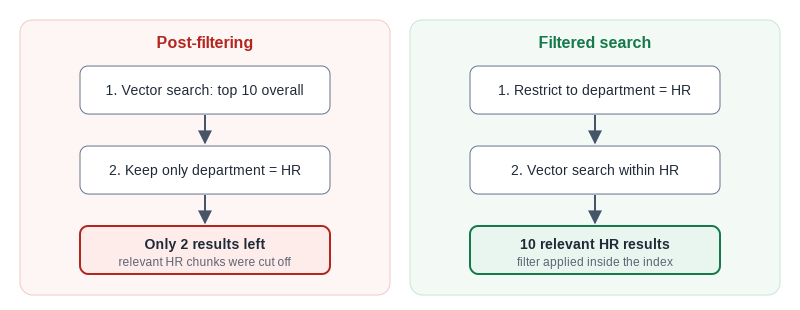
- Post-filtering searches the top k overall, then drops results that fail the filter. If the filter is selective, few or no results survive, even though matching relevant documents exist.
- Pre-filtering first finds all documents that match the filter, then searches among them. Exact, but slow if the matching set is large and must be scanned.
- Filtered (in-index) search applies the filter while traversing the ANN index. Modern vector databases (Qdrant, Weaviate, Milvus, recent pgvector versions with iterative scans) do this, and it is what you want.
If your store only supports post-filtering, ask for more results than you need (for example k * 5) and then filter, or partition the data so filters are not needed.
Index the fields you filter on
Dedicated vector databases filter fastest on fields that have a payload index. In Qdrant:
client.create_payload_index("docs", field_name="department",
                            field_schema=models.PayloadSchemaType.KEYWORD)
client.create_payload_index("docs", field_name="year",
                            field_schema=models.PayloadSchemaType.INTEGER)
In pgvector, ordinary B-tree indexes on the filter columns serve the same purpose.
Multi-tenancy
A SaaS product that offers RAG to many customers (tenants) must guarantee that one tenant's question can never retrieve another tenant's documents. There are two common designs:
| One collection per tenant | Shared collection + tenant filter | |
|---|---|---|
| Isolation | Strong: physically separate | Logical: depends on the filter always being applied |
| Number of tenants | Tens to a few thousand | Thousands to millions |
| Overhead | Per-collection memory and management | Low |
| Deleting a tenant | Drop the collection | Delete by filter |
Shared collection done safely
The tenant ID must come from your authentication system, never from the user's request or the LLM. Wrap the search in a function that cannot be called without it:
from qdrant_client import QdrantClient, models

client = QdrantClient(url="http://localhost:6333")
client.create_payload_index(
    "docs", field_name="tenant_id",
    field_schema=models.KeywordIndexParams(type="keyword", is_tenant=True),  # optimises per-tenant storage
)

def search_for_tenant(tenant_id: str, query_vector, k: int = 5, extra: list | None = None):
    """The ONLY search entry point. tenant_id comes from the authenticated session."""
    if not tenant_id:
        raise PermissionError("tenant_id is required")
    conditions = [models.FieldCondition(key="tenant_id", match=models.MatchValue(value=tenant_id))]
    conditions += extra or []
    return client.query_points("docs", query=query_vector.tolist(), limit=k,
query_filter=models.Filter(must=conditions)).pointsWrite an automated test that indexes documents for two tenants and asserts that searches for tenant A never return tenant B's chunks, including for queries that exactly match B's text. Run it in CI. Access control within one tenant (per user or per group) is covered in Access Control and Document-Level Permissions.
Key takeaways
- Metadata filters add hard constraints such as department, date, status or tenant to similarity search.
- Prefer stores that filter during the ANN search; post-filtering can silently return too few results.
- Create payload or column indexes on fields you filter by.
- For multi-tenancy, enforce the tenant filter in one server-side function, with the tenant ID taken from authentication.