
Search Tutorials
--Ads--What is a Vector Database?
Vector database fundamentals, architecture and how they compare with relational databases.
A vector database stores embeddings (vectors) together with IDs, metadata and often the original text, and finds the vectors most similar to a query vector very quickly, even among millions or billions. In a RAG system it is the component that turns "find relevant passages" into a millisecond operation. This lesson explains what vector databases do, how they are built, and how they differ from relational databases.
What you will learn
- What problem vector databases solve
- The main parts of a vector database's architecture
- How a vector database differs from a relational database, and when to use each
- The core operations: upsert, query, filter and delete
Prerequisites
The problem
To find the passages most similar to a question, you compare the question's embedding with every passage's embedding. With 10,000 chunks a simple loop or a NumPy matrix product is fast enough. With 50 million chunks, comparing against every vector for every query is too slow and too expensive. You also need to store vectors durably, update and delete them, filter by metadata ("only HR documents"), and serve many users at once. Vector databases are built for exactly this.
Architecture
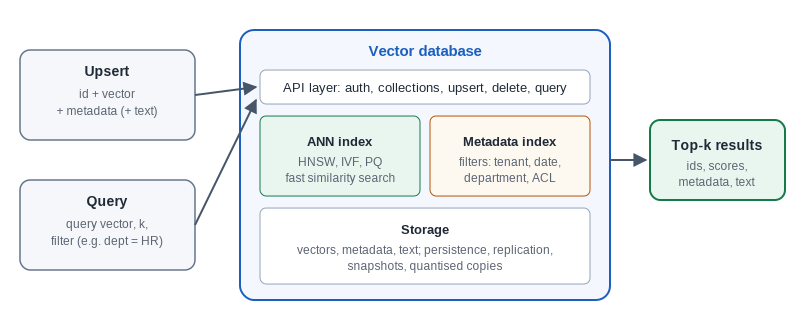
- API layer: create collections, upsert, delete and query, with authentication.
- Approximate nearest neighbour (ANN) index: a data structure such as HNSW or IVF that finds near-best matches without scanning everything (Vector Index Types).
- Metadata index: makes filters fast, for example by tenant, department, language or date.
- Storage: persists vectors, metadata and text, with replication, snapshots and sometimes compressed (quantised) copies of vectors.
Core concepts
| Term | Meaning |
|---|---|
| Collection / index | A named set of vectors with the same dimension and distance metric (like a table) |
| Point / record | One item: an ID, a vector, metadata (also called payload) and often text |
| Dimension | The vector length, fixed by the embedding model (for example 384 or 1,536) |
| Distance metric | Cosine, dot product or Euclidean; must match how the embedding model was trained |
| Top-k query | Return the k most similar records to a query vector |
| Filter | Restrict results by metadata values |
| Upsert | Insert, or replace if the ID already exists |
The core operations in code
This example uses Chroma, an embedded vector database that runs inside Python with no server. Other databases use different method names for the same operations.
pip install chromadb sentence-transformersimport chromadb
from rag_helpers import embed # local embedding model (384 dimensions)
client = chromadb.PersistentClient(path="vdb_demo")
collection = client.get_or_create_collection("policies")
# UPSERT: ids, vectors, metadata and text
texts = ["Employees get 18 days of paid leave.", "Expense claims are due within 30 days.",
"Laptops must use full-disk encryption."]
collection.upsert(
ids=["hr-1", "fin-1", "it-1"],
embeddings=embed(texts).tolist(),
documents=texts,
metadatas=[{"dept": "hr"}, {"dept": "finance"}, {"dept": "it"}],
)
# QUERY: top-k similar, with an optional metadata filter
result = collection.query(query_embeddings=embed("holiday allowance", query=True).tolist(),
n_results=2)
print(result["ids"][0], result["documents"][0])
result = collection.query(query_embeddings=embed("deadlines", query=True).tolist(),
n_results=1, where={"dept": "finance"})
print(result["documents"][0])
# DELETE
collection.delete(ids=["it-1"])
print(collection.count())['hr-1', 'fin-1'] ['Employees get 18 days of paid leave.', 'Expense claims are due within 30 days.']
['Expense claims are due within 30 days.']
2Vector database vs relational database
| Relational database (e.g. PostgreSQL, MySQL) | Vector database | |
|---|---|---|
| Main query | Exact matches, ranges, joins, aggregates (SQL) | Nearest neighbours by similarity |
| Answer type | Exactly the rows that match | The most similar records, ranked by score |
| Index types | B-tree, hash | HNSW, IVF, PQ (approximate) |
| Transactions and joins | Strong | Limited or none |
| Good for | Orders, users, finance, reporting | Semantic search, recommendations, RAG retrieval |
The line is blurring: PostgreSQL with the pgvector extension, Elasticsearch, OpenSearch and MongoDB add vector search to existing databases. If you already run one of them, it may be all you need (Choosing a Vector Database).
Common mistakes
- Wrong distance metric: creating a collection with Euclidean distance for a model trained for cosine gives worse ranking unless vectors are normalised.
- Mixing embedding models in one collection: vectors become incomparable.
- Storing only vectors: without text and metadata you cannot show, cite or filter results.
- Random IDs: use stable IDs (such as
doc_id:chunk_index) so you can update and delete.
Key takeaways
- A vector database stores vectors with IDs, metadata and text, and finds the most similar ones quickly.
- Its main parts are an API, an ANN index, a metadata index and durable storage.
- Relational databases answer exact questions; vector databases answer "most similar" questions.
- The core operations are upsert, query with filters, and delete.
Frequently asked questions
Do I need a vector database for a small project?
No. Up to roughly 100,000 vectors, a NumPy array or FAISS in memory is fine. Use a database when you need persistence, updates, filtering or scale.
Are vector search results exact?
Usually approximate: ANN indexes trade a little recall for speed. You can tune this, or use exact search for small collections.
Practice exercises
- Add a
yearfield to the metadata and query only documents from one year. - Upsert "hr-1" with new text and confirm the old text is replaced.