
Search Tutorials
--Ads--Access Control and Document-Level Permissions
Make sure users can only retrieve the documents they are allowed to see.
Company knowledge is not all public inside the company. Salary bands, board minutes, legal cases and customer contracts are restricted to certain people. A RAG system that indexes everything and answers anyone becomes a data-leak machine: "What is the salary band for my manager's role?" A secure system enforces the same permissions as the source systems, at retrieval time, for every question.
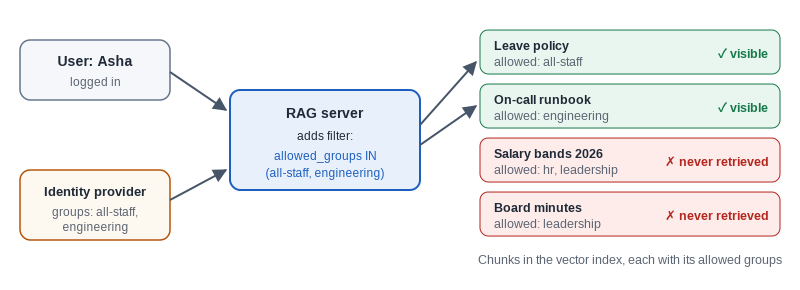
The core rule
Filter before generation, in code, using identity from authentication. A document the user may not see must never reach the prompt. Asking the LLM to "not reveal restricted information" is not access control: the model has already seen it, and prompts can be manipulated.
Step 1: Capture permissions at ingestion
When you load a document, read its permissions from the source system (SharePoint, Google Drive, Confluence and most document systems expose them through their APIs) and store them on every chunk as a list of allowed groups or users.
def chunk_records(doc_id: str, chunks: list[str], allowed_groups: list[str]) -> list[dict]:
    return [{
        "id": f"{doc_id}:{i}",
        "text": chunk,
        "metadata": {"doc_id": doc_id, "allowed_groups": sorted(set(allowed_groups))},
    } for i, chunk in enumerate(chunks)]

# e.g. from the source system's permission API
records = chunk_records("hr/salary-bands-2026.pdf", chunks, allowed_groups=["hr", "leadership"])
Use groups rather than individual users wherever possible. Group membership changes often, but it lives in your identity provider, so you do not need to re-index when someone joins a team.
Step 2: Filter every search
At query time, get the user's groups from the authenticated session (or the identity provider), and pass them as a filter to the vector database. In Qdrant, MatchAny matches chunks whose allowed_groups list contains any of the user's groups:
from qdrant_client import QdrantClient, models

client = QdrantClient(url="http://localhost:6333")
client.create_payload_index("docs", field_name="allowed_groups",
                            field_schema=models.PayloadSchemaType.KEYWORD)

def secure_search(user, query_vector, k: int = 5):
    groups = user.groups                      # from the verified session, NEVER from the request body
    if not groups:
        return []
    return client.query_points(
        "docs", query=query_vector.tolist(), limit=k,
        query_filter=models.Filter(must=[
            models.FieldCondition(key="allowed_groups", match=models.MatchAny(any=groups)),
        ]),
    ).points
The same filter in PostgreSQL with pgvector uses the array overlap operator:
SELECT id, text FROM chunks
WHERE allowed_groups && %(user_groups)s::text[]
ORDER BY embedding <=> %(query_vec)s
LIMIT 5;
Step 3: Apply permissions everywhere
Retrieval is not the only path to data. Check each of these:
- Caches: retrieval and answer caches must be keyed by permission scope (Caching).
- Tools and agents: every tool (search, get_document, SQL) must apply the same filter, with the user identity passed by your code, not chosen by the model.
- Conversation history: shared or exported chats may contain restricted answers.
- Summaries and derived indexes: RAPTOR summaries, GraphRAG community reports and multi-vector summaries mix content from several documents. Give each derived item the intersection of its sources' permissions, or build them per permission scope.
- Logs and traces: restrict who can read them.
Step 4: Keep permissions in sync
When a document's permissions change at the source, its chunks must be updated quickly. Include permissions in the content hash used for change detection (Re-Indexing), or subscribe to permission-change events. For highly sensitive data, some teams additionally re-check permissions against the source system for the final top results before generation.
Step 5: Test it
def test_restricted_documents_never_retrieved():
    intern = FakeUser(groups=["all-staff"])
    for query in ["salary bands 2026", "board meeting minutes", "executive compensation"]:
        hits = secure_search(intern, embed(query, query=True)[0], k=20)
        groups = {g for h in hits for g in h.payload["allowed_groups"]}
        assert groups <= {"all-staff"}, f"leak for '{query}': {groups}"
Run permission tests in CI with queries that exactly match restricted content, the case most likely to leak if a filter is missing.
Key takeaways
- Enforce permissions in retrieval code before generation; never rely on the LLM to withhold data.
- Store allowed groups on every chunk at ingestion, taken from the source system.
- Take user identity and groups from authentication, and apply the filter in every search path, cache and tool.
- Keep permissions in sync, handle derived summaries carefully, and test for leaks in CI.