
How to Create a Hello World Program in Java Using JDK 25 (Latest Features) – A Complete Beginner to Modern Guide (2026)
In this tutorial we are going to learn the new feature of Java 25 which is known as JEP 512: Compact Source Files and Instance Main Methods, which provides a new way of writing Hello World Program. This is a new way of writing Java programs for learning and teaching which removes heavy boilerplate code and replaces it with simple code. In this tutorial we will see the old method of writing Hello World program and also learn the new way of writing Hello World program. So, let's get started.
Introduction
The Hello World program has always been the first stepping stone for anyone entering the world of programming. Beginners starts programming with the Hello World example and this is the program where he learns to create, compile and run Java programs. In Java, Hello World program introduces programmers with Java's structure, compilation process, execution model, and interaction with the Java Virtual Machine (JVM).
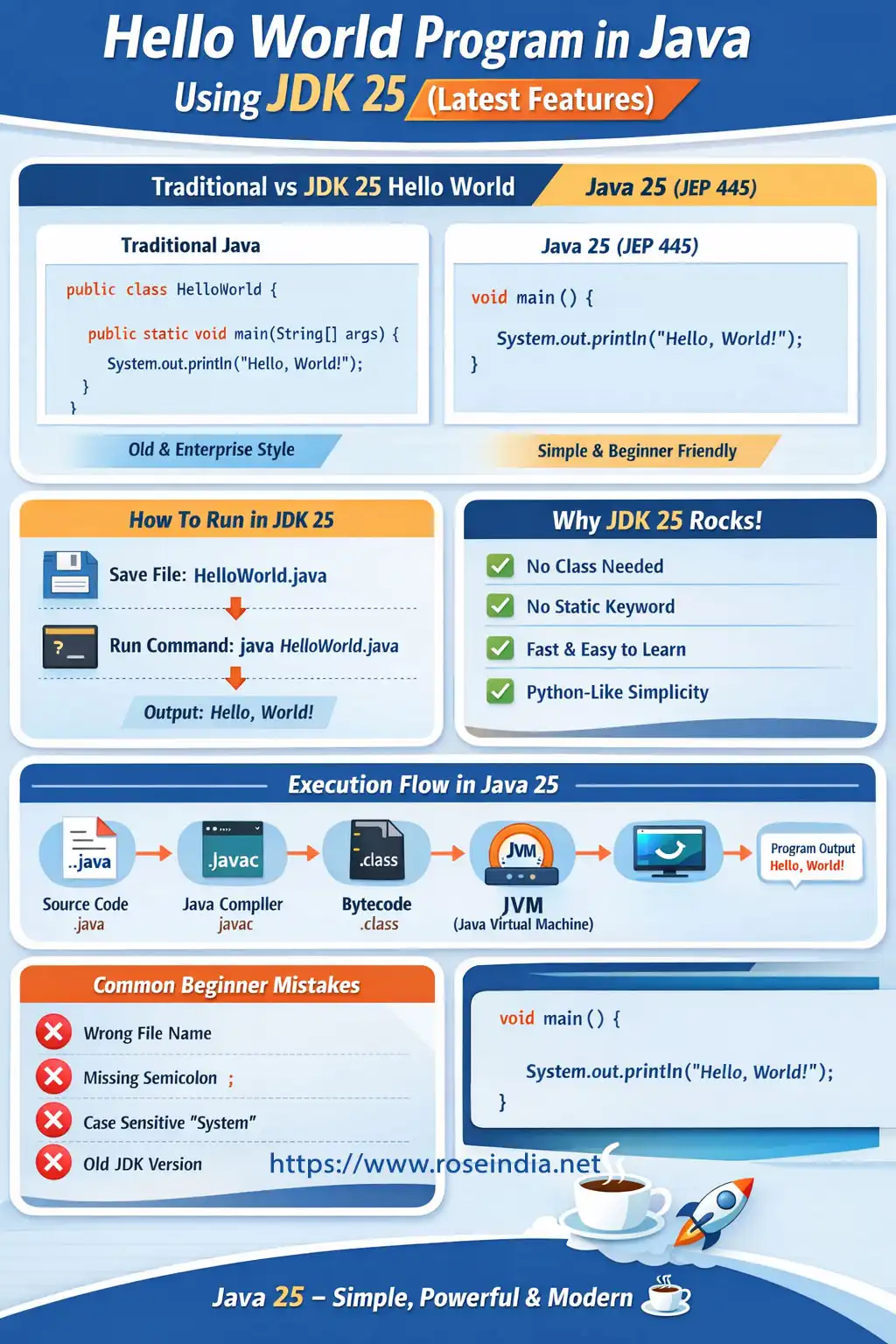
With the release of JDK 25, Java has taken a major leap forward in simplifying the developer experience, especially for beginners. In this comprehensive guide, you will learn every modern and traditional way to create a Hello World program using JDK 25, along with deep explanations, comparisons, execution flow, best practices, and common mistakes. You will learn the old and new methods of creating Hello World programs. We have tested programs given here on OpenJDK 25.
Prerequisites to Run Java 25 Hello World
We are using JDK 25 to run the programs described here so, you must have JDK 25 installed on your machine. Before writing your first program, ensure:
- JDK 25 is installed
- java and javac commands are accessible
- A text editor or IDE (VS Code, IntelliJ, Notepad)
Check your Java version:
java --version
Output should indicate Java 25 or later.
Traditional Hello World Program in Java (Still Fully Supported)
First of all we will learn the traditional (old) way of developing Hello World Program. Java 25 is fully supporting traditional Hello World code and you can follow the steps to run the program. Now we will describe the same steps for you.
Let’s start with the classic approach, which is still widely used in enterprise applications.
Code Example
public class HelloWorld {
  public static void main(String[] args) {
    System.out.println("Hello, World!");
  }
}
Explanation
public class HelloWorld
- Defines a class
- Class name must match file name (HelloWorld.java)
- Required in traditional Java applications
public static void main(String[] args)
- Entry point of Java application
- public allows JVM access
- static avoids object creation
- void indicates no return value
- String[] args handles command-line input
System.out.println()
- Prints output to console
- Automatically moves to the next line
How to Compile and Run Traditional Java Program
Step 1: Compile
javac HelloWorld.java
Step 2: Run
java HelloWorld
Output
Hello, World!
Why Traditional Hello World Still Matters in 2026
Even with new Java features, the traditional structure is essential for:
- Spring Boot
- Enterprise systems
- Android apps
- Interviews
- Legacy codebases
Understanding this approach is non-negotiable for serious Java developers. As a beginner you should also understand the traditional way of developing Hello World programs.
Single-File Source Code Execution (Modern Java Feature)
Java also supports running the code from the single .java file without compilation. This feature was introduced in Java SE 11 via JEP 330: Launch Single-File Source-Code Programs. This is a good feature for beginners as they can just run the program single .java file without compilation. JDK 25 also provides this feature and we can run the java code using the command java HelloWorld.java.
Java allows you to run a .java file directly, without explicitly compiling it.
Code
class HelloWorld {
  public static void main(String[] args) {
    System.out.println("Hello, World!");
  }
}
Run Directly
java HelloWorld.java
Benefits
- No separate javac step
- Faster development
- Ideal for demos and scripting
- Great for beginners
Unnamed Classes and Instance Main Methods (JDK 25 Highlight)
Now we will see how to write Hello World programs in Java using its latest feature. This is the Most Important Java Feature for Beginners.
Introduced in JEP 445, unnamed classes revolutionize how Java programs are written. JEP 445: Unnamed Classes and Instance Main Methods
First, the protocol is enhanced by which Java programs are launched to allow instance main methods. Now the main method is not static, need not be public, and need not have a String[] parameter, thus writing a Hello World program is much easier. Here is the example of writing Hello World program in modern way:
class HelloWorld {
  void main() {
    System.out.println("Hello, World!");
 }
}
The JEP 445 introduced a Second feature, which is known as unnamed classes to make the class declaration implicit.
Simplest Hello World in Java 25
void main() {
   System.out.println("Hello, World!");
}
What’s Removed?
- No class declaration
- No static
- No access modifiers
- No boilerplate
How to Run
java HelloWorld.java
This is the recommended way to start learning Java in 2026. This is a much easier example and easy to run in JDK 25. You can even compile this HelloWorld program into .class and then run as usual.
Why Unnamed Classes Are a Game Changer
Traditional Java
public class HelloWorld {
   public static void main(String[] args) {
     System.out.println("Hello, World!");
  }
}
Modern Java 25
void main() {
   System.out.println("Hello, World!");
}
Advantages
- Reduced cognitive load
- Beginner-friendly
- Python-like simplicity
- Faster learning curve
- Ideal for scripting and teaching
Hello World with Command-Line Arguments (Modern Style)
void main(String[] args) {
   System.out.println("Hello, " + args[0]);
}
Run
java HelloWorld.java Java
Output
Hello, Java
How Java 25 Executes a Hello World Program
Regardless of syntax simplicity, Java’s execution model remains robust.
Execution Flow
- Source code (.java)
- Bytecode generation
- Class loading
- JVM execution
- Output displayed
Writing program using IO class in JDK 25
Now I will show you examples of using the IO class in Java which is coming with JDK 25. This helper class (IO) provides many methods for console input and output, which makes programs simple and more readable. Here Hello world example using JDK 25 and IO class.
Print Hello World:
void main() {
    IO.println("Hello, World!");
}
Here is example of command line arguments:
void main(String [] args) {
    IO.println("Hello, World!");
	IO.println(args[0]);
}
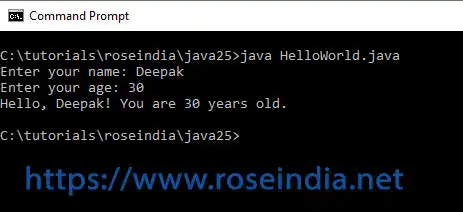
Example of taking input from user and then printing on console:
// No explicit import needed as it is in java.lang
public class HelloWorld {
    public static void main(String[] args) {
        IO.print("Enter your name: "); // Prints a prompt without a newline
        String name = IO.readln();     // Reads a line of text

        IO.print("Enter your age: ");
        String age = IO.readln();

        IO.println("Hello, " + name + "! You are " + age + " years old.");
    }
}
Here is the screenshot of the program:
Java hides complexity without removing it.
Java 25 vs Older Java Versions (Hello World Comparison)
| Feature | Java 8 | Java 17 | Java 25 |
| Boilerplate | High | High | Low |
| Direct Execution | ❌ | ❌ | ✅ |
| Unnamed Classes | ❌ | ❌ | ✅ |
| Beginner Friendly | ❌ | ⚠️ | ✅ |
Common Mistakes Beginners Make in Java 25
❌ Using New Syntax on Old JDK
void main() { }
0Fails on Java < 21
❌ File Name Issues
- Must end with .java
❌ Missing Semicolons
System.out.println("Hello")
❌ Case Sensitivity Errors
system.out.println()
1Best Practices for Hello World in Java 25
- Start with unnamed classes
- Progress to traditional Java
- Understand JVM basics
- Practice command-line execution
- Avoid IDE dependency early
Why Java Simplified Hello World in JDK 25
Java aims to:
- Compete with Python and JavaScript
- Lower entry barriers
- Attract new developers
- Maintain enterprise dominance
Java now offers:
- Simple syntax for beginners
- Powerful runtime for enterprises
What to Learn After Hello World
Once you’re comfortable, move on to:
2- Variables and data types
- Control statements
- Methods and classes
- OOP concepts
- Exception handling
- Collections
- Multithreading
Learning Java properly starts with Hello World.
FAQs – Hello World in Java 25
Is Hello World still relevant?
Yes, it verifies the environment and teaches fundamentals.
Which syntax should beginners use?
Unnamed classes (void main()).
3Can enterprises use unnamed classes?
No, they are mainly for learning and scripting.
Does Java 25 replace traditional Java?
No, it complements it.
Final Recommendation (2026+)
If you are new to Java, start with:
4
void main() {
   System.out.println("Hello, World!");
}
Then gradually move to traditional Java as you learn OOP and frameworks.
Conclusion
The Hello World program in Java JDK 25 represents more than just printing text—it reflects Java’s evolution into a modern, beginner-friendly language without losing its enterprise power.
Java in 2026 is:
5- Simple ☕
- Powerful 💪
- Future-proof 🚀
Mastering Hello World is your first step toward Java mastery.
Related Tutorials
- What are the prerequisites for learning Java?
- New to Java
- What is OOP in Java?
- Java Tutorials
- Core Java
- Java SE 6
- Java SE 7
- Advanced Java
- J2ME
- JSP
- Servlets
- JDBC
- EJB
- Web Services
- JSTL
- Hello world
- Hello world (First java program)
Mastering Java:
6