Build a Simple RAG Application Using LangGraph and Python: A Complete Step-by-Step Tutorial
Introduction
Generative AI is the latest advancement in AI which changed the way we interact with information. Large Language Models also known as LLMs are powerful tools in the hands of the developers that can understand natural language, generate meaningful responses, summarize documents, and assist with complex tasks. But there is a big limitation, LLMs can’t automatically access the content of your private documents, internal databases, business applications, or recently updated information.
This is precisely where Retrieval-Augmented Generation (RAG) comes into play. With the help of RAG your LLMs can access your private enterprise data and answer your question. In this tutorial we are going to teach you how to create a RAG application using LangGraph in Python programming language. This tutorial will make a base for you to learn the advanced concepts of RAG.
RAG is a set of technologies and frameworks that combines information retrieval with the power of generative AI. In the RAG application we are not relying exclusively on the knowledge learned during model training, but our RAG application retrieves relevant information from an external knowledge source such as vector store and databases and provides it to an LLM as context. Finally LLMs generate the grounded output from the given inputs.
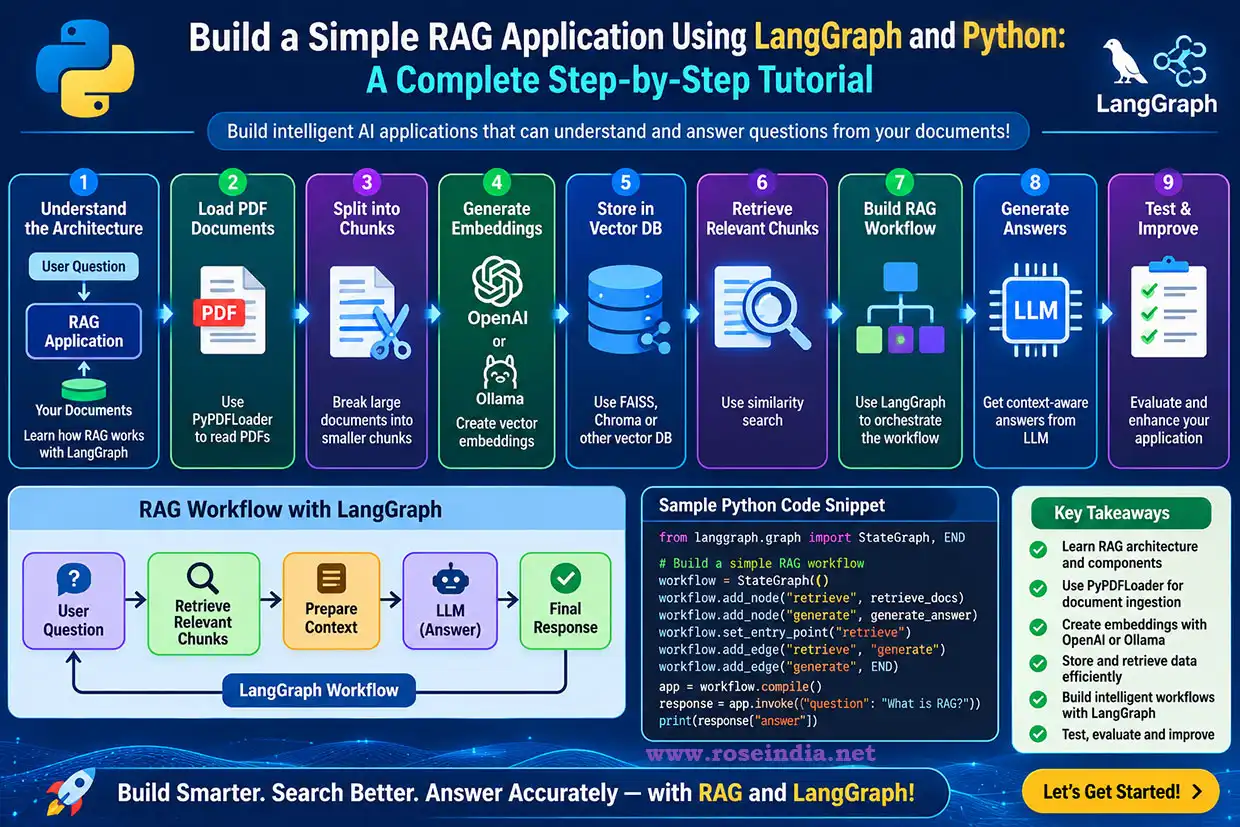
Imagine you have hundreds of PDF documents containing information like company policies, technical manuals, product specifications, or customer information. You want your users to ask the questions in natural language and get the answers based on the content from the documents. Then in this case the RAG application will help you in achieving this. In this post we will index a pdf document in the vector store and then ask the questions to get the answers from the pdf document.
You can also build a simple chatbot backed by LLM’s but in this case it's not sufficient. Here we need a mechanism to load the documents (like pdf, word, txt etc.), the content out of it, divide the contents into smaller pieces, generate the embeddings using an embedding model and finally save it into a vector store. Once the data is loaded into the vector store you need to retrieve relevant information based on the user query from the vector store and take the help of LLM to generate a grounded answer.
This tutorial is a detailed tutorial which teaches you to build a simple RAG application using Python, LangChain, LangGraph, OpenAI embeddings, FAISS, and PyPDFLoader. You can also extend this tutorial and make a more complex solution.
We will also explore LangGraph and understand how LangGraph helps organize the RAG process into a structured workflow.
By the end of this tutorial, you will understand how to:
- Understand the architecture of a basic RAG application.
- Load PDF documents using PyPDFLoader.
- Split large documents into smaller chunks.
- Generate vector embeddings using OpenAI/Ollama.
- Store embeddings in a vector database.
- Retrieve relevant document chunks using similarity search.
- Build a RAG workflow using LangGraph.
- Generate context-aware answers using an LLM.
- Test and improve the application.
1. What Is Retrieval-Augmented Generation (RAG)?
Let’s first understand RAG and learn how it works. Retrieval-Augmented Generation is an architectural approach that connects a language model with an external information retrieval system. In the case of traditional LLM, the answer is generated based on the training data supplied to the LLM during the training process. If you ask any question to the LLM then it will answer you based on the knowledge it learned during the training process.
A RAG application brings one more step in this process before an answer is generated, it uses the tools and library to search the external knowledge based for information relevant to the user’s question. The retrieved information is passed to the LLM as additional content. Then LLM uses the external information for the generation of the answer.
How does RAG work?
Consider a scenario where an organization has uploaded several PDF documents containing employee policies and these documents are stored into persistence storage like vector db. There are many ways you can store the information based on the application requirement in the persistence store.
A user asks:
"What is the company's annual leave policy?"
The RAG application performs the following operations:
- Receives the user's question.
- Converts the question into a vector embedding.
- Searches the vector database for relevant document chunks.
- Retrieves the most relevant content.
- Combines the retrieved content with the user's question.
- Sends the context to the LLM.
- Generates an answer based on the retrieved information.
The LLM can now answer questions using the organization's documents instead of depending only on its general training knowledge. This makes LLM more powerful, which can use the latest available information for the generation of answers. This way you will be able to use LLMs to work with your latest organizational data.
RAG versus traditional LLM applications
Now lets look at the differences between RAG and traditional LLM applications. Following table provides you detailed information on this:
|
Feature |
Traditional LLM |
RAG application |
|
Knowledge source |
Model training and prompt |
Model plus external documents |
|
Private documents |
Not automatically accessible |
Can retrieve authorized content |
|
Updated information |
Requires an appropriate updated knowledge source |
Knowledge base can be refreshed |
| Source references | Not inherently available | Can provide document references |
| Domain-specific answers | Depends on supplied context and model knowledge | Grounded in retrieved domain content |
| Data ingestion | Not required for basic prompting | Required for the knowledge base |
There are some limitations of RAG application as well. It does not guarantee that every answer will be correct. Retrieval quality, document quality, prompt design, and model behavior all influence the final result. So, it's necessary to test your application on different parameters before moving it to production.
02. Why Use LangGraph for Building RAG Applications?
There are many components that come with the LangChain ecosystem for the development of AI enabled applications. These components from LangChain are very powerful and useful for developing applications powered by large language models. These components include document loaders, text splitters, embedding models, vector stores, retrievers, and model integrations.
LangGraph is another python library that extends this ecosystem by providing graph-based workflow orchestration. You will be able to use LangGraph for development of applications that need graph-based orchestration. In this example we are using LangGraph for handling the agents.
A RAG application can be implemented as a sequential pipeline, but representing its execution as a graph provides greater flexibility. We have used the graph-way execution of the flow.
1LangGraph allows developers to define:
- Nodes that execute individual operations.
- Edges that determine execution order.
- Conditional edges for decision-making.
- Shared state between workflow steps.
- Loops for iterative execution.
- Checkpointing and persistence capabilities.
Our application is simple and just needs 3 nodes to perform the task. These nodes perform specific tasks. For our basic application, we will create three primary nodes:
Node 1: Retrieve Documents
2Receives the user's question and retrieves relevant document chunks from FAISS. Here the user questions are converted into vector embeddings and then using vector search relevant documents are retrieved. Once the relevant documents are retrieved it is used in the next step for the preparation of context.
Node 2: Prepare Context
In Retrieval-Augmented Generation (RAG), context refers to the external information, documents, or data chunks pulled from a knowledge base and fed into a Large Language Model (LLM) alongside the user's prompt. The generation of right content is very important for the generation of correct answers. In this step we combine the retrieved document chunks into a context string.
3Node 3: Generate Answer
The final step is the generation of answers with the help of LLM. In this step the generated context and question is sent to the LLM that generates the final response. Here we have used LangGraph, which will execute these operations in sequence.
This design comes with an important advantage, you can extend the same graph later with additional nodes for document relevance evaluation, query rewriting, hallucination checking, and human approval. This way the use of LangGraph makes this application much extendable, which enables us to add more features at a later point of time.
43. Understanding the RAG Architecture
First of all you should understand the architecture of the RAG application. The RAG application works in 2 parts, one for ingestion and another part of retrieval. Before writing the code, let's understand the complete architecture.
A RAG application generally consists of two independent workflows:
- Document ingestion and indexing.
- Question answering and retrieval.
3.1 Document ingestion workflow
In the first part we ingest the documents such as pdf, word, csv, text and other file formats. For this tutorial will just ingest one PDF file. This step is crucial for retrieval quality and you should choose better data processing and chunking strategy. The ingestion workflow prepares documents for retrieval.
5It consists of the following steps:
Step 1: Load documents
Read PDF documents using PyPDFLoader. The PyPDFLoader will load the file for extracting the data present in it. For commercial applications many different data extraction techniques are used.
6Step 2: Extract text
Extract the text and metadata from each PDF page. We will use the simple methods of PyPDFLoader for extracting the data. The PyPDFLoader is the easiest way for extracting the data from the pdf file.
Step 3: Perform document chunking
7Divide large documents into smaller text segments. Since a big document can’t be used for ingestion and retrieval, it is converted into chunks using various chunking strategies.
Step 4: Generate embeddings
Convert each text segment into a numerical vector using an embedding model. We use the embedding model for the conversion of chunked text into numerical vectors.
8Step 5: Store embeddings
Save the vectors and their associated text and metadata in a vector store. Here in this example we have used a FAISS vector storing the vectors. The same FAISS db will be used for retrieval of data using vector search.
3.2 Question-answering workflow
The next part is the retrieval or question-answering part. Here we use the FAISS db to retrieve the documents for creating the context. When a user submits a question, the application executes another workflow for the retrieval and generation of answer. Here we have also used LangGraph for graph-aware orchestration.
9Step 1: Receive the question
The application accepts a natural-language question. In the step we take the input from the user for general question-answering.
Step 2: Generate query embedding
0The embedding model converts the question into a vector. We have provided the question to the embedding model and it converts it into numerical vector format. This vector will be used for search in the vector database.
Step 3: Perform similarity search
The third step is to search the relevant document in the vector store with the help of the vector generated in step 2. The vector database searches for document chunks that are semantically similar to the question.
1Step 4: Retrieve relevant content
The application selects the most relevant document chunks and uses it to prepare the content for passing it to the LLM model for answer generation.
Step 5: Generate an answer
2The final step is to generate the answer based on the context created in step 4. The LLM receives the question and retrieves content and generates a response.
The complete architecture can be represented as:
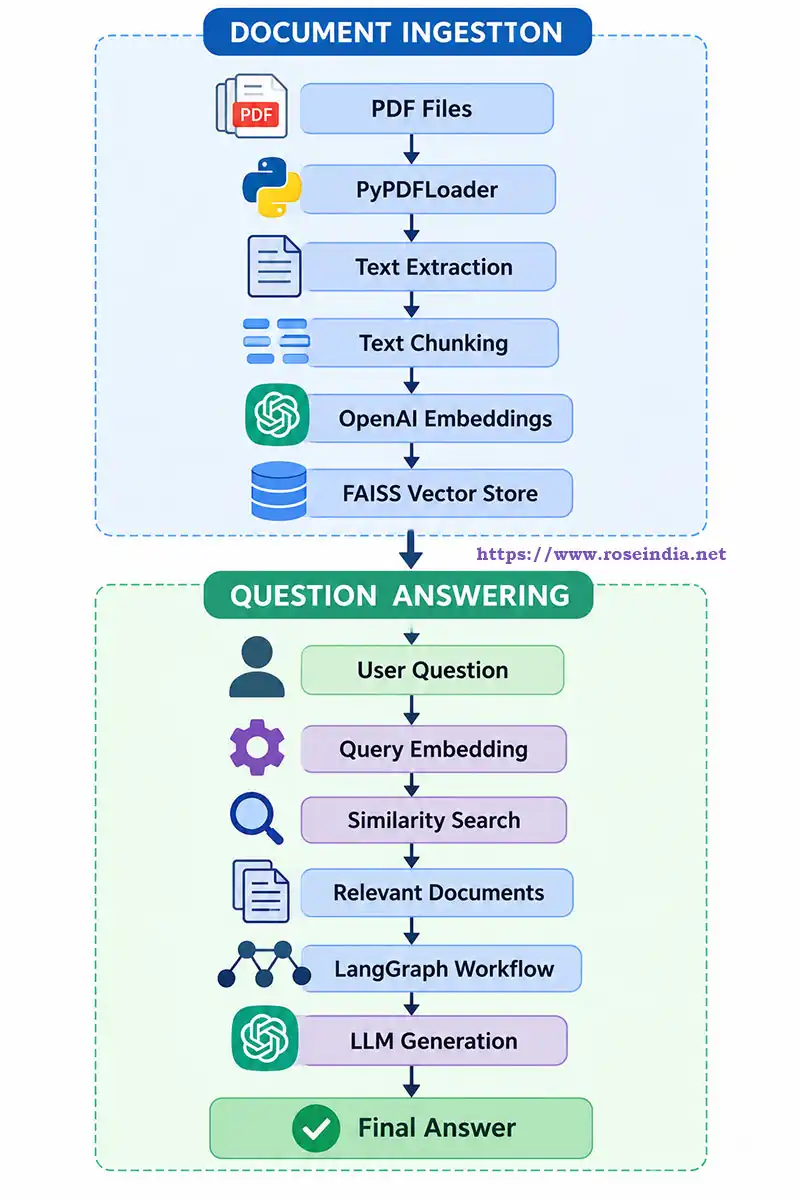
The ingestion process is generally performed when documents are uploaded or updated. In this tutorial the ingestion process is very simple, but in actual production application it involves multiple steps. For example you need to extract the data from different types of pdf files and clean the data. The question-answering workflow runs whenever a user submits a question.
Separating these workflows prevents the application from unnecessarily rebuilding the entire vector index for every question. We have built two different python codes, one for ingestion and other for retrieval of data, which makes this application independent of ingestion and retrieval. Once the data is ingested and indexed in the vector database you will be able to search multiple times (question-answering multiple times on the same database).
4. Technologies and Tools Required
There are many technologies involved in the development of RAG applications. In this tutorial we have used a minimal set of technologies, but in production grade RAG Applications a lot many technologies are used. We will use the following technologies to implement our application.
4Python
Python is the primary programming language for this tutorial. It provides a large ecosystem of libraries for machine learning, natural language processing, document processing, and AI application development. It is easy to develop any program in Python and also it takes less time in learning Python as compared to other programming languages such as Java.
LangChain
LangChain provides reusable components for connecting document loaders, embedding models, vector stores, and LLMs. We have used various modules of LangChain in this application and you will be able to learn all these in this tutorial.
LangGraph
LangGraph manages the execution flow of the RAG application using nodes, edges, and shared state. LangGraph also makes it possible to plug-in other steps in the program easily. For example we can easily plugin RAG evaluation using the RAGAS framework.
5PyPDFLoader
PyPDFLoader is a document loader that extracts content from PDF files. PyPDFLoader is a very powerful library for extracting the data from the pdf files. It generally creates a separate LangChain Document object for each page, including page metadata.
OpenAI Embeddings
We will use the text-embedding-3-small model to convert text into vector representations.
The default output dimension is 1,536.
6These vectors represent semantic characteristics of the text and can be compared to identify related content.
FAISS
FAISS stands for Facebook AI Similarity Search. It is a library designed for efficient similarity search and clustering of dense vectors. We will use FAISS to store and retrieve document embeddings locally. FAISS is suitable for a demonstration and local prototype. Enterprise applications may require additional capabilities such as metadata filtering, multitenancy, access control, distributed operation, and persistent database management. Row level and attribute based security is another enterprise feature of Enterprise RAG applications.
OpenAI Chat Model
We will use an OpenAI chat model to generate answers using the retrieved document content.
7For the local setup we have used Ollama as a model serving environment. EMBEDDING MODEL and LLM MODEL NAME.
5. Setting Up the Development Environment
Let's begin by creating a Python project.
Create a project directory:
8
mkdir langgraph-rag
cd langgraph-rag
Create a virtual environment:
python -m venv venv
Activate it on Windows:
venv\Scripts\activate
On Linux or macOS:
9
source venv/bin/activate
Install the required packages
Run the following command:
pip install langchain
pip install langchain-community
pip install langchain-openai
pip install langchain-text-splitters
pip install langgraph
pip install faiss-cpu
pip install pypdf
pip install python-dotenv
pip install langchain-ollama
Alternatively, install the dependencies together:
pip install langchain langchain-community langchain-openai langchain-text-splitters langgraph faiss-cpu pypdf python-dotenv langchain-ollama
Create a requirements.txt file:
0
langchain
langchain-community
langchain-openai
ollama
langchain-text-splitters
langgraph
faiss-cpu
pypdf
python-dotenv
langchain-ollama
Run following command to install dependencies using requirements.txt
pip install -r requirements.txt
For reproducible deployments, pin and test compatible package versions rather than relying on unbounded dependency versions.
Configure the OpenAI API key
Create a .env file in the project directory:
1OPENAI_API_KEY=your_openai_api_key
Replace the placeholder with your actual API key.
Do not commit this file to Git or expose the API key in frontend code.
2Add following to .gitignore file:
.env
venv/
__pycache__/
faiss_index/
6. Project Directory Structure
Let's organize the application into separate files.
The responsibilities of the files are:
3
langgraph-rag/
│
├── pdf/
│ ├── employee_policy.pdf
│ └── technical_manual.pdf
│
├── faiss_index/
│
├── .env
├── .gitignore
├── requirements.txt
├── ingest.py
└── rag_app.py
| File or directory | Responsibility |
| pdf/ | Stores input PDF documents |
| faiss_index/ | Stores the generated vector index |
| .env | Stores environment variables |
| requirements.txt | Lists Python dependencies |
| ingest.py | Loads, splits, embeds, and indexes documents |
| rag_app.py | Implements the LangGraph question-answering workflow |
This separation makes the application easier to maintain and extend.
7. Step 1: Import the Required Libraries
Let's start by creating ingest.py.
Import the required classes:
4
# pip install -r requirements.txt
import os
from dotenv import load_dotenv
from langchain_ollama import OllamaEmbeddings
from langchain_community.document_loaders import (
    PyPDFLoader
)
# from langchain_openai import OpenAIEmbeddings
from langchain_community.vectorstores import FAISS
from langchain_text_splitters import (
    RecursiveCharacterTextSplitter
)
Let's understand the purpose of each import.
- os: Used for directory and file operations.
- load_dotenv: Loads environment variables from the .env file.
- PyPDFLoader: Reads PDF documents and extracts their text.
- RecursiveCharacterTextSplitter: Splits documents into smaller chunks.
- OpenAIEmbeddings: Generates vector embeddings.
- FAISS: Stores embeddings and performs similarity searches.
Load the environment variables:
load_dotenv()
api_key = os.getenv("OPENAI_API_KEY")
if not api_key:
	raise ValueError("OPENAI_API_KEY is missing")
We will now implement the document ingestion process.
58. Step 2: Load PDF Documents Using PyPDFLoader
Document loading is the first important stage of the ingestion pipeline.
Suppose we have two PDF files:
pdfs/
employee_policy.pdf
technical_manual.pdf
We need to read both files and extract their text.
Create a function:
def load_pdf_documents(folder_path):
    documents = []
    for filename in os.listdir(folder_path):
        if filename.lower().endswith(".pdf"):
            file_path = os.path.join(
                folder_path,
                filename
            )
            loader = PyPDFLoader(file_path)
            pdf_documents = loader.load()
            documents.extend(pdf_documents)
            print(
                f"Loaded {len(pdf_documents)} pages "
                f"from {filename}"
            )
    return documents
Execute the function:
7
documents = load_pdf_documents(
"pdfs"
)
if not documents:
raise ValueError(
    "No PDF documents found"
)
print("Total documents:", len(documents))
How does PyPDFLoader work?
PyPDFLoader is a powerful and extensively used document loader in LangChain that uses the pure-Python pypdf library to parse PDF files and convert each page into a separate LangChain Document object. When PyPDFLoader processes a PDF, it extracts the text from individual pages and creates LangChain Document objects. We have used the PyPDFLoader library to extract data from PDF files in our project.
A Document object contains two important properties:
page_content: Contains the extracted text.
8metadata: Contains additional information about the document, such as its source filename and page number.
For example:
print(documents[0].page_content)
print(documents[0].metadata)
The output may look similar to:
9Employee leave policy
Employees are eligible for annual leave
according to the company leave policy.
0Metadata:
{
'source': 'documents/employee_policy.pdf',
'page': 0
}
The actual output depends on the PDF content. You can download any sample pdf files from the internet and use them for testing this program. The extracted content from the PDF files will be used for question-answering in the project.
Why is metadata important?
The metadata is additional information about the PDF or any other document being ingested. It is stored alongside vector embeddings in your database, metadata enables powerful filtering and improves search relevance. You can use metadata for filtering the data based on the value of metadata. Metadata becomes extremely useful when building enterprise RAG applications. For example, imagine that an organization has uploaded 50,000 documents and in this case if metadata is present it will be much easier to filter or use the document in a better way.
1When the application generates an answer, it should ideally identify:
- Document name.
- Page number.
- Document category.
- Department.
- Document creation date.
- Document version.
- Document owner.
This information can be attached to document chunks and used to provide citations, apply filters, and enforce access policies. For this tutorial, we will retain the metadata generated by PyPDFLoader.
Important: Scanned PDFs may not contain extractable text. They require OCR processing before their contents can be indexed. In such cases OCR libraries are used during the data extraction process if the PDF file contains scanned text.
29. Step 3: Split Documents into Smaller Chunks
The next step is to split the document into smaller chunks and this process is called chunking. One of the most important steps in a RAG application is document chunking.
Why do we need chunking?
Imagine a PDF containing 100 pages of technical documentation. Sending the entire document to an LLM for every question would be inefficient and could exceed the model's context window. Instead, we divide the document into smaller segments called chunks. Laster on each chunk is independently converted into an embedding and indexed in the vector store. This makes indexing and retrieval faster. When a user asks a question, the retrieval system searches for the most relevant chunks rather than retrieving the entire document.
3What is RecursiveCharacterTextSplitter?
LangChain provides RecursiveCharacterTextSplitter to divide documents into smaller text segments. In most of the project RecursiveCharacterTextSplitter is used. It attempts to split text using a hierarchy of separators, typically paragraphs, lines, spaces, and finally individual characters.
Let's implement the chunking process:
def split_documents(documents):
    text_splitter = RecursiveCharacterTextSplitter(
        chunk_size=200,
        chunk_overlap=10,
        length_function=len
    )
    chunks = text_splitter.split_documents(
        documents
    )
    return chunks
Execute the function:
4
chunks = split_documents(documents)
print("Total chunks:", len(chunks))
Understanding chunk size
The chunk_size parameter controls the maximum target size of each text chunk.
For example:
chunk_size=200
5This configuration uses approximately 200 characters per chunk. The original tutorial uses a chunk size of 200 and an overlap of 10, reporting 63 chunks from its two PDF files, each containing two pages. Our output will depend on the actual documents being processed.
Understanding chunk overlap
The chunk_overlap parameter specifies how much text should be repeated between consecutive chunks.
For example:
6chunk_overlap=10
A small portion of text from one chunk is retained in the next chunk.
Why is this important?
7Consider the following sentence:
"An employee can apply for annual leave after completing the probation period. The application must be approved by the reporting manager."
If the sentence is divided between two chunks, the meaning of the first chunk may become incomplete. Overlap helps preserve context across chunk boundaries.
8How should we choose chunk size?
There is no universally correct chunk size. A smaller chunk size can provide more precise retrieval, but may lose important context. A larger chunk size can preserve more context, but may retrieve unrelated information. So, based on the project requirement the chunksize is decided. Here we are giving the suggested starting chunk size for different use cases.
Some starting configurations are:
| Use case | Suggested starting chunk size |
| Short FAQs | 300–500 |
| General documents | 500–1,000 |
| Technical documentation | 800–1,500 |
| Long policy documents | 1,000–2,000 |
These values are illustrative and should be tested against the document structure and embedding model. For enterprise applications, chunk size should be selected through retrieval evaluation rather than assumptions. So, developers put enough effort on deciding the chunk size by evaluating it in the production environment.
910. Step 4: Generate Vector Embeddings
Now that we have divided the documents into chunks, the next step is to convert each chunk into a numerical representation. This process is called embedding generation. An embedding model converts text into a vector containing numerical values. For this purpose the embedding model is used which converts text into vector representation.
For example, a sentence such as:
"How can I apply for annual leave?"
0is converted into a numerical vector.
Another sentence such as:
"What is the procedure for requesting vacation?"
1may produce a vector that is relatively close to the first vector because both sentences have similar semantic meanings. This allows the application to perform semantic search rather than relying only on exact keyword matching.
What is text-embedding-3-small?
We will use OpenAI's text-embedding-3-small embedding model.
Its default output dimension is 1,536.
2Let's initialize the model:
def create_vector_store(chunks):
    embeddings = OllamaEmbeddings(
        model="nomic-embed-text:latest"
    )
#     embeddings = OpenAIEmbeddings(
#         model="text-embedding-3-small"
#     )
    vector_store = FAISS.from_documents(
        documents=chunks,
        embedding=embeddings
    )
    vector_store.save_local(
        "faiss_index"
    )
    return vector_store
The embedding model can also process multiple documents through its document embedding interface. We do not need to generate embeddings manually for every chunk when using FAISS with LangChain. The vector store integration can perform this operation automatically. We pass the document chunks and the name of the embedding vector to the FAISS db and it automatically generates the required embedding vectors for the documents.
11. Step 5: Store Embeddings in FAISS
The next step is to save the document chunks into FAISS db. After generating embeddings, we need a mechanism to store and retrieve them. This is the responsibility of a vector store.
3A vector store maintains the relationship between:
- Original text.
- Numerical embeddings.
- Document metadata.
For this tutorial, we will use FAISS. Create a function to build the index:
def create_vector_store(chunks):
    embeddings = OllamaEmbeddings(
        model="nomic-embed-text:latest"
    )
#     embeddings = OpenAIEmbeddings(
#         model="text-embedding-3-small"
#     )
    vector_store = FAISS.from_documents(
        documents=chunks,
        embedding=embeddings
    )
    vector_store.save_local(
        "faiss_index"
    )
    return vector_store
Execute it:
4
vector_store = create_vector_store(chunks)
print("FAISS index created successfully.")
What happens internally?
The following operations take place:
- FAISS receives the document chunks.
- The embedding model converts the chunks into vectors.
- FAISS indexes the vectors.
- LangChain maintains the relationship between vectors and their corresponding Document objects.
- The index is saved locally.
The resulting directory contains the persisted FAISS index and associated document storage. Here the data is saved into disk and in the retrieval state FAISS db will load this data and perform vector search.
Why persist the vector database?
Without persistence, the application would need to reload all documents and regenerate embeddings every time it starts. This could increase processing time and API costs. By saving the index, we can reuse it for subsequent queries. For this example, the index is saved locally. In a real application, you should also implement index versioning, backup, controlled updates, and safe loading of persisted artifacts. Only load trusted FAISS indexes because local persistence may involve serialized objects.
512. Complete Document Ingestion Script
We can now combine all the previous steps into a single script.
The complete ingest.py file looks like this:
# pip install -r requirements.txt
import os
from dotenv import load_dotenv
from langchain_ollama import OllamaEmbeddings
from langchain_community.document_loaders import (
    PyPDFLoader
)
# from langchain_openai import OpenAIEmbeddings
from langchain_community.vectorstores import FAISS
from langchain_text_splitters import (
    RecursiveCharacterTextSplitter
)

load_dotenv()

def load_pdf_documents(folder_path):
    documents = []
    for filename in os.listdir(folder_path):
        if filename.lower().endswith(".pdf"):
            file_path = os.path.join(
                folder_path,
                filename
            )
            loader = PyPDFLoader(file_path)
            pdf_documents = loader.load()
            documents.extend(pdf_documents)
            print(
                f"Loaded {len(pdf_documents)} pages "
                f"from {filename}"
            )
    return documents


def split_documents(documents):
    text_splitter = RecursiveCharacterTextSplitter(
        chunk_size=200,
        chunk_overlap=10,
        length_function=len
    )
    chunks = text_splitter.split_documents(
        documents
    )
    return chunks


def create_vector_store(chunks):
    embeddings = OllamaEmbeddings(
        model="nomic-embed-text:latest"
    )
#     embeddings = OpenAIEmbeddings(
#         model="text-embedding-3-small"
#     )
    vector_store = FAISS.from_documents(
        documents=chunks,
        embedding=embeddings
    )
    vector_store.save_local(
        "faiss_index"
    )
    return vector_store


def main():
#     if not os.getenv("OPENAI_API_KEY"):
#         raise ValueError(
#             "OPENAI_API_KEY is missing"
#         )
    documents = load_pdf_documents(
        "pdfs"
    )
    if not documents:
        raise ValueError(
            "No PDF documents found"
        )
    print("Total documents:", len(documents))
    chunks = split_documents(documents)
    print("Total chunks:", len(chunks))
    create_vector_store(chunks)
    print(
        "Document ingestion completed successfully."
    )


if __name__ == "__main__":
    main()
Run the script:
6python ingest.py
After successful execution, the FAISS index will be available in the faiss_index directory. In the next step we will load the data from faiss_index using the FIASS db and perform vector search for question-answering. We have now completed the document ingestion pipeline. The next step is to build the question-answering workflow using LangGraph.
Next -> Create the LangGraph RAG Application - Develop Retriever
7Related: