RAG Application Using LangGraph and Python: Retriever (Search)
In this section we will develop the Search or retriever code
13. Step 6: Create the LangGraph RAG Application
Now we will implement the question-answering component.
Create a new file named rag_app.py.
Our application will perform the following operations:
- Accept a question.
- Retrieve relevant document chunks.
- Prepare the context.
- Generate an answer using an LLM.
We will implement these operations as individual LangGraph nodes.
Import the required libraries
import os
from dotenv import load_dotenv
from langchain_ollama import OllamaEmbeddings,ChatOllama
from typing import TypedDict, List
# from langchain_openai import (
#     OpenAIEmbeddings,
#     ChatOpenAI
# )
from langchain_community.vectorstores import FAISS
from langgraph.graph import (
    StateGraph,
    START,
    END
)
Load the environment variables
load_dotenv()
# if not os.getenv("OPENAI_API_KEY"):
#     raise ValueError(
#         "OPENAI_API_KEY is missing"
#     )
embeddings = OllamaEmbeddings(
    model="nomic-embed-text:latest"
)
# embeddings = OpenAIEmbeddings(
#     model="text-embedding-3-small"
# )
Initialize the embedding model
We must use the same embedding model configuration that was used to build the FAISS index.
# embeddings = OpenAIEmbeddings(
#     model="text-embedding-3-small"
# )
If you are using OpenAI model then uncomment above code.
Load the FAISS index
vector_store = FAISS.load_local(
    "faiss_index",
    embeddings,
    allow_dangerous_deserialization=True
)
The deserialization option must only be enabled for a trusted index created and controlled by your application.
Initialize the LLM
llm = ChatOllama(
    model="llama3.2:latest",
    temperature=0
)
# llm = ChatOpenAI(
#     model="gpt-4.1",
#     temperature=0
# )
The model name is configurable. Select a currently available model that meets your application's cost, latency, and quality requirements. A temperature of zero is useful when we want relatively consistent responses.
If you are using OpenAI model then you should uncomment above code to load
OpenAI Model. In our testing we have used Local Ollama model for running our
program.
14. Step 7: Define the LangGraph State
LangGraph uses a shared state object to pass information between nodes. We will create a TypedDict containing the following fields:
- question: User's question.
- documents: Retrieved document chunks.
- context: Combined document context.
- answer: Final generated response.
Define the state:
class RAGState(TypedDict):
    question: str
    documents: List
    context: str
    answer: str
The state acts as the communication mechanism between the workflow nodes. For example, the retrieval node updates the documents field. The context node reads documents and updates context. Finally, the generation node reads the question and context and updates the answer. This makes the execution flow easier to understand and maintain.
15. Step 8: Create the Document Retrieval Node
Now we will proceed with the programming of the question-answering program. The first node in our graph is responsible for retrieving relevant document chunks. We will use the FAISS similarity search functionality.
Create the retrieval function:
def retrieve_documents(state: RAGState):
    question = state["question"]
    retriever = vector_store.as_retriever(
        search_kwargs={
            "k": 4
        }
    )
    documents = retriever.invoke(
        question
    )
    return {
        "documents": documents
    }
Understanding the retrieval process
The application converts the user's question into an embedding using the configured embedding model. FAISS then searches for the nearest document vectors.
We have configured:
search_kwargs={
    "k": 4
}
This means that the retriever will return up to four relevant documents. The value of k influences the amount of information supplied to the LLM. A very small value may miss important information, while a very large value may introduce irrelevant content. The optimal value should be determined through testing. This value (4) is ok for our program, but in case of commercial application we may extract more values from the vector store.
16. Step 9: Create the Context Preparation Node
The retrieval node returns a list of Document objects. We need to combine their contents into a single context string before sending them to the LLM.
Create another function:
def prepare_context(state: RAGState):
    documents = state["documents"]
    context = "\n\n".join(
        document.page_content
        for document in documents
    )
    return {
        "context": context
    }
This function extracts the text from every retrieved document and combines it into one string.
For example, the context may look like:
Document 1:
Employees are eligible for 20 days
of annual leave.
Document 2:
Annual leave requests must be
approved by the reporting manager.
Document 3:
Employees should submit leave
0requests through the HR portal.
The context now contains the information that the LLM needs to answer the question. For a production system, you should preserve the source metadata alongside the text rather than simply combining the content. This enables citations and traceability. In the production system it is mandatory to provide citations for manual verification of the result. Before taking business decisions users manually verifies the document.
17. Step 10: Create the Answer Generation Node
Now we need to send the retrieved context and the user's question to the LLM. We will use a prompt that instructs the model to answer using the supplied documents. You should create your prompt well for best results. You should both send context and question to the LLM for the generation of the answer. In the production system various guardrails techniques are used for making the system secure.
1Create the generation function:
def generate_answer(state: RAGState):
    question = state["question"]
    context = state["context"]
    prompt = f"""
You are a helpful AI assistant.

Answer the user's question using
only the information provided
in the context.

If the answer is not available,
clearly state that you do not have
enough information.

Context:

{context}

Question:

{question}

Answer:
"""
    response = llm.invoke(prompt)
    return {
        "answer": response.content
    }
Why is prompt engineering important in RAG?
The prompt defines how the LLM should use the retrieved information. Without clear instructions, the model may combine retrieved information with its general knowledge, which will create wrong answers. For document-based applications, this can result in answers that are not sufficiently grounded in the source material.
Our prompt contains three important instructions:
2- Answer using the supplied context.
- Do not invent information that is missing.
- Clearly communicate when the answer is unavailable.
These instructions help improve answer reliability, although they do not guarantee that the model will always follow them.
18. Step 11: Build the LangGraph Workflow
We now have three functions:
- retrieve_documents()
- prepare_context()
- generate_answer()
The next step is to connect them using LangGraph. A StateGraph in LangGraph is a very important component which works as a central builder class used to model and orchestrate stateful, multi-step agent workflows as a directed graph. First, initialize the StateGraph:
3
workflow = StateGraph(RAGState)
The add_node method in LangGraph registers a functional step (a node) inside a StateGraph builder so it can process and update the workflow's shared state. Now we have to add all the nodes:
workflow.add_node(
    "retrieve",
    retrieve_documents
)
workflow.add_node(
    "prepare_context",
    prepare_context
)
workflow.add_node(
    "generate",
    generate_answer
)
The add_edge method in LangGraph defines a fixed, unconditional connection between two nodes inside a StateGraph, dictating the exact order in which steps execute. Once the source node finishes running, the graph always transitions directly to the target node. Now connect the nodes.
# Add edges
workflow.add_edge(
    START,
    "retrieve"
)
workflow.add_edge(
    "retrieve",
    "prepare_context"
)
workflow.add_edge(
    "prepare_context",
    "generate"
)
workflow.add_edge(
    "generate",
    END
)
Finally, compile the graph:
4rag_app = workflow.compile()
Understanding the graph
The workflow now looks like this:
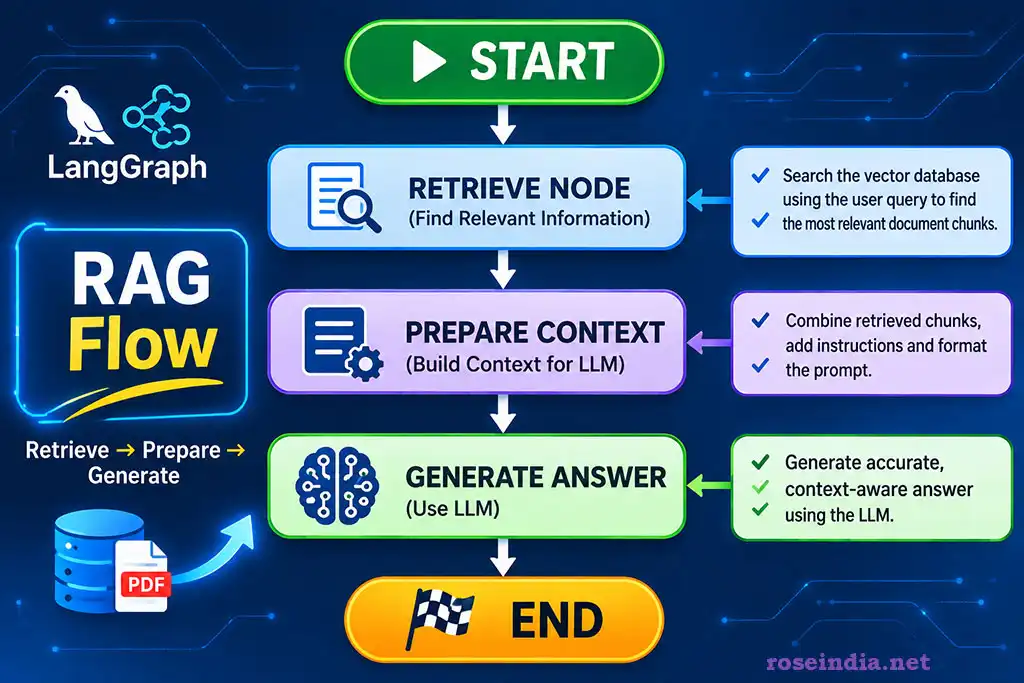
Each node performs an independent operation. LangGraph manages the execution order and passes the shared state between them. The graph must be compiled before it can be invoked.
19. Step 12: Execute the RAG Application
Our RAG workflow is now ready. Let's create a function that accepts a question and invokes the graph.
def ask_question(question):
    result = rag_app.invoke(
        {
            "question": question
        }
    )
    return result["answer"]


if __name__ == "__main__":
    while True:
        question = input(
            "\nEnter your question (or exit): "
        )
        if question.lower() in [
            "exit",
            "quit"
        ]:
            break
        answer = ask_question(question)
        print("\nAnswer:\n")
        print(answer)
Run the application:
6python rag_app.py
Example question:
What is the annual leave policy?
7The application will retrieve relevant content from the indexed PDF documents and send it to the LLM.
A possible answer could be:
According to the available documents,
8employees are eligible for 20 days of
annual leave.
Employees should submit their leave
9requests through the HR portal, and
approval must be obtained from their
reporting manager.
0The actual response depends on the contents of the uploaded PDF documents.
We have successfully built a basic RAG application using LangGraph.
20. Complete rag_app.py Implementation
For convenience, here is the complete question-answering implementation:
1
import os
from dotenv import load_dotenv
from langchain_ollama import OllamaEmbeddings,ChatOllama
from typing import TypedDict, List
# from langchain_openai import (
#     OpenAIEmbeddings,
#     ChatOpenAI
# )
from langchain_community.vectorstores import FAISS
from langchain_openai import ChatOpenAI
from langgraph.graph import (
    StateGraph,
    START,
    END
)

load_dotenv()
# if not os.getenv("OPENAI_API_KEY"):
#     raise ValueError(
#         "OPENAI_API_KEY is missing"
#     )
embeddings = OllamaEmbeddings(
    model="nomic-embed-text:latest"
)
# embeddings = OpenAIEmbeddings(
#     model="text-embedding-3-small"
# )


vector_store = FAISS.load_local(
    "faiss_index",
    embeddings,
    allow_dangerous_deserialization=True
)

llm = ChatOllama(
    model="llama3.2:latest",
    temperature=0
)
# llm = ChatOpenAI(
#     model="gpt-4.1",
#     temperature=0
# )


class RAGState(TypedDict):
    question: str
    documents: List
    context: str
    answer: str

def retrieve_documents(state: RAGState):
    question = state["question"]
    retriever = vector_store.as_retriever(
        search_kwargs={
            "k": 4
        }
    )
    documents = retriever.invoke(
        question
    )
    return {
        "documents": documents
    }


def prepare_context(state: RAGState):
    documents = state["documents"]
    context = "\n\n".join(
        document.page_content
        for document in documents
    )
    return {
        "context": context
    }


def generate_answer(state: RAGState):
    question = state["question"]
    context = state["context"]
    prompt = f"""
You are a helpful AI assistant.

Answer the user's question using
only the information provided
in the context.

If the answer is not available,
clearly state that you do not have
enough information.

Context:

{context}

Question:

{question}

Answer:
"""
    response = llm.invoke(prompt)
    return {
        "answer": response.content
    }

workflow = StateGraph(RAGState)
workflow.add_node(
    "retrieve",
    retrieve_documents
)
workflow.add_node(
    "prepare_context",
    prepare_context
)
workflow.add_node(
    "generate",
    generate_answer
)
# Add edges
workflow.add_edge(
    START,
    "retrieve"
)
workflow.add_edge(
    "retrieve",
    "prepare_context"
)
workflow.add_edge(
    "prepare_context",
    "generate"
)
workflow.add_edge(
    "generate",
    END
)
rag_app = workflow.compile()

def ask_question(question):
    result = rag_app.invoke(
        {
            "question": question
        }
    )
    return result["answer"]


if __name__ == "__main__":
    while True:
        question = input(
            "\nEnter your question (or exit): "
        )
        if question.lower() in [
            "exit",
            "quit"
        ]:
            break
        answer = ask_question(question)
        print("\nAnswer:\n")
        print(answer)
Above code is the complete code of the retriever program.
21. How Is LangGraph Different from a Traditional RAG Pipeline?
A conventional RAG implementation can be built using a simple sequence of function calls:
documents = retriever.invoke(question)
2context = prepare_context(documents)
answer = llm.invoke(context)
This is sufficient for a basic application. However, as the application becomes more complex, managing multiple operations through sequential function calls can become difficult.
3Consider a more advanced RAG application with the following requirements:
- Retrieve relevant documents.
- Evaluate document relevance.
- Rewrite the user's question if retrieval quality is poor.
- Perform retrieval again.
- Check whether the generated answer is grounded in the retrieved context.
- Regenerate the answer if necessary.
- Return the final response.
This is where graph-based orchestration becomes valuable.
LangGraph allows us to implement conditional transitions and loops.
4For example:
This architecture is more flexible because the application can make decisions based on intermediate results.
522. Improving the Basic RAG Application
Our current implementation is intentionally simple and it uses LangGraph for state orchestration, which is good for further improvements. Now we will understand how our basic RAG application can be improved. Our RAG application provides the foundation for understanding the RAG architecture and LangGraph orchestration. But we don’t have so much optimization done in this system. The real-world applications require additional capabilities. Let's explore some useful improvements.
22.1 Improve document chunking
The original example uses:
chunk_size=200
6chunk_overlap=10
This is a useful configuration for demonstrating the process, but it may not be optimal for real-world documents. You may increase the chunk size to 1000 and test your application. Higher chunk size improves the accuracy of the retrieval.
You can experiment with:
7text_splitter = RecursiveCharacterTextSplitter(
chunk_size=1000,
chunk_overlap=150
8)
You should also consider semantic chunking, document structure, headings, tables, and paragraph boundaries; these changes will help you in understanding RAG in a much better way.
22.2 Add metadata filtering
Suppose an organization has documents belonging to several departments. You may want to retrieve documents only from the HR department. Document metadata can help support such requirements. You may use a metadata filter at the time of retrieval, which will ensure you only get the data satisfying these conditions.
9For example:
metadata = {
"department": "HR",
0"document_type": "Policy",
"year": 2026
}
1A production retrieval layer should apply the appropriate metadata filters before returning documents.Do not treat metadata supplied by the user as an authorization mechanism. Access restrictions must be enforced by trusted backend logic.
22.3 Implement similarity thresholds
A vector search may return the nearest documents even when none is sufficiently relevant. This can create misleading answers. A similarity threshold can help determine whether the retrieved content is sufficiently related to the question. For example, use a score-based retrieval operation and evaluate the returned scores. The exact threshold depends on the vector store, distance metric, embedding model, and score interpretation.
22.4 Add source citations
A useful RAG application should ideally identify where the answer came from.
2For example:
Answer:
Employees are eligible for 20 days
3of annual leave.
Sources:
- employee_policy.pdf, Page 3
- employee_handbook.pdf, Page 12
We can use the metadata already available in the Document objects to build these references. This improves transparency and helps users verify the generated answer. You can also retrieve the text from the db and display it to the user for verification. In such cases you will have to build a good GUI for displaying the results.
422.5 Add conversation memory
A basic RAG application processes individual questions. However, users often ask follow-up questions.
For example:
Question 1:
5"What is the annual leave policy?"
Question 2:
"Who approves it?"
6The second question depends on the first question's context. Conversation history or a query-rewriting component can help resolve follow-up questions before retrieval. LangGraph provides capabilities for managing state and persistent conversation workflows. You should try to manage the state and compare the results.
22.6 Add retrieval evaluation
Retrieval quality is one of the most important factors in RAG performance. You should evaluate whether the system retrieves the correct information for representative questions. Useful evaluation dimensions include:
- Retrieval precision.
- Retrieval recall.
- Context relevance.
- Answer correctness.
- Faithfulness to retrieved information.
- Citation accuracy.
Frameworks such as Ragas and DeepEval can help automate parts of RAG evaluation. In the future tutorials I will show you how to evaluate retrieval quality using these frameworks.
723. Common Problems and Troubleshooting
While implementing a RAG application, developers may encounter several issues. As a developer you should be able to fix these issues. These days people are using AI assisted coding with the help of tools like Claude and others. You may use these tools for debugging code bases and fixing the issue. For now let's look at some common problems you may face while developing a RAG application.
Problem 1: PDF documents are not loading
Possible reasons:
- Incorrect file path.
- Missing PDF files.
- Unsupported or corrupted PDF.
- Scanned PDF without extractable text.
Solutions:
8- Verify the document directory.
- Check file permissions.
- Test the PDF using a PDF reader.
- Apply OCR when the PDF contains scanned images.
Problem 2: The vector index cannot be loaded
Possible reasons:
- FAISS index was not created.
- Incorrect index directory.
- Embedding configuration changed.
- Persisted index files are missing.
Solutions:
- Verify the faiss_index directory.
- Confirm that the index was saved successfully.
- Use the same embedding model and compatible dimensions.
- Rebuild the index when required.
Problem 3: OpenAI API errors
Possible reasons:
9- Invalid API key.
- API quota or billing restrictions.
- Network connectivity problems.
- Rate limits.
Solutions:
- Verify the API key.
- Check account usage and API access.
- Implement retry and backoff mechanisms.
- Handle API exceptions appropriately.
Problem 4: The application produces incorrect answers
Possible reasons:
- Poor document extraction.
- Incorrect chunk size.
- Low-quality retrieval.
- Missing document context.
- Ambiguous questions.
- Inappropriate prompt instructions.
Solutions:
0- Inspect the retrieved chunks.
- Improve chunking.
- Tune the number of retrieved documents.
- Add reranking.
- Introduce relevance evaluation.
- Require the model to abstain when evidence is insufficient.
Problem 5: The application cannot answer follow-up questions
A basic RAG application does not automatically understand conversation context.
For example:
"What is the company's leave policy?"
1followed by:
"Who approves it?"
The second query may need to be rewritten as:
2"Who approves an employee's leave request according to the company's leave policy?"
A query-rewriting node can solve this problem.
24. Taking the RAG Application to Enterprise Level
The application we developed is a useful starting point, but it should not be deployed as an enterprise knowledge platform without additional architecture and security controls.
3Enterprise RAG systems typically require much more than document ingestion, embeddings, and similarity search. Consider the following capabilities.
24.1 Multi-tenancy
A SaaS RAG application may serve multiple organizations. Each organization should have logically isolated documents, embeddings, metadata, and user access. The retrieval layer must ensure that one tenant cannot retrieve another tenant's information. So, you should also learn how to implement multi-tenancy in your RAG applications.
24.2 Authentication and authorization
Users should authenticate before accessing the application.
4Authorization should determine which documents and knowledge sources each user can access.
Possible access-control models include:
- Role-Based Access Control (RBAC).
- Attribute-Based Access Control (ABAC).
- Group-based document permissions.
- Document-level access control.
- Row-Level Security (RLS).
24.3 Hybrid search
Vector search is useful for semantic similarity, but it may not perform well for every query. For example, a user searching for a specific policy number or customer ID may need exact keyword matching. Hybrid search combines semantic retrieval with lexical search. A common architecture combines:
5- Vector similarity search.
- Full-text search.
- Metadata filtering.
- Result fusion.
- Optional reranking.
24.4 Reranking
Initial retrieval may return documents that are semantically related but not sufficiently relevant to the exact question. A reranking model evaluates the retrieved candidates and reorders them based on their relevance to the query. This can improve the quality of the context supplied to the LLM.
24.5 Guardrails
Enterprise applications must protect against inappropriate or unsafe model behavior. Useful controls include:
- Prompt injection detection.
- Input validation.
- Output validation.
- Sensitive information detection.
- Restricted tool execution.
- Context-grounding checks.
- Human approval for sensitive operations.
Retrieved documents should be treated as untrusted input. Instructions found inside a document must not override system-level security policies.
624.6 Monitoring and observability
A production RAG platform should record and monitor:
- User queries.
- Retrieval latency.
- Number of retrieved chunks.
- Embedding latency.
- LLM response latency.
- Token consumption.
- API failures.
- Retrieval quality.
- Answer quality.
- User feedback.
This information helps developers identify performance bottlenecks and improve the system.
24.7 Data governance
Organizations often work with confidential and regulated information.
7A production platform should consider:
- Encryption at rest and in transit.
- Tenant isolation.
- Data retention policies.
- Document lifecycle management.
- Audit trails.
- Data classification.
- Personally Identifiable Information (PII) protection.
- Data residency.
- Encryption key management.
Security must be enforced in the retrieval and data-access layers, not merely through prompt instructions.
25. Future Enhancements: From Simple RAG to Agentic RAG
Once the basic LangGraph workflow is working, we can extend it into a more intelligent system.
8A conventional RAG workflow generally retrieves information and generates an answer.
Agentic RAG introduces additional decision-making capabilities.
For example, an agentic RAG application can:
9- Understand the user's question.
- Decide whether retrieval is required.
- Rewrite an ambiguous question.
- Select an appropriate knowledge source.
- Retrieve information.
- Evaluate the relevance of retrieved documents.
- Search again when necessary.
- Generate an answer.
- Validate the answer against available evidence.
- Return the result with citations.
This is particularly useful when working with large enterprise knowledge bases.
Possible LangGraph extensions
Query Rewriting Node
Improves the user's question before retrieval.
0Document Grading Node
Evaluates whether retrieved documents are relevant.
Conditional Routing Node
1Determines whether the workflow should proceed to generation or perform another retrieval operation.
Hallucination Checking Node
Checks whether the generated answer is supported by the retrieved context.
2Human-in-the-Loop Node
Requests human review when the system cannot confidently complete a task.
Multi-Source Retrieval Node
3Retrieves information from multiple sources, such as PDF documents, SQL databases, APIs, and enterprise knowledge systems.
These capabilities transform a simple RAG application into a more sophisticated knowledge assistant.
26. Conclusion
In this tutorial, we built a simple Retrieval-Augmented Generation application using Python, LangChain, LangGraph, OpenAI embeddings, FAISS, and PyPDFLoader. This is a simple RAG application specifically developed to teach you the development of RAG application. We started by loading PDF documents and extracting their contents. We then divided the documents into smaller chunks, generated embeddings, and stored the vectors in FAISS.
4Next, we created a LangGraph workflow with three nodes:
- Document retrieval.
- Context preparation.
- Answer generation.
Finally, we connected the nodes, compiled the graph, and executed the application to answer questions based on the indexed PDF documents.The most important takeaway is that LangGraph provides a structured way to orchestrate RAG workflows.
This tutorial provides you a foundation for the development of enterprise applications by combining the knowledge here with the enterprise application development skills. You learn to develop a simple application. You also learned how to modify it by adding sophisticated features like query rewriting, conditional retrieval, reranking, answer verification, conversation history, and enterprise security.
5Enterprise RAG application development requires careful attention to document processing, retrieval quality, context management, security, evaluation, and observability. If you are beginning your journey towards enterprise application development this example using LangGraph is an excellent practical exercise.
Frequently Asked Questions (FAQs)
1. What is LangGraph?
LangGraph is a framework for building stateful, graph-based workflows and agents. It allows developers to define nodes, edges, conditional routing, and shared state for orchestrating complex AI applications.
2. What is RAG in Generative AI?
Retrieval-Augmented Generation is an approach that retrieves relevant information from an external knowledge source and provides it to an LLM as context before generating a response.
63. What is the difference between LangChain and LangGraph?
LangChain provides components and abstractions for developing LLM applications. LangGraph provides graph-based orchestration for building stateful workflows and agents using those components.
4. Why do we need embeddings in RAG?
Embeddings convert text into numerical vectors that represent semantic characteristics. They enable similarity-based retrieval of documents related to a user's question.
5. What is FAISS?
FAISS is a vector similarity search library that enables efficient searching and indexing of dense vectors.
76. Can we use a different embedding model?
Yes. You can use other embedding providers or local embedding models. However, the same compatible embedding configuration must be used for indexing and querying.
7. Can we use local LLMs instead of OpenAI?
Yes. Local models can be integrated through suitable LangChain integrations, Ollama, or other model-serving systems.
8. Is LangGraph suitable for enterprise RAG applications?
Yes. LangGraph can orchestrate sophisticated retrieval workflows. Enterprise readiness still requires security, authorization, scalable infrastructure, monitoring, data governance, and evaluation.
89. Does RAG completely eliminate hallucinations?
No. RAG can improve factual grounding, but incorrect retrieval, missing context, ambiguous documents, and model errors can still produce hallucinations.
10. What is Agentic RAG?
Agentic RAG extends conventional retrieval workflows with decision-making capabilities such as query rewriting, retrieval selection, relevance evaluation, iterative searching, and answer verification.
Create the LangGraph RAG Application - Develop Retriever <-- Previous
9Related: