
Search Tutorials
--Ads--HyDE: Hypothetical Document Embeddings
Search with an embedding of a hypothetical answer instead of the question.
Questions and answers look different. A question is short and asks ("why is my VPN slow?"); a document is longer and states ("VPN performance can degrade when split tunnelling is disabled..."). HyDE (Hypothetical Document Embeddings), introduced by Gao and colleagues in 2022, bridges the gap: an LLM first writes a hypothetical answer, and you search with the embedding of that answer instead of the question.
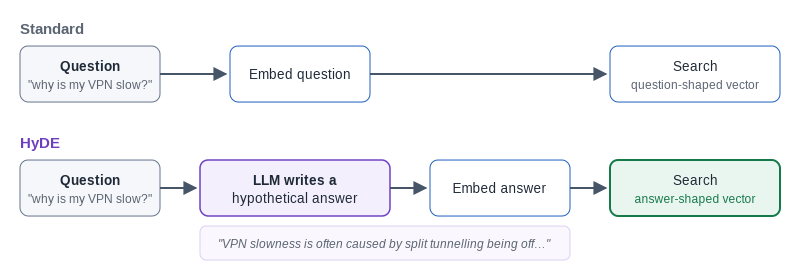
Why it works
The hypothetical answer may contain wrong details, and that is fine: it is never shown to the user. What matters is that it uses the vocabulary, style and structure of a real answer. Its embedding therefore lands in the region of embedding space where real answering documents live. The real documents, not the invented text, are then given to the LLM to generate the final answer.
Implementation
import numpy as np
from rag_helpers import ask, embed

HYDE_PROMPT = """Write a short passage (3-5 sentences) that could appear in a company's internal
IT or HR documentation and that answers the question below. Write it in the style of
documentation, not as a chat reply. If you do not know the specifics, write a plausible
generic passage.

Question: {question}"""

def hyde_vector(question: str, include_question: bool = True) -> np.ndarray:
    hypothetical = ask(HYDE_PROMPT.format(question=question), max_tokens=400)
    doc_vec = embed(hypothetical)[0]                # embedded as a DOCUMENT (no query prefix)
    if not include_question:
        return doc_vec
    q_vec = embed(question, query=True)[0]
    combined = doc_vec + q_vec                     # average the two signals
    return combined / np.linalg.norm(combined)

def hyde_search(question: str, vectors: np.ndarray, texts: list[str], k: int = 5):
    scores = vectors @ hyde_vector(question)
    return [(texts[i], float(scores[i])) for i in np.argsort(-scores)[:k]]
Two details matter:
- The hypothetical passage is embedded as a document (without the query instruction prefix), because it should look like the documents in the index.
- Combining the hypothetical-answer vector with the original question vector makes the method more robust: if the invented passage goes off-topic, the question vector keeps the search anchored. The original paper averaged several hypothetical documents for the same reason.
When HyDE helps, and when it hurts
| Helps | Hurts or does not help |
|---|---|
| Short or vague questions | Questions about specific codes, names or numbers: the LLM invents different ones |
| Question and document styles differ greatly (FAQ-style questions over technical manuals) | Topics the LLM knows nothing about: the hypothetical text goes in the wrong direction |
| Weak or general-purpose embedding models | Strong retrieval-tuned embedding models, which already map questions to answers well |
| Zero-shot settings with no training data | Latency-critical systems: it adds a full generation step before search |
Modern embedding models are trained specifically on question-to-passage matching, so HyDE's gains are smaller than they were in 2022 and can be negative. Compare recall with and without HyDE on your evaluation set before adopting it.
Key takeaways
- HyDE embeds an LLM-written hypothetical answer and searches with it.
- The hypothetical text only guides the search; the LLM answers from real documents.
- Embed the hypothetical passage as a document, and combine it with the question vector for robustness.
- It helps most with vague questions and style mismatches, and less with strong modern embedding models.