
Search Tutorials
--Ads--Dense, Sparse and Multi-Vector Embeddings
How dense embeddings, BM25/SPLADE sparse vectors and ColBERT late interaction differ.
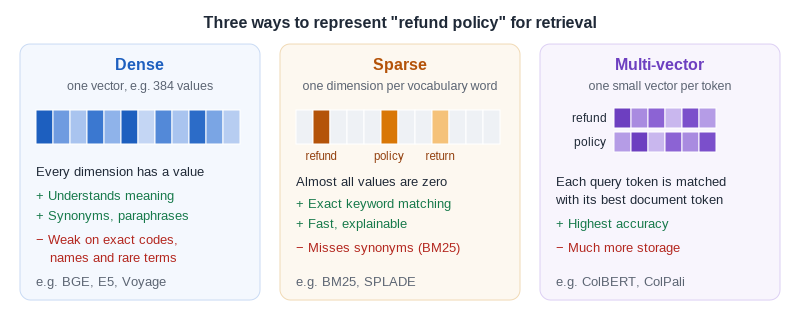
"Embedding" usually means a dense vector, but it is not the only way to represent text for retrieval. Sparse vectors are the basis of keyword search, and multi-vector models such as ColBERT give the highest accuracy of all. Understanding all three helps you choose the right retriever and explains why hybrid search works so well.
Dense vectors
A dense embedding is a fixed-length list of numbers (for example 384 or 1,024), where every dimension has a value. The dimensions do not correspond to words; together they encode meaning. That is why dense retrieval matches "vacation days" to "paid leave". Its weakness is exact matching: product codes like XR-4471, error numbers, people's names and rare jargon are often matched poorly.
Sparse vectors
A sparse vector has one dimension per word in the vocabulary (tens of thousands of dimensions), and almost all of them are zero. Only the words in the text, and sometimes related words, get a weight.
BM25: classic keyword scoring
BM25 scores a document by how often the query's words appear in it, weighted by how rare each word is across the collection, with a correction for document length. It needs no training and no GPU and is extremely good at exact terms.
# pip install rank-bm25
import re
from rank_bm25 import BM25Okapi

def tokenize(text: str) -> list[str]:
    return re.findall(r"\w+", text.lower())

chunks = [
    "Error XR-4471 means the payment gateway timed out.",
    "Payment problems are usually caused by network issues.",
    "Employees get 18 days of paid leave.",
]
bm25 = BM25Okapi([tokenize(c) for c in chunks])
print(bm25.get_scores(tokenize("what does XR-4471 mean")))
# The first chunk scores far higher: it is the only one containing "xr" and "4471"
SPLADE: learned sparse vectors
SPLADE uses a transformer model to produce sparse vectors. It assigns weights to the words in the text and to related words that are not there (expanding "refund" with "return" and "money back"), which gives some of the semantic power of dense vectors while keeping exact-term matching and fast inverted-index search.
# Requires sentence-transformers v5 or later
from sentence_transformers import SparseEncoder

model = SparseEncoder("naver/splade-cocondenser-ensembledistil")
doc = model.encode_document(["Our refund policy allows returns within 30 days."])
query = model.encode_query(["money back guarantee"])
print(model.similarity(query, doc))

# Inspect the strongest terms of the document vector
for token, weight in model.decode(doc[0], top_k=8):
    print(f"{token:12} {weight:.2f}")
Multi-vector (late interaction)
Multi-vector models such as ColBERT keep one small vector (for example 128 dimensions) for every token of the document. To score a document, each query token is compared with every document token, the best match per query token is kept, and those maxima are summed. This operation is called MaxSim.
import numpy as np

def maxsim(query_tokens: np.ndarray, doc_tokens: np.ndarray) -> float:
    """query_tokens: (q, d), doc_tokens: (n, d), all rows normalised."""
    similarities = query_tokens @ doc_tokens.T          # (q, n)
    return float(similarities.max(axis=1).sum())         # best doc token per query token
Because matching happens at token level, multi-vector retrieval captures both exact terms and meaning, and it tends to generalise well to new domains. The price is storage: a 300-token chunk needs 300 vectors instead of one. Libraries such as PyLate and RAGatouille make ColBERT models easy to use, and vector databases such as Qdrant and Vespa support multi-vector fields. A common pattern is to retrieve candidates with dense or sparse search and then re-score them with a multi-vector model.
The same idea applied to page images, ColPali, is covered in Vision-Based Document Retrieval.
Comparison
| Dense | Sparse (BM25) | Sparse (SPLADE) | Multi-vector | |
|---|---|---|---|---|
| Meaning and synonyms | Strong | None | Some | Strong |
| Exact terms and codes | Weak | Strong | Strong | Strong |
| Storage per chunk | 1 vector | Small (inverted index) | Small | 1 vector per token |
| Training needed | Pretrained model | No | Pretrained model | Pretrained model |
| Explainability | Low | High | High | Medium |
Dense and sparse retrieval make different mistakes, so combining them almost always beats either one alone. This is hybrid search, the recommended default for production RAG.
Key takeaways
- Dense vectors capture meaning but struggle with exact identifiers.
- Sparse vectors (BM25, SPLADE) excel at exact terms; SPLADE adds learned term expansion.
- Multi-vector models (ColBERT) compare token by token for the best accuracy, at a large storage cost.
- Combining dense and sparse retrieval is the standard way to get the strengths of both.