
Search Tutorials
--Ads--Agentic RAG with Tool Use
Let the LLM decide when, what and how many times to retrieve.
Classic RAG follows a fixed script: retrieve once, then generate. That works for simple questions, but it cannot decide that no search is needed, that a second search with different words would help, or that the answer lives in a database rather than a document. In agentic RAG, retrieval becomes a set of tools that the LLM calls as many times as it needs, with queries it writes itself.
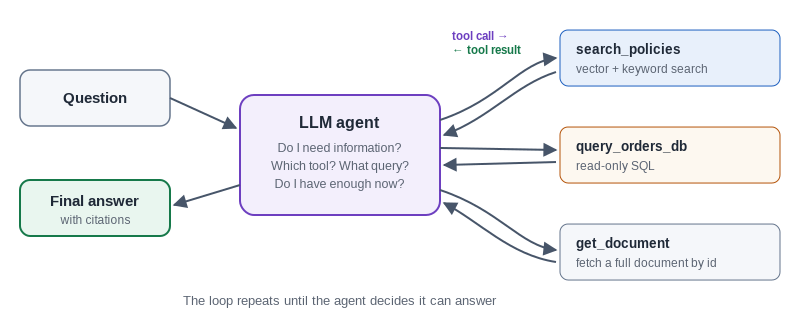
Classic vs agentic RAG
| Classic RAG | Agentic RAG | |
|---|---|---|
| Who decides to retrieve? | Your code, always | The model, when needed |
| Number of searches | One | Zero to many |
| Query wording | The user's question (or a rewrite) | Written by the model, refined after seeing results |
| Sources | Usually one index | Any tools: indexes, databases, APIs |
| Latency and cost | Predictable, low | Variable, higher |
Define retrieval tools
The Anthropic Python SDK's tool runner turns typed Python functions into tools and runs the call-execute-respond loop for you. The function's docstring becomes the tool description, so write it for the model: what the tool does, when to use it, and what the arguments mean.
import json
from pathlib import Path
import anthropic
from anthropic import beta_tool
from retriever import DenseRetriever          # from the top-k search lesson
from text_to_sql import run_readonly          # from the Text-to-SQL lesson

client = anthropic.Anthropic()
records = json.loads(Path("index/chunks.json").read_text(encoding="utf-8"))
policies = DenseRetriever(records)

@beta_tool
def search_policies(query: str, k: int = 5) -> str:
    """Search Zentrix Labs HR, travel, expense and IT policy documents.

    Use for any question about company rules or entitlements. Write the query as keywords or a
    short question. Call again with different wording if the results do not answer the question.

    Args:
        query: What to search for.
        k: Number of passages to return (1-10).
    """
    hits = policies.search(query, k=max(1, min(k, 10)))
    return "\n\n".join(f'<result id="{h.id}" score="{h.score:.2f}">\n{h.text}\n</result>'
                       for h in hits) or "No results."

@beta_tool
def query_orders_db(sql: str) -> str:
    """Run a read-only SQLite SELECT query on the orders database.

    Tables: customers(id, name, city, signup_date), orders(id, customer_id, order_date,
    amount_inr, status: delivered|shipped|cancelled). Use for totals, counts and rankings.

    Args:
        sql: A single SELECT statement.
    """
    try:
        columns, rows = run_readonly(sql)
    except Exception as error:
        return f"Error: {error}"
    return "\n".join([" | ".join(columns)] + [" | ".join(map(str, r)) for r in rows]) or "No rows."

SYSTEM = """You are the Zentrix Labs assistant. Use the tools to find information before answering
questions about company policies or business data; do not answer such questions from memory.
You may search several times. When you answer, cite the result ids you relied on in square
brackets. If the tools do not provide the answer, say so."""

def agent_answer(question: str) -> str:
    runner = client.beta.messages.tool_runner(
        model="claude-opus-5-5",
        max_tokens=8000,
        output_config={"effort": "medium"},
        system=SYSTEM,
        tools=[search_policies, query_orders_db],
        messages=[{"role": "user", "content": question}],
    )
    final = None
    for message in runner:                       # one message per model turn
        for block in message.content:
            if block.type == "tool_use":
                print(f"  -> {block.name}({json.dumps(block.input)[:80]})")
        final = message
    return "".join(b.text for b in final.content if b.type == "text")

print(agent_answer("If I work from home, can I claim my internet bill, and up to how much?"))
-> search_policies({"query": "home internet reimbursement remote work"})
You can claim home internet costs if you work remotely: the company reimburses up to
1,500 rupees per month [remote-work-1].For a question like "Thanks!" the agent calls no tools at all; for a question that mixes policy and sales data, it calls both.
Writing good tools
- Few, well-described tools beat many overlapping ones. Say in each description when to use it and when not to.
- Return compact, labelled results with IDs so the model can cite them. Long tool results fill the context quickly.
- Return errors as text ("Error: no such column") rather than raising exceptions, so the model can correct itself.
- Keep security in your code. Tools should enforce read-only access and the user's permissions; the model only chooses arguments.
Controlling cost and latency
- Set an iteration limit, for example by counting messages in the
for message in runnerloop and stopping after ten, so a confused agent cannot loop forever. - Use a lower
effortfor simple tool selection and a higher one for multi-step research. - Route easy questions to classic RAG and reserve the agent for complex ones (see Query Routing).
- Log every tool call; tool-call traces are the best debugging tool for agents.
This lesson runs the agent loop in your own process, which is natural when the tools query your local index and database. If you would rather not host the loop, Anthropic's Managed Agents service runs the agent and a sandbox for its tools on Anthropic's infrastructure, and can call your own tools or MCP servers.
Key takeaways
- Agentic RAG exposes retrieval as tools; the model decides whether, how and how often to use them.
- The SDK's tool runner turns typed, documented Python functions into tools and runs the loop.
- Write tool descriptions for the model, return compact cited results, and keep security checks in code.
- Limit iterations, choose effort per task and log every tool call.