
Search Tutorials
--Ads--LangChain Architecture and Core Concepts
We have already given a high-level introduction to LangChain in the previous article. Now we will show how the core concepts work together. This matters because LangChain architecture underwent crucial changes in the latest 1.0 version. In this section we will learn the architecture of LangChain and look into its core components.
LangChain Architecture
LangChain’s is a very powerful framework and its power comes from its architectural components. These components work together to create sophisticated AI applications and provide power to the GenAI applications. In this section we are going to learn it in detail with the help of diagrams showcasing the relationships between different components. LangChain is a structured framework comprising various core components like models, prompts, chains, memory, indexes/retrievers, and agents.
Models: This comprises Chat models, LLMs, and embedding models.
Prompts: The prompts are two types namely dynamic prompt templates and chat message templates.
Chains: Chains are sequential processing and pipelines built with LangChain Expression Language (LCEL).
Memory: The memory represents the conversation history and it is used for state management.
Indexes / Retrievers: These are used for extracting the content from the documents like pdf, word, excel etc and processing the data. Document loaders, text splitters, embedding models, and vector stores (e.g., Chroma, Pinecone, FAISS) for RAG (Retrieval-Augmented Generation).
Agents: The agents are another very important component of LangChain which uses the LLMs to decide on the tools to be used in the flow. It’s a LLM-driven component that decides which tools or APIs to call autonomously.
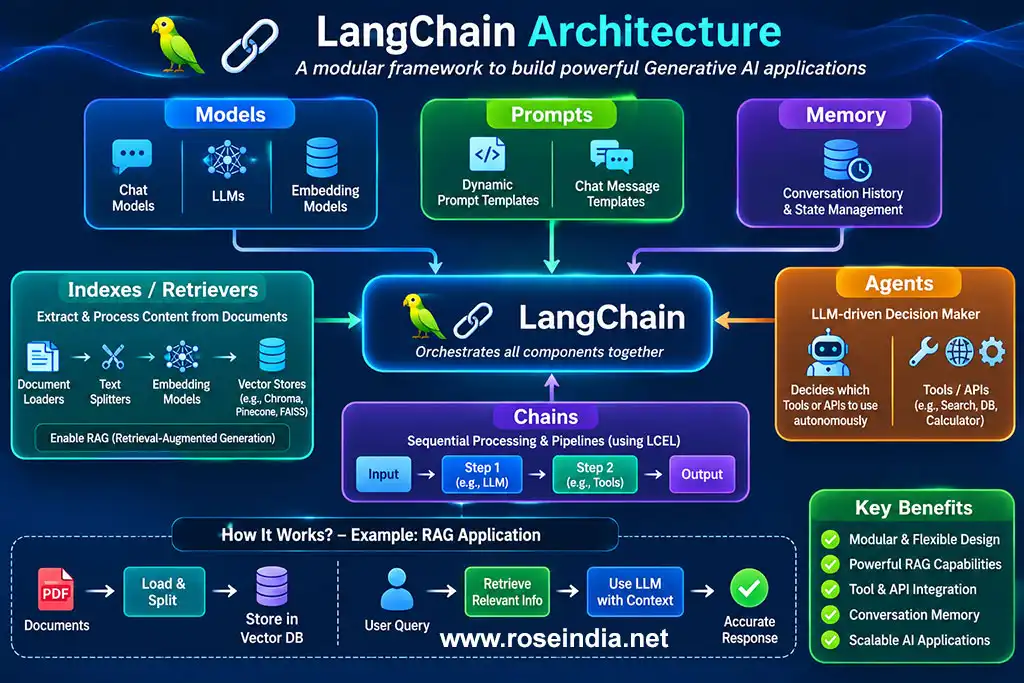
Image: LangChain Architecture
Core component ecosystem
The following diagram illustrates how key components of LangChain integrate to power end-to-end AI applications:
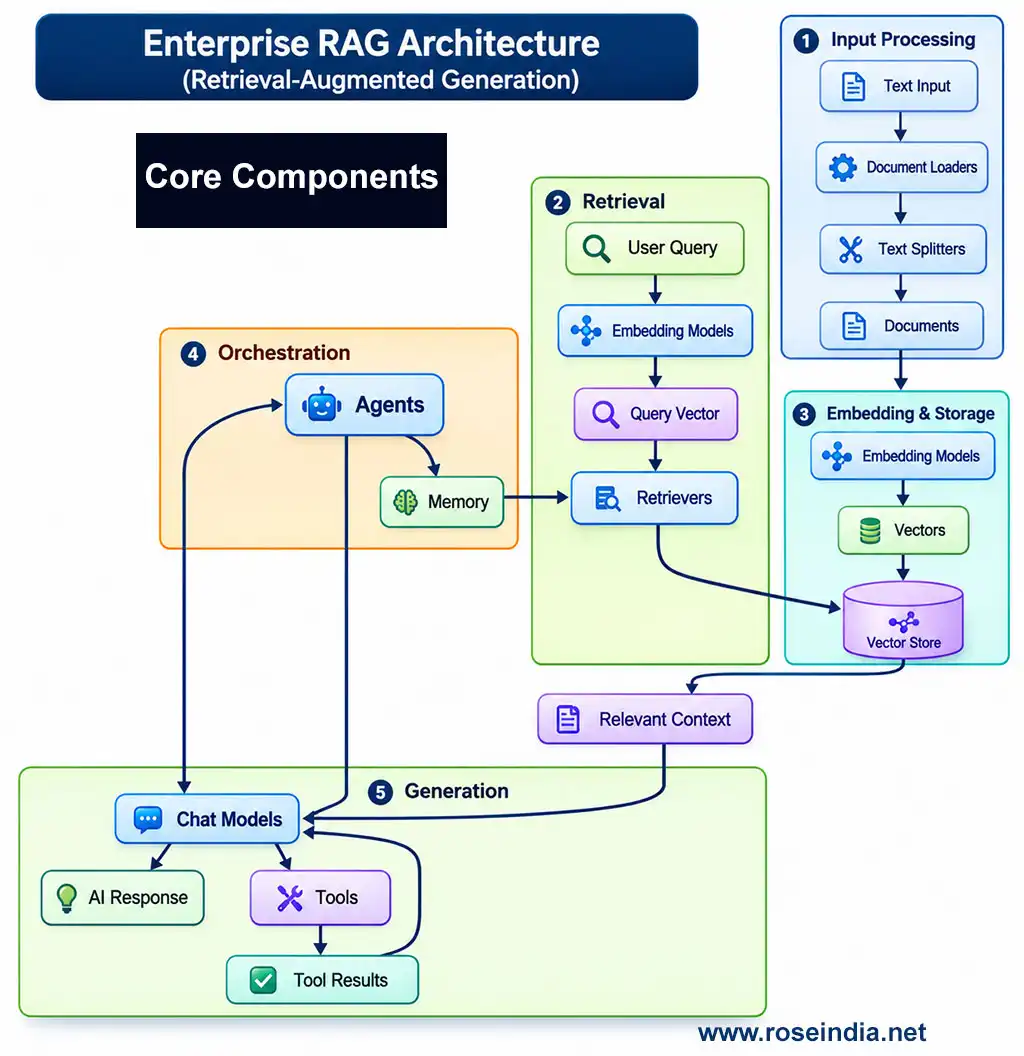
How components connect
LangChain uses modular approach and each component layer builds on the previous ones:
-
Input processing – First component is built for the processing of the input. It transform raw data into structured documents
-
Embedding & storage – The next component is used for creating the embeddings and finally saving into the vector store. This component converts text into searchable vector representations
-
Retrieval – The retriever component is used for searching the relevant documents based on the user queries
-
Generation – Here AI models are used to create responses, optionally with tools
-
Orchestration – This components is responsible for coordinating everything through agents and memory systems
Component categories
Now let's look at the various component categories. LangChain organizes components into these main categories:
| Category | Purpose | Key Components | Use Cases |
| Models | AI reasoning and generation | Chat models, LLMs, Embedding models | Text generation, reasoning, semantic understanding |
| Tools | External capabilities | APIs, databases, etc. | Web search, data access, computations |
| Agents | Orchestration and reasoning | ReAct agents, tool calling agents | Nondeterministic workflows, decision making |
| Memory | Context preservation | Message history, custom state | Conversations, stateful interactions |
| Retrievers | Information access | Vector retrievers, web retrievers | RAG, knowledge base search |
| Document processing | Data ingestion | Loaders, splitters, transformers | PDF processing, web scraping |
| Vector Stores | Semantic search | Chroma, Pinecone, FAISS, pgvector | Similarity search, embeddings storage |
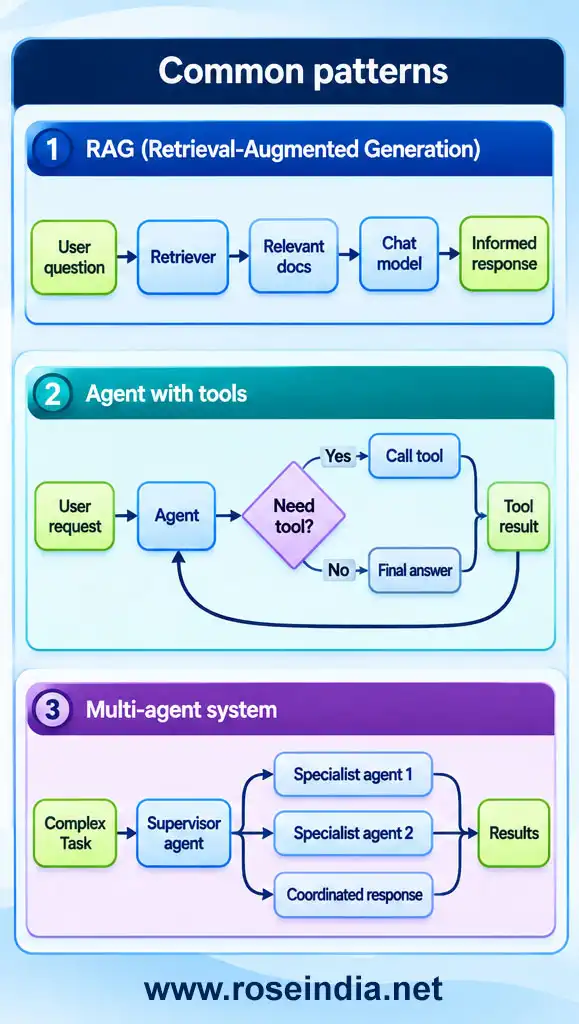
A Shared Interface Called Runnable
All tools and components in LangChain, including prompt templates, chat models, retrievers, output parsers, and others, share a common interface called Runnable. This shared interface ensures uniformity regardless of model-specific features.
3 key execution methods that Runnable offers include:
- invoke(): It runs once in sync on a single input.
- stream(): It returns incremental output in separate chunks. It is effective in chat interfaces where tokens are consumed as responses are generated in batches rather than as a single response block.
- batch(): This method runs the same operation across multiple inputs. The method relies on a thread pool, rather than true async execution.
LangChain Expression Language (LCEL)
LangChain Expression Language, or LCEL, is the syntax for composing chains of Runnable components together in a pipeline.
Here is a familiar pattern of the syntax we have mentioned in the first article of the series:
chain = prompt | model | output_parser
result = chain.invoke({"topic": "ice cream"})
Each component uses the same Runnable interface, which allows invoking, streaming, and batching chains.
Other LCEL primitives that are often found in real chains include:
- RunnableParallel: This control works for concurrently running multiple chains against the same input, with an ability to return combined results. This fits into use cases where a single request requires multiple pieces of information from different sources.
- RunnablePassthrough: Passing unchanged input alongside a transformed version of the same through a chain.
- RunnableLambda: This command can package an arbitrary function as a Runnable. This helps integrate custom logic into an LCEL chain, so that you don’t need to build a complete custom class.
Is LCEL Obsolete in LangChain 1.0? Addressing a Common Misconception
After the release of LangChain 1.0, there were comments and rumors that LCEL has become obsolete. But this notion is far from accurate. The latest LangChain version still supports both LCEL and the Runnable interface. Both are still effective tools for composing sequences of components into pipelines. For example, a typical retrieval-and-generation chain retriever | prompt | model | output_parser follows the same build path in 1.0 as in earlier versions. In version 1.0, LCEL became more specific. Version 1.0 introduced a dedicated agent-building tool, create_agent, which is built directly on the LangGraph runtime. Naturally, LCEL is no longer portrayed as the method for building agents. These are the only changes that occurred to LCEL in LangChain 1.0.
Prompts and Prompt Templates
Prompt templates improve text prompt construction with relevant parameters. The text prompt or structured message list that we send to a model can follow prompt templates for faster execution. Thanks to these templates, developers no longer need to hardcode a string. A template defines placeholders that are filled in at runtime:
from langchain_core.prompts import ChatPromptTemplate
prompt = ChatPromptTemplate.from_messages([
	("system", "You are a helpful assistant that answers concisely."),
	("human", "{question}")
	])
Models Layer
LangChain’s core value proposition is its provider-agnostic platform, and the model layer remains central to that promise. Previously, a single package had to support multiple model providers internally. LangChain 1.0 introduced multiple model-specific integration packages. Here?s an example of such integration packages - langchain-openai, langchain-anthropic.
Each integration package works through the same chat model interface. Switching from one provider to another doesn’t require rewriting the entire chain, but only the specific instance of the integration package class.
In LangChain 1.0, multimodal content blocks have also been standardized. This ensures equal representation of different output types, including text, images, audio, presentations, and other non-text content across APIs of different model providers.
Memory and State Management
Earlier versions kept conversation memory by using dedicated memory classes inside the chain. This practice has changed in recent years, especially for agents’ memory management. Rather than using dedicated memory classes inside the chain, LangChain now handles memory through checkpoints. A checkpoint remains persistent throughout the agent conversation and keeps every piece of memory, from messages and intermediate results to the history of tool calling. Thanks to this stateful memory management, it doesn’t lose context when a conversation is paused and resumed later.
The create_agent Factory and the Agent Loop
On the surface, the agent loop may appear simple, but the ReAct reasoning pattern underlying the agent execution loop involves multiple to-and-fro actions. For example, when a message drops, it prompts the model whether it needs to call a tool. If requested, it’s followed by runtime execution of the tool. Finally, the outcome returns to the model as feedback. This cycle repeats until the model produces a final answer. This is how the agent loop works in LangChain.
Building the loop is the create_agent factory’s responsibility. It is built on LangGraph’s execution runtime:
from langchain.agents import create_agent
from langchain_openai import ChatOpenAI
model = ChatOpenAI(model="gpt-4o")
agent = create_agent(model, tools=[search_tool, calculator_tool])
result = agent.invoke({"messages": [{"role": "user", "content": "What's 15% of last quarter's revenue?"}]})
Because it’s built on LangGraph’s execution runtime, any agent built by the create_agent factory automatically inherits reliability attributes like state persistence, checkpointing, and the ability to pause for human input in a conversation.
Middleware: Agent Loop Customization
We also have a new middleware system in LangChain 1.0. It plays a crucial role in customizing the agent loop, particularly for modifying agent behavior. The best part is that it can change agent behavior without interfering with the core loop logic. Before and after calling any model, middleware hooks modify agent loop behavior. Common examples of middleware hooks include logging, model routing, dynamic prompt adjustment, availability-based tool filtering, conversation history summarization to compress context, and human approval checkpoints for critical actions. The agent loop customization is often referred to as "context engineering" within the LangChain community.
Directly Using create_agent vs. LangGraph
Though both create_agent and LangGraph offer effective solutions for practical problems, understanding their differences and critical use cases is important.
The create_agent factory provides a default agent loop development method. It offers a step-by-step reasoning and tool-calling path for a model to deliver an answer. When the agent loop doesn’t need any abrupt structural changes, the high-level primitives of the create_agent factory are enough.
On the other hand, using LangGraph directly is a better choice for requirements like durable state and granular-level structural controls. Well-defined multi-branch workflows, integrated retry logic, concurrently running steps, flexible process pauses, and workflow-integrated human checkpoints. Such deeper controls require lower-level primitives that LangGraph provides.
How It All Fits Together
Ultimately, it’s worth understanding what a LangChain application request path looks like. As soon as an input arrives, a prompt template reconstructs it with the right parameters. Then it is sent to the unified model interface, and the configured model is called. For an application with a straightforward deterministic pipeline, all the successive steps are composed using LCEL syntax. But for agentic applications, create_agent factory takes the charge and runs the model through LangGraph's loop. Inside the loop, LangGraph’s low-level primitives check for tool calls and execute them, implement checkpointing state, and allow middleware configuration. The loop continues until the response is finalized. The final response passes through an output parser and is returned to the user.
Frequently Asked Questions
What is a Runnable in LangChain?
The shared interface that LangChain components such as prompt templates, models, retrievers, and parsers use is called Runnable.
Is LCEL deprecated in LangChain 1.0?
No. LangChain still supports LCEL for building deterministic applications that require straightforward sequential pipelines. The only change is that manually assembled LCEL syntax pipelines are no longer used to build agents. In LangChain 1.0, agent-building responsibility now belongs to the create_agent factory or LangGraph.
What's the difference between create_agent and LangGraph?
The create_agent factory provides high-level standardized primitives for building a regular tool-calling agent loop, on top of LangGraph. LangGraph offers low-level primitives for explicit controls and multi-branch workflows in an agentic application.
Do I need to learn LangGraph separately to use LangChain agents?
It’s not required in the beginning. The create_agent factory, which is built on top of LangGraph, handles it. But you need to learn LangGraph to build a complex agentic application that involves explicit structural controls, complex branching of workflows, and frequent task pauses for human approval,
How does LangChain handle conversation memory in version 1.0?
LangChain 1.0 primarily relies on LangGraph's checkpointing system for managing conversation memory and agent state.
What's Next
In this article, we have described how LangChain's components work within the architecture and the changes brought by version 1.0. In the next article of this LangChain tutorial series, we will discuss “Installing and Setting Up LangChain.”
Related Tutorials: