LangChain Tutorials - Index
LangChain is extensively used in apps powered by large language models (LLMs). From AI chatbots to RAG (Retrieval Augmented Generation) systems, agentic AI assistants, and multilayered AI workflows, LangChain powers almost every LLM-based application. Though it was originally conceived for Python, LangChain emerged as an irreplaceable tool for connecting Large Language Models (LLMs) to real data, system memories, and third-party tools.
Java developers can access the same toolkit through LangChain4j. LangChain4j is separately built as an idiomatic Java library. Java developers can use this toolkit alongside LangGraph4j and Spring AI.
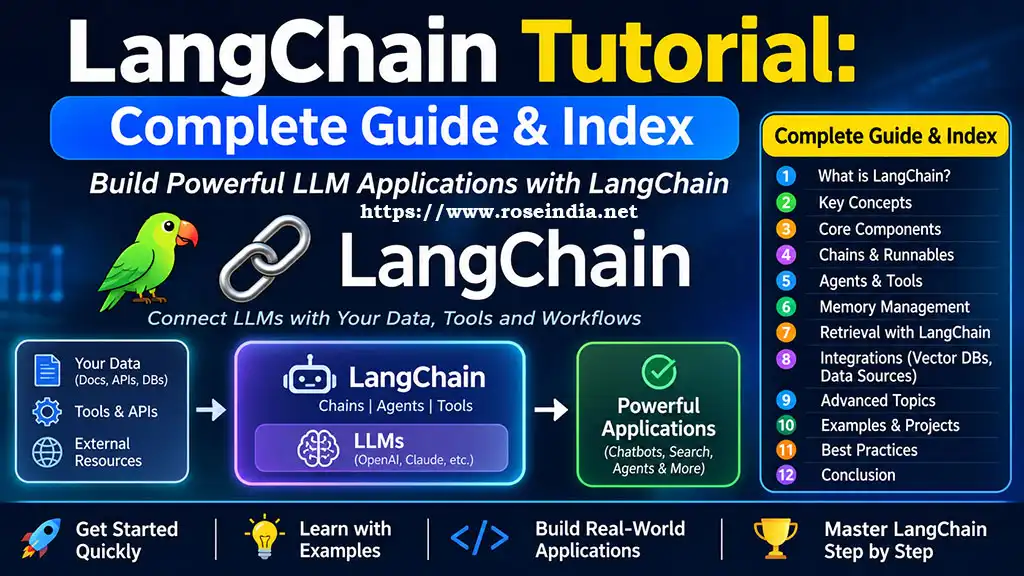
In this index page, you will find everything from LLM basics to production-ready AI applications. It covers the LangChain toolset alongside the original Python/JS ecosystem and its Java counterparts.
If you are new to this space, start with What is LangChain? and LangChain Architecture and Core Concepts.
Section I: Introduction to LangChain
In this section, we introduce LangChain as a framework, explain its core building blocks, and LangChain’s role as a toolkit across LLM applications.
A brief introduction to LangChain, how it originated, LangChain’s emergence as an LLM tool, and the problems LangChain solves in LLM app development projects.
2. LangChain Architecture and Core Concepts
LangChain architecture components and how models, prompts, chains, memory, and agents fit into LangChain's architecture.
3. Installing and Setting Up LangChain
A step-by-step guide to setting up the LangChain environment, API keys, virtual environments, and writing your very first LangChain script.
4. LangChain for Java Developers: An Overview
Comparing the Java ecosystem, which includes LangChain4j and Spring AI, to the Python original, and how to make the right choice between the two.
5. LangChain vs. Using an LLM API Directly
Comparing a LangChain build to directly adding it on top of calling OpenAI, Anthropic, or Gemini APIs.
Section II: Models and Prompts
A model and prompts remain key components of any LangChain application. This section explains how LangChain connects to LLMs and helps get reliable, well-articulated output.
1. LLMs and Chat Models in LangChain
Introduction to LangChain's built-in model interface to connect to OpenAI, Anthropic, Google, and other open-source models.
2. Prompt Templates and Prompt Engineering
How to create and use reusable prompts with different parameters rather than hardcoding entire strings.
3. Output Parsers for Structuring LLM Responses
Learn how to convert free-text model output into formats like JSON, structured objects, or validated schemas.
4. Prompting with Relevant Examples
Explaining how you can use relevant examples within prompts to enhance output quality.
5. Streaming Responses for Chat-like Interfaces
Explaining how LangChain streams token-by-token responses through a chat-like interface.
Section III: Chains and LCEL
LangChain organizes multiple steps through Chains. This section explains Chains that create a reusable pipeline of prompts, model calls, parsing, and logic.
1. What are Chains in LangChain
Definition of Chains and how they build a pipeline of prompts, models, and parsers.
02. LangChain Expression Language (LCEL)
Explaining LangChain Expression Language (LCEL) and its modern, declarative syntax for composing LangChain components into organized pipelines.
3. Building Custom Chains
1*How to build your own reusable components like custom Chains that can be integrated into the LCEL pipeline.
4. Concurrent and Conditional Execution in Chains
How to run steps and branching logic simultaneously based on intermediate outcomes.
2Section IV: Memory and Conversation State
This section covers memory usage, conversation history management, context windows, and conversation storage.
1. LangChain Memory Management
This section explains types of LangChain memories such as buffer memory, summary memory, and entity memory, and their respective use cases.
32. Conversation History and Context Windows
Explaining how to maintain coherent conversations across multiple turns and sessions, while staying within the model’s context limit.
3. Storing Conversations Locally
4How to store chat history across multiple user sessions with Redis, PostgreSQL, or other backends.
Section V: Retrieval-Augmented Generation (RAG)
RAG, or Retrieval-Augmented Generation, is a technique for delivering responses based on specific databases and documents. In this section, we explain how to use the RAG technique in LangChain applications for answering questions using your own documents and data.
1. Document Loaders in LangChain
5Here you learn how to load PDFs, web pages, CSVs, databases, and other data sources into LangChain.
2. Text Splitting Strategies
Explaining how large documents are split into easily retrievable chunks without losing context.
63. Embeddings: Turning Text into Vectors
Here we explain how embedding models turn text documents into vectors for semantic search.
4. Vector Stores: Pinecone, Chroma, FAISS, and Others
7Know about multiple vector databases and how to integrate them with LangChain.
5. Creating a Complete RAG Pipeline with LangChain
Walking you through the entire RAG pipeline covering steps such as load, split, embed, store, retrieve, and generate.
86. Retrieval Techniques and Best Practices
Explaining multiple retrieval techniques like similarity search, MMR, and hybrid search, and their accuracy levels.
7. Advanced RAG Techniques
9This section explains advanced RAG techniques to improve response accuracy against complex, multi-part questions.
Section VI: Agents and Tools
We describe LangChain agents, how tool and function calling happen in LangChain, custom tools for LangChain agents, and the MCP protocol.
1. LangChain Agents Architecture
0Explaining the core agent architecture and how LangChain agents decide and prioritize actions.
2. Tool Calling and Function Calling
Explaining how an LLM calls external functions, APIs, and services when reasoning.
13. Custom Tools for LangChain Agents
Know how to write custom tools for an agent for tasks like search, calculation, or querying systems.
4. LangChain’s Model Context Protocol (MCP)
2Explaining how to give LangChain agents standard access to tools by connecting to external MCP servers.
5. ReAct Pattern for Reasoning
Explaining how the ReAct (Reason-and-Act) pattern helps agents to reason through complex multi-step tasks.
3Section VII: LangGraph: Stateful, Multi-Agent Workflows
LangGraph extends the capability of LangChain through graph-based orchestration. This equips LangChain for developing reliable, stateful multi-agent workflows rather than simple linear chains.
1. Introduction to LangGraph
Introducing LangGraph and how graph-based orchestration works.
42. Building Multi-Agent Workflows using LangGraph
Explaining how multiple specialized agents coordinate with one another for complex multi-step tasks.
3. Human-in-the-Loop Workflows in LangGraph
5Explaining how human-in-the-loop workflows work, how an output is sent for human approval before an agent action.
Section VIII: LangChain for the Java Ecosystem
This section focuses on using LangChain above native Java libraries, rather than having a separate Python service.
1. Getting Started with LangChain4j
6LangChain4j installation and steps to build the first Java-based LLM application are explained.
2. RAG Application Development usingLangChain4j
Explaining RAG pipeline creation and retrieval for Java applications.
73. AI Agents in Java with LangChain4j
Explaining LangChain4j's agentic module and how tool and function calling happen in Java applications.
4. Integrating LangChain4j with Spring Boot
8Explaining steps to integrate LangChain4j into a Spring Boot application.
5. Choosing Between Spring AI vs. LangChain4j
A comparative analysis to help Java teams choose between Spring AI and the LangChain4j framework.
96. LangGraph4j: Multi-Agent Workflows in Java
Explaining how you can build stateful, multi-agent workflows in Java by integrating with LangChain4j or Spring AI.