JavaScript Hide Table Rows
|
|
In this section, you will learn how to hide table rows using JavaScript.
In the given example, we have created a table. The method getElementById() of document object grabs the id of the table. Then we have determined the length of rows using the length property and stored it in the variable 'len'. To store the state of the table, we have used the variable hide and created another variable rowStyle to store the required style of the rows. It is set to none to hide a row. After that we have created a for loop which go through all the rows of the table starting with the second row, and set their style with the code t.rows[i].style.display = rowStyle.
Here is the code:
| <html> <h2>Hide Table Row</h2> <script language="javascript"> var hide= true; function hideRows(tableId){ var t = document.getElementById(tableId); var len = t.rows.length; var rowStyle = (hide)? "none":""; for(i=1 ; i< len; i++){ t.rows[i].style.display = rowStyle; } } </script> <table border="1" id="table"> <tr><th>Name</th><th>Address</th></tr> <tr><td>Tina</td><td>Mumbai</td></tr> <tr><td>Angelina</td><td>Delhi</td></tr> </table> <input type="Button" value="Hide Rows" onclick="hideRows('table');"> </html> |
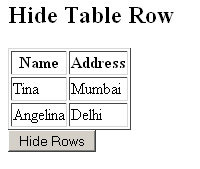
Output will be displayed as:
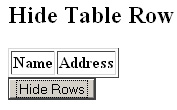
On clicking the button, all the rows of the table gets removed except the first one as we have started the for loop with second row:


Tutorials
- Java 26 (JDK 26) Features with examples
- Top 10 Reasons to Learn Java in 2026
- JDK 26 Tutorial
- Java Certification Roadmap 2026: Which Oracle Certs Matter
- Install JDK 26: A Complete Beginner's Guide (2026)
- What Is Java? A Complete, Up-to-Date Guide for 2026
- Java 26 HTTP3 tutorial - HTTP 3 support in JDK 26 - How to use HTTP/3 in Java 26 application?
- JDK 28 Preview: Value Objects, Shenandoah GC & JSON API
- Java Tutorials