
JavaScript Cookies
|
|
In this section, you will learn cookies in JavaScript.
A cookie is a temporary file that contains the visitor's information on the particular web page. In the given example we have created a cookie that stores the name of a visitor for 1 day. For this purpose we have created three functions. The function CreateCookie(cookieName,cookieValue,days) stores the name of the visitor in the cookie and add the no of days after which the cookie will expire. This function stores the cookie name, value and the date of expiration in the document.cookie object. Then, we have created another function RetrieveCookie(cookieName) which returns the value of cookie if exists. After that we have created one more function cookieExist() that displays a welcome message if the cookie exists otherwise it displays a prompt box to enter the name of the user.
Here is the code:
| <html> <h2>JavaScript Cookies</h2> <script> function CreateCookie(cookieName,cookieValue,days){ var date=new Date(); date.setDate(date.getDate()+days); if((days==null)){ exp = new Date().toGMTString(); } else{ exp = date.toGMTString(); } document.cookie=cookieName+ "=" +escape(cookieValue)+ ";expires="+ exp; } function RetrieveCookie(cookieName){ if (document.cookie.length>0){ cookieStart=document.cookie.indexOf(cookieName + "="); if (cookieStart!=-1){ cookieStart=cookieStart + cookieName.length+1; cookieEnd=document.cookie.indexOf(";",cookieStart); if (cookieEnd==-1) cookieEnd=document.cookie.length; return unescape(document.cookie.substring(cookieStart,cookieEnd)); } } return null; } function isCookieExist(){ username=RetrieveCookie('username'); if (username!=null && username!="") { alert('Welcome '+username+'!'); } else { username=prompt('Enter your name:',""); if (username!=null && username!=""){ CreateCookie('username',username,1); } } } </script> <input type="button" value="Set/Get Cookie" onclick="isCookieExist()"> </html> |
Output will be displayed as:

On clicking the button, a prompt box will be displayed asking to enter the name:

As you enter the name and click the ok button, the cookie will get set:
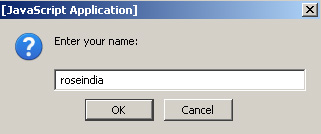
If the visitor arrives at the same page, they will get the welcome message:


Tutorials
- Java 26 (JDK 26) Features with examples
- Top 10 Reasons to Learn Java in 2026
- JDK 26 Tutorial
- Java Certification Roadmap 2026: Which Oracle Certs Matter
- Install JDK 26: A Complete Beginner's Guide (2026)
- What Is Java? A Complete, Up-to-Date Guide for 2026
- Java 26 HTTP3 tutorial - HTTP 3 support in JDK 26 - How to use HTTP/3 in Java 26 application?
- JDK 28 Preview: Value Objects, Shenandoah GC & JSON API
- Java Tutorials