
JavaScript move div
|
|
This section illustrates you how to move a div element on the window using JavaScript.
In the following code, we have defined a div element consisting of text 'Hello World' in order to move it on the browser. For this, we have used onClick event handler to specifiy what should happen when the mouse is clicked on the window. The properties clientX and clientY of event object indicates the cursor's horizontal and vertical position when the event occurs relative to the upper-left corner of the window and the pageX and pageY provide coordinates in the document's space. To set the element top position relative to the next element top edge we have used the property style.top and the style.left sets the position of the left edge of an element relative to the left edge of the next element. This code works correctly on Internet Explorer.
Here is the code:
| <html> <h2>Move div</h2> <script type="text/javascript"> var X, Y; window.document.onclick=moveDiv; function moveDiv(){ X = (document.layers) ? e.pageX :event.clientX Y = (document.layers) ? e.pageY :event.clientY document.getElementById('div').style.position="absolute"; document.getElementById('div').style.left=X; document.getElementById('div').style.top=Y; } </script> <div id="div" style="width:85px;height:32px;border:solid;">Hello World</div> </html> |
Output will be displayed as:
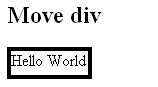
If you click anywhere on the window, the element will move to that position.


Tutorials
- Java 26 (JDK 26) Features with examples
- Top 10 Reasons to Learn Java in 2026
- JDK 26 Tutorial
- Java Certification Roadmap 2026: Which Oracle Certs Matter
- Install JDK 26: A Complete Beginner's Guide (2026)
- What Is Java? A Complete, Up-to-Date Guide for 2026
- Java 26 HTTP3 tutorial - HTTP 3 support in JDK 26 - How to use HTTP/3 in Java 26 application?
- JDK 28 Preview: Value Objects, Shenandoah GC & JSON API
- Java Tutorials