
JavaScript getElementById Style
|
|
In this part of JavaScript examples, we have created a simple example which shows the use of style attribute over any element by using the method getElementById().
In the following example, we have created three buttons which calls three different functions addStyleColor() , addStyleHeight() and addStyleWidth() and changes the style property of the specified div with the element's style attribute.
| function addStyleColor() { document.getElementById('myDiv').style.backgroundColor="#ccffdd"; } |
Above line of code defines a function into which specified div's background color is being changed with the help of style attribute.
| function addStyleHeight() { document.getElementById('myDiv').style.height="150px"; } |
Above line of code defines a function into which specified div's height is being changed with the help of style attribute.
| function addStyleWidth() { document.getElementById('myDiv').style.width="250px"; } |
Above line of code defines a function into which specified div's width is being changed with the help of style attribute. Here is the full HTML code as follows :
|
Output :
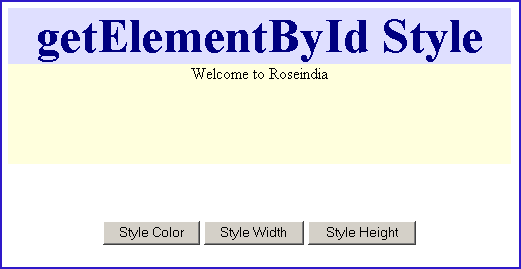
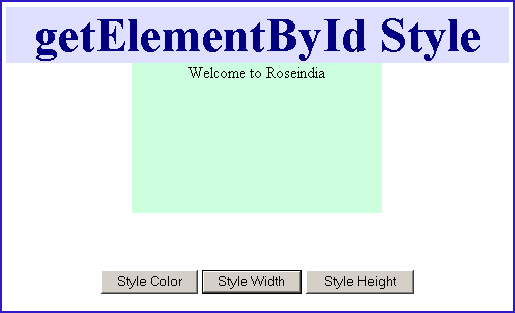
Click on the button "Style Color". It will call the method addStyleColor() and will change the background color of "myDiv".

Click on the button "Style Height". It will call the method addStyleHeight() and will change the height of "myDiv".

Click on the button "Style Width". It will call the method addStyleWidth() and will change the width of element "myDiv".


Tutorials
- Java 26 (JDK 26) Features with examples
- Top 10 Reasons to Learn Java in 2026
- JDK 26 Tutorial
- Java Certification Roadmap 2026: Which Oracle Certs Matter
- Install JDK 26: A Complete Beginner's Guide (2026)
- What Is Java? A Complete, Up-to-Date Guide for 2026
- Java 26 HTTP3 tutorial - HTTP 3 support in JDK 26 - How to use HTTP/3 in Java 26 application?
- JDK 28 Preview: Value Objects, Shenandoah GC & JSON API
- Java Tutorials