
JavaScript getAttribute Href
|
|
In JavaScript we can get the URL value of the linked resource by getting the HREF value of the link. We can achieve this in two ways :
- document.getElementById('myLink').href or
- document.getElementById('myLink').getAttribute('href')
The first way returns the whole URL of the linked resource and another returns only the exact URL of the linked resource. To explain use of getAttribute("href") we have created a simple example here.
Explanation :
This HTML page contains one link and one button. On the click event of the button it calls a function getAttributeHREF() which is defined in the JavaScript in the <script></script> tag. In this function first line will get the whole URL path of the linked resource by the "document.getElementById('myLink').href" and another line will show exact path in the alert message by the document.getElementById('myLink').getAttribute("href").
Here is the full code :
<html>
 <head>
  <title>
    getAttribute HREF Example
  </title>
  <script language="javascript" >
    function getAttributeHREF() {
      alert(document.getElementById('myLink').href);
      alert(document.getElementById('myLink').getAttribute("href"));
    }
  </script>
 </head>
 <body>
<div style="background: #DFDFFF; width:'100%';" align="center">
 <font color="#000080" size="12pt">
  <b>getAttribute HREF</b>
 </font>
</div>
<center>
 <div style='float:inherit'>
	<a id="myLink" href="relativeURL" >
            This is the link with HREF="relativeURL"
        </a>
 </div>
</center>
<center>
<div>
 <input type="button" value="showHREF"
    onClick="getAttributeHREF();">
</div>
</center>
</body>
</html>
|
Output :
Output page will be as given below :

When you click on the button "showHREF" it calls the function "getAttributeHREF()" defined in the JavaScript. URL fetched with "href" property holds full address as shown below :

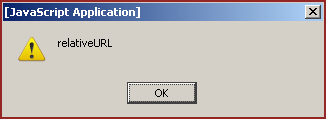
URL fetched with the getAttribute("href") method would be a relative URL as below :
You can also download full code from the following link:


Tutorials
- Java 26 (JDK 26) Features with examples
- Top 10 Reasons to Learn Java in 2026
- JDK 26 Tutorial
- Java Certification Roadmap 2026: Which Oracle Certs Matter
- Install JDK 26: A Complete Beginner's Guide (2026)
- What Is Java? A Complete, Up-to-Date Guide for 2026
- Java 26 HTTP3 tutorial - HTTP 3 support in JDK 26 - How to use HTTP/3 in Java 26 application?
- JDK 28 Preview: Value Objects, Shenandoah GC & JSON API
- Java Tutorials