
Fading elements in and out example


Fading elements in and out example
For fading effect jQuery has following three methods :
.fadeIn( )
This method fade the matched elements to opaque.
Example :
Following code animates hidden divs to fade in :
$("div:hidden:first").fadeIn("slow");
.fadeTo( )
This method can be used for adjusting the opacity of the matched elements.
Example :
Following code change the opacity of the image :
$('#clickmeDiv').click(function() {
$('#image').fadeTo('slow', 0.5, function() {
// Animation complete.
});
});
.fadeOut( )
This method hide the marched element and set their visibility to transparent.
Example :
In this Example, a list is given , if we hover on first two element, "<<<" is appended on it, to show mouse pointing. If we hover on last two elements ,"<<<" is appended on it & it will fade out/in to show mouse pointing.
<!DOCTYPE html>
<html>
<head>
  <style>
  ul { margin-left:20px; color:blue; }
  li { cursor:default; }
  span { color:red; }
  </style>
  <script src="jquery-1.4.2.js"></script>

</head>
<h3><font color="red">Hover on any element to see effect</font></h3>
<body>
	<ul>
    <li>Cake</li>
    <li>Pastries</li>
    <li class='fade'>Patties</li>
	<li class='fade'>Noodles</li>
  </ul>
<script>
    $("li").hover(
      function () {
        $(this).append($("<span><<< </span>"));
      },
      function () {
        $(this).find("span:last").remove();
      }
    );
 //li with fade class
   $("li.fade").hover(function(){$(this).fadeOut(100);$(this).fadeIn(500);});

</script>
</body>
</html>
|
Output :
When we hover on second element of the list :
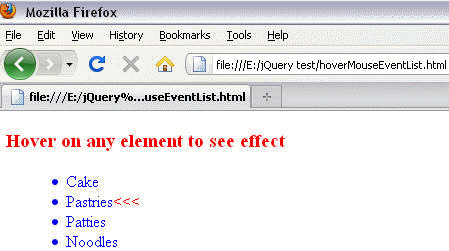
When we hover on last two elements ., it will fade in/out + append string "<<<" :

Learn from experts! Attend jQuery Training classes.