Create JSON Response in Spring Boot - How to Generate JSON Response in Spring Boot Application?
In this tutorial we are going to create examples to show you the generation of JSON response in Spring Boot application. In this tutorial we are using Spring Boot 4 and JDK 17. We have used Eclipse IDE for running the application.
In the Spring Boot framework spring-boot-starter-web dependency is used which add Jackson dependency. The Jackson is the default dependency added to the Spring Boot application via spring-boot-starter-web. Jackson is most widely used library for processing JSON data. In the Spring Boot application it is automatically configured when spring-boot-starter-web is added to the Spring Boot application.
With the use of Jackson dependency its very easy to generate a JSON response and Java objects can be converted into JSON response automatically. In this example we should you how to convert Map to JSON object. I have also added an example to convert Java Class object to JSON response.
Check YouTube Video at: https://www.youtube.com/watch?v=s1RAKt5WJfk
Here is the complete source code of our pom.xml file:
<?xml version="1.0" encoding="UTF-8"?>
<project xmlns="http://maven.apache.org/POM/4.0.0" xmlns:xsi="http://www.w3.org/2001/XMLSchema-instance"
	xsi:schemaLocation="http://maven.apache.org/POM/4.0.0 https://maven.apache.org/xsd/maven-4.0.0.xsd">
	<modelVersion>4.0.0</modelVersion>
	<parent>
		<groupId>org.springframework.boot</groupId>
		<artifactId>spring-boot-starter-parent</artifactId>
		<version>4.0.5</version>
		<relativePath/> <!-- lookup parent from repository -->
	</parent>
	<groupId>net.roseindia</groupId>
	<artifactId>demo</artifactId>
	<version>0.0.1-SNAPSHOT</version>
	<name/>
	<description/>
	<url/>
	<licenses>
		<license/>
	</licenses>
	<developers>
		<developer/>
	</developers>
	<scm>
		<connection/>
		<developerConnection/>
		<tag/>
		<url/>
	</scm>
	<properties>
		<java.version>17</java.version>
	</properties>
	<dependencies>
		<dependency>
			<groupId>org.springframework.boot</groupId>
			<artifactId>spring-boot-starter-webmvc</artifactId>
		</dependency>

		<dependency>
			<groupId>org.springframework.boot</groupId>
			<artifactId>spring-boot-starter-webmvc-test</artifactId>
			<scope>test</scope>
		</dependency>
	</dependencies>

	<build>
		<plugins>
			<plugin>
				<groupId>org.springframework.boot</groupId>
				<artifactId>spring-boot-maven-plugin</artifactId>
			</plugin>
		</plugins>
	</build>

</project>
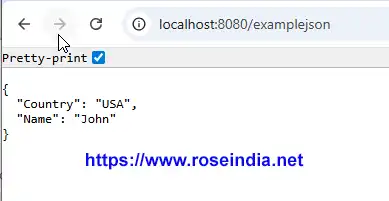
In the following code code block we have annotated the getJson() method with @GetMapping("/examplejson") which handles the "/examplejson" request from browser:
@GetMapping("/examplejson")
public Map getJson() {
	Map m = new HashMap();
	m.put("Name", "John");
	m.put("Country", "USA");
	return m;

}
Once there is a request from browser the value of map is returned as JSON Data. Here is the screenshot:
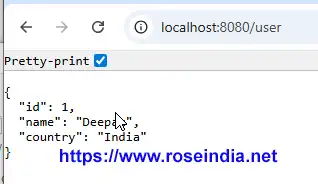
To convert the Java class object to JSON response following code is used:
@GetMapping("/user")
public User getUser() {
	return new User(1, "Deepak", "India");
}
Here is the screenshot of the response JSON:
Here is the example code of Spring application class:
package net.roseindia.demo;

import java.util.HashMap;
import java.util.Map;

import org.springframework.boot.SpringApplication;
import org.springframework.boot.autoconfigure.SpringBootApplication;
import org.springframework.web.bind.annotation.GetMapping;
import org.springframework.web.bind.annotation.RequestMapping;
import org.springframework.web.bind.annotation.RestController;

@SpringBootApplication
@RestController
public class DemoApplication {

	public static void main(String[] args) {
		SpringApplication.run(DemoApplication.class, args);
	}

	@RequestMapping("/")
	public String HelloWorld() {
		return "HelloWorld";
	}

	@GetMapping("/examplejson")
	public Map getJson() {
		Map m = new HashMap();
		m.put("Name", "John");
		m.put("Country", "USA");
		return m;

	}
    @GetMapping("/user")
    public User getUser() {
        return new User(1, "Deepak", "India");
    }

}
Here is full code of User class:
package net.roseindia.demo;

public class User {
    private int id;
    private String name;
    public int getId() {
		return id;
	}

	public void setId(int id) {
		this.id = id;
	}

	public String getName() {
		return name;
	}

	public void setName(String name) {
		this.name = name;
	}

	public String getCountry() {
		return country;
	}

	public void setCountry(String country) {
		this.country = country;
	}

	private String country;

    public User(int id, String name, String country) {
        this.id = id;
        this.name = name;
        this.country = country;
    }

}
In this tutorial we have learned how to generate JSON Response in Spring Boot application.
Related Tutorials: