Python Tutorial - Python Syntax
Programmers should first learn the syntax of the Python programming language. Learning the syntax of Python will help you to quickly understand and feel about this language. Here in this tutorial we are going to teach you Python programming language syntax. We will explain the concepts with many examples.
What is Python Syntax?
Python syntax refers to the set of rules and conventions that dictate how the Python programming language should be written and structured. This includes things like indentation, variable and function naming conventions, and the use of keywords and operators. It also includes the use of specific syntax elements such as colons, parentheses, and semicolons. Understanding and following the syntax of Python is crucial for writing clean, readable, and error-free code.
What is the importance of syntax in Python?
The syntax of a programming language is important because it is the foundation on which the language is built. It determines how the code is written and organized, and it serves as the foundation for the language's semantics (the meaning of the code). Without a consistent and well-defined syntax, it would be difficult for programmers to write and understand code, and for compilers or interpreters to process it.
In Python, syntax is particularly important because the language places a strong emphasis on code readability. The use of indentation, for example, is used to indicate the structure and scope of the code, making it easier for others to understand the logic of the program. Additionally, the use of clear and consistent naming conventions and structure makes it easier to navigate and debug the code.
In summary, the syntax in Python is important because it makes the code readable, easy to understand, and easy to maintain. It also ensures that the code can be processed correctly by the interpreter and it ensures that the code written is error-free.
- What is Python Programming
- Ways to Code Python Program
- Interactive Mode Programming
- Script Mode Programming
- IPython
- Jupyter Notebook
- IDLE
- Pycharm
- Python Identifiers
- Python Reserved Words
- Python Lines and Indentation
- Python Multi-Line Statements
- Quotations in Python
- Comments in Python
- Using Blank Lines in Python Programs
- Waiting for the User
- Multiple Statements on a Single Line
- Multiple Statement Groups as Suites
- Command Line Arguments in Python
What is Python Programming
Python is a popular, high-level programming language. It is easy to learn and has a simple syntax, making it a great language for beginners to start with. Python is used for a wide variety of tasks such as web development, data analysis, artificial intelligence, and scientific computing. Some key features of Python include its support for object-oriented, functional, and imperative programming styles, as well as its ability to work with multiple programming paradigms. It also has a large and active community, which means there are many resources and libraries available to help you learn and develop with Python. To get started, you will need a computer and a text editor or an IDE (Integrated Development Environment) to write and run your Python code.
Ways to Code Python Program
There are several ways to code in Python using the command line, including:
- Interactive mode: Interactive mode allows you to enter and execute individual lines of code in a command-line interface. This is useful for quick testing and experimentation.
- Script mode: In this mode, you write your code in a script file (usually with a .py extension) and then run the script using the command line. This is the most common way to write and run Python programs.
- IPython: IPython is an enhanced interactive shell for Python that provides additional features such as tab-completion, syntax highlighting, and command history. It can be used in place of the standard Python interpreter in interactive mode.
- Jupyter Notebook: Jupyter Notebook is a web-based interactive development environment that allows you to create and share documents that contain live code, equations, visualizations, and narrative text. It can be used to write and run Python code in a more organized and interactive way.
- IDLE : IDLE is the built-in Python development environment. IDLE is a simple IDE that comes with the standard Python distribution and can be used for writing and running Python code.
- Pycharm: PyCharm is a popular IDE for Python that provides advanced features such as code completion, debugging, and version control. It can be run from the command line.
All of these methods provide different ways to code in Python and can be used depending on the specific task or project. Let’s understand each mode with an example.
Interactive mode
In Python, interactive mode programming allows you to enter and execute individual lines of code in a command-line interface, rather than writing code in a script and running the script. This mode is useful for quick testing and experimentation.
To use interactive mode programming, you can simply open a terminal or command prompt and type "python" (without the quotes) to start the Python interpreter. Then you can enter Python code directly into the command line and see the results immediately.
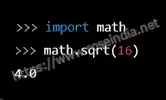
For example, you can perform simple mathematical calculations by typing the expressions directly into the interpreter:
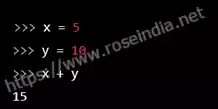
You can also assign values to variables and perform operations on them:
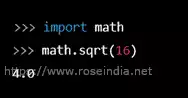
You can also import modules and use their functions or classes in interactive mode:
One of the advantages of interactive mode programming is that it allows you to test small pieces of code and see the results immediately, without the need to write and run a full script. This can be a useful tool for learning Python and debugging code. However, it's not recommended to write large programs in the interactive mode as it can be difficult to manage and organize your code.
Script mode
In script mode, you write your code in a script file (usually with a .py extension) and then run the script using the command line. This is the most common way to write and run Python programs.
For example, let's say you want to write a script that calculates the area of a circle with a given radius. You would create a new file called "area_of_circle.py" and open it in a text editor. Then you would write the following code:
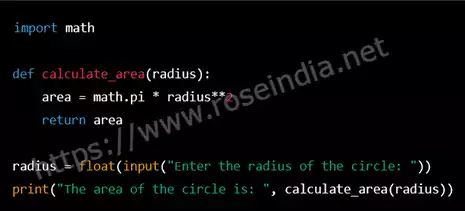
In this script, we first import the math module, which provides mathematical functions such as pi. Then we define a function called calculate_area that takes in a radius and returns the area of a circle using the formula pi*r^2.
Then we are using the built-in function input() to ask the user to input the radius of the circle and then using the function we defined above to calculate the area of the circle and print it.
Once you have saved the file, you can run the script by opening a terminal or command prompt and navigating to the directory where the script is saved. Then you can run the script using the following command:
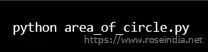
When you run this script, it will ask you to enter the radius of the circle and then it will print the area of the circle.
Script mode allows you to write and save your code in a separate file, making it easier to organize and reuse your code. It also allows you to run your code on any machine that has Python installed, making it a powerful way to create stand-alone programs.
IPython
IPython is an enhanced interactive shell for Python that provides additional features such as tab-completion, syntax highlighting, and command history. It can be used in place of the standard Python interpreter in interactive mode.
For example, let's say you want to use IPython to experiment with a list of numbers. You can start IPython by typing "ipython" in the command line and then you will be able to enter commands directly into the interpreter.
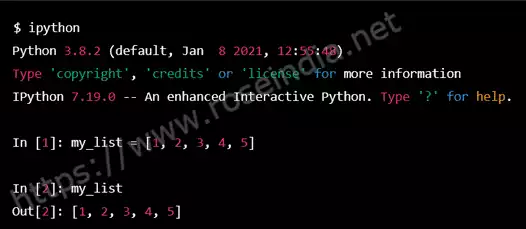
In this example, we start IPython by typing "ipython" in the command line. Then we created a list of numbers called "my_list" and assigned it the values of [1, 2, 3, 4, 5]. Then we simply printed the list. One of the advantages of IPython over the standard Python interpreter is that it provides enhanced tab-completion, which allows you to quickly complete commands and variable names by pressing the tab key. It also provides syntax highlighting, which makes it easier to read and understand your code. Additionally, IPython provides command history, so you can easily recall and reuse previous commands. IPython can be a useful tool for learning Python and for interactive data exploration and analysis. It is widely used in scientific computing, data science, and machine learning.
Jupyter Notebook
Jupyter Notebook is a web-based interactive development environment that allows you to create and share documents that contain live code, equations, visualizations, and narrative text. It can be used to write and run Python code in a more organized and interactive way. 0
For example, let's say you want to use Jupyter Notebook to analyze a dataset of weather data. You could create a new notebook, and then add cells for code and cells for text (in the form of markdown) to explain your analysis. Here is an example of how you could use Jupyter Notebook to load a CSV file with weather data, using the pandas library, and then display the first five rows of the data:
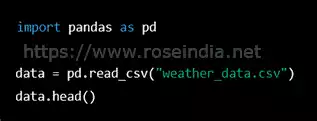
Then, you could add a markdown cell to explain what you did and what you're trying to accomplish with the analysis: 1
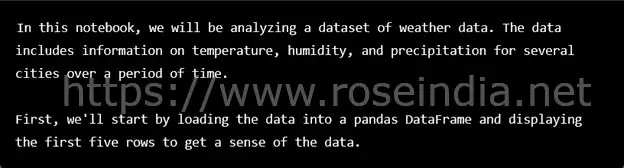
Jupyter Notebook allows you to run the code and see the results directly in the notebook, and also provides a way to document your work, making it easier to share and communicate your findings with others. Jupyter Notebook also supports many programming languages other than python, which makes it a versatile tool for data analysis and scientific computing. You can start the Jupyter Notebook server by running the command “jupyter notebook” in your command line. This will open the notebook in a web browser and from there you can create a new notebook or open an existing one.
IDLE
Python IDLE (Integrated Development and Learning Environment) is a built-in text editor that comes with the Python programming language. It is used to write and execute Python code. IDLE has a simple and user-friendly interface that makes it easy for beginners to learn Python. An example of using IDLE to write and run a Python script: 2
- Open IDLE by searching for it in your computer's applications or by running "idle" in the command prompt.
- In the IDLE window, click on "File" and select "New File" to create a new script.
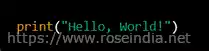
- Type in the following code:
- Save the script by clicking "File" and selecting "Save"
- To run the script, click on "Run" and select "Run Module"
- The output "Hello, World!" will be displayed in the Python shell.
IDLE also has a shell mode, where you can run python commands interactively and test the commands instantly.
Pycharm
PyCharm is a popular integrated development environment (IDE) for Python programming. It is developed by JetBrains and provides a more advanced set of features compared to IDLE. PyCharm offers a wide range of features such as code completion, debugging, and code refactoring. It also offers built-in support for version control systems like Git, making it a popular choice among professional developers. An example of using PyCharm to write and run a Python script: 3
- Open PyCharm and create a new project by clicking on "Create New Project"
- In the project window, right-click on the project name and select "New" and then "Python File"
- Name the file "main.py" and click "OK"
- Type in the following code:
0
- To run the script, click on the green play button on the top right corner of the window or press Shift + F10
- The output "Hello, World!" will be displayed in the Run window at the bottom of the screen
PyCharm also has built-in support for debugging, testing, and version control, making it a powerful tool for professional developers. Additionally, it also provides a large number of customization options to fit your development workflow.
Python Identifiers
In Python, an identifier is a name used to identify a variable, function, class, or any other object. Identifiers are used to give a specific name to the different elements in a Python program, so that we can easily refer to them later on. Here are some rules for creating valid identifiers in Python: 4
- Identifiers can only contain letters, numbers, and underscores (_)
- Identifiers cannot start with a number
- Identifiers cannot contain spaces
- Identifiers are case-sensitive, meaning that "myVariable" and "myvariable" are different identifiers
- Identifiers cannot be a Python keyword, such as "for", "while", "class", etc.
Examples of valid Python identifiers:
- my_variable
- myVariable
- _private_variable
- PI
Examples of invalid Python identifiers:
- 123number (starts with a number)
- my variable (contains a space)
- for (a Python keyword)
In a python program, you can use identifiers to store data in variables, call functions, and create objects from classes. Here's an example of a simple Python program that uses identifiers: 5
1
The above program defines an identifier “my_variable” with a string value and a function “print_message” which prints the value of “my_variable”. The program calls the function “print_message” and prints the value of “my_variable” which is "Hello, World!".
Python Reserved Words
Python has a set of reserved words, also known as keywords, that have special meaning in the language and cannot be used as identifiers. They are used to structure and control the flow of a Python program. Here are some examples of Python reserved words: 6
- if: used to create a conditional statement
- while: used to create a loop that continues to execute as long as a certain condition is true
- for: used to create a loop that iterates over a sequence of items
- def: used to define a function
- class: used to define a class
- try: used to handle exceptions
- except: used to catch and handle an exception
- with: used to work with context managers
An example of how reserved words are used in a Python program:
2
In the above example, the reserved word “if” is used to create a conditional statement, “for” is used to create a loop, “def” is used to define a function “my_function” . You can see that if we use any of these reserved words as an identifier it will raise a syntax error. 7
Python Lines and Indentation
In Python, lines of code are used to create statements and blocks of code. A statement is a single line of code that performs a specific action, such as assigning a value to a variable or calling a function. Indentation is used in Python to indicate the beginning and end of a block of code. In Python, a block of code is a group of statements that are executed together. Indentation is done using whitespaces or tabs, and it is important to be consistent in the use of indentation throughout a Python program. Here's an example of how lines and indentation are used in Python:
3
In the above example, the first line assigns the value 5 to the variable “x”. The second line is an “if” statement, which checks if the value of “x” is greater than 0. If the condition is true, the statements inside the if block (indented with 4 spaces) will be executed, which are “print("x is positive")” and “print("This is inside the if block")”. Once the if block is finished, the next statement outside the if block “print("This is outside the if block")” will be executed. 8
It's important to notice that the indentation should be consistent throughout the program, using the same number of spaces or tabs for each level of indentation. Inconsistent indentation will cause an IndentationError. In python, indentation is used to define the block of code. It's important to keep in mind that, unlike some other languages, Python does not use curly braces or other characters to define the beginning and end of a block of code, it uses indentation.
Python Multi-Line Statements
In Python, a statement can be written in one line or it can span multiple lines. A statement that spans multiple lines is called a multi-line statement. There are a few ways to write a multi-line statement in Python. Here's an example of a multi-line statement using the line continuation character ():
4 9
In the above example, the variable x is assigned the value of the sum of 1, 2, 3, 4, 5, 6, 7, 8, 9. The line continuation character () is used at the end of each line to indicate that the statement continues on the next line. Another way to write multi-line statement is by using Parentheses (()), Brackets ([]), and Braces ({}):
5
In this example, the Parentheses are used to indicate that the statement continues on the next line. You can also use triple quotes (either ''' or """) to write multi-line statements: 0
6
In this example, we used triple quotes to create a multi-line string. It's important to notice that the indentation does not matter when using these methods to write multi-line statements. In general, it's considered a good practice to break up long statements into multiple lines for readability, as it makes the code more organized and easier to understand.
Quotations in Python
In Python, you can use single quotes ('), double quotes ("), and triple quotes (''' or """) to define strings. The choice of which type of quotes to use depends on the content of the string.
Single quotes ('...') and double quotes ("...") are used to define strings that do not contain any line breaks or special characters that need to be escaped. Here's an example of using single quotes and double quotes to define strings: 1
7
Triple quotes ('''...''' or """...""") are used to define strings that contain line breaks or special characters that need to be escaped. Here's an example of using triple quotes to define a string:
8 2
In the above example, the triple quotes are used to create a multi-line string that contains multiple lines of text. It's also important to notice that in python you can use single quotes inside a string defined with double quotes and vice-versa, as long as you match the quotes properly.
9
In general, it's a good practice to be consistent with the type of quotes you use throughout your code, and use triple quotes when defining multi-line strings. 3
Comments in Python
In Python, comments are used to add human-readable explanations or notes to the source code of a program. Comments are ignored by the Python interpreter and do not affect the execution of the code. They are used to make the code more readable and understandable for other developers who might read or work on the code in the future.
There are two types of comments in Python: single-line comments and multi-line comments. A single-line comment starts with the pound symbol (#) and continues until the end of the line. Here's an example of a single-line comment:
0 4
A multi-line comment starts and ends with triple quotes (''' or """). Everything between the triple quotes is considered a comment. Here's an example of a multi-line comment:
1
It's a good practice to use comments to explain the purpose of the code, how it works, or any other information that might be useful for someone reading the code. Comments can also be used to temporarily disable a piece of code without having to delete it. In addition to the above, python also has a docstring, which is a special type of comment used to document the code. Docstrings are enclosed in triple quotes and are placed at the beginning of a module, class, function, or method definition. Here's an example of a docstring: 5
2
Docstrings are used to provide a detailed description of the code, its arguments, return value and other useful information. They can also be accessed at runtime using the “__doc__” attribute and are used by tools such as Sphinx to generate documentation automatically.
Using Blank Lines in Python Programs
In Python, blank lines (empty lines) are used to separate and organize the code into logical blocks. They are ignored by the Python interpreter and do not affect the execution of the code.
Using blank lines can make the code more readable and easier to understand. It can be used to separate different sections of the code, separate functions, or to group related statements together.
Here's an example of using blank lines to organize a Python program: 6
3
In the above example, a blank line is used to separate the function definition from the rest of the code. Another blank line is used to separate the assignment of values to variables “x” and “y” from the following “if” statement.
Using blank lines can also help to make the code more readable and easy to understand. It's also important to notice that too many blank lines can make the code hard to read, it's good to be consistent in the use of blank lines throughout the program and use them when they help to improve the readability of the code. In general, it's a good practice to use blank lines to separate different sections of the code, separate functions, or to group related statements together. This makes the code more readable and easier to understand. 7
Waiting for the User
In Python, you can use the “input()” function to wait for the user to enter a value before continuing with the execution of the program. The “input()” function takes a string argument that is displayed as a prompt for the user, and returns the value entered by the user as a string. Here's an example of using the “input()” function to wait for the user to enter a value:
4
In the above example, the program will display the prompt "What's your name? " and wait for the user to enter a value. The value entered by the user will be stored in the variable “name”, and then the program will print "Hello, (entered name)!" It's important to notice that the “input()” function returns the value entered by the user as a string. If you want to use the value as a number, you need to convert it using the appropriate function, such as “int()” or “float()”. 8
5
In this example, the program will ask for the user's age, and will convert the input string to an integer using the “int()” function, then the program will check if the age is greater than 18 and will print an appropriate message.
It's also important to consider that the input function can raise a “ValueError” exception if the user enters a value that can't be converted to the desired type, and that it's good practice to handle this exception. In general, the “input()” function is a useful tool for creating interactive programs that can wait for user input before continuing with the execution of the code. 9
Multiple Statements on a Single Line
In Python, multiple statements can be written on a single line by separating them with a semicolon (;). This can be useful for compacting the code and making it more concise, but it can also make the code less readable and harder to understand. Here's an example of using multiple statements on a single line:
6
In the above example, the variable “x” is assigned the value 5, the variable “y” is assigned the value 10, and the sum of “x” and “y” is printed. It's important to notice that using multiple statements on a single line can make the code less readable and harder to understand, especially when the statements are complex or perform different actions. 0
It's also important to consider that when debugging, it might be harder to identify the source of a problem when multiple statements are on the same line. In general, it's a good practice to use a single statement per line and limit the use of multiple statements on a single line to simple statements that perform related actions. This makes the code more readable and easier to understand, and also easier to debug.
Multiple Statement Groups as Suites
In Python, a suite is a group of statements that belong together and are executed together. Suites are used in the control flow statements like “if”, “for”, and “while” to define the block of code that will be executed when a certain condition is met. A suite is formed by one or more semicolon-separated simple statements with an optional leading indentation. The most common way to indicate a suite is to simply indent it:
7 1
In this example, the suite of statements “print("x is positive")” and “x = x - 1” belongs to the “if” statement. You can also use semicolons to separate the statements:
8
In this example, the “if” statement is followed by two simple statements separated by semicolons. It's important to notice that the indentation is crucial in Python, as it defines the suite of statements that belong to a certain control flow statement. It's also important to notice that the semicolon-separated style is less common and less recommended as it makes the code less readable and harder to understand. In general, it's a good practice to use indentation to define the suite of statements that belong to a certain control flow statement. This makes the code more readable and easier to understand. 2
Command Line Arguments in Python
In Python, command line arguments are used to pass parameters to a script when it is executed. These arguments are passed as a list of strings, and can be accessed in the script using the “sys.argv” list. The first element of the list, “sys.argv[0]”, is the name of the script, and the following elements are the arguments passed to the script. Here's an example of a Python script that prints the command line arguments passed to it:
9
If you run the script with the command “python script.py arg1 arg2 arg3”, the output will be: 3
0
You can also use the “argparse” module to create more powerful command-line interfaces. This module provides an easy way to write user-friendly command-line interfaces.
1 4
If you run the script with the command “python script.py -n John -a 25”, the output will be:
2
In this example, the script accepts two command line arguments “-n” or “--name” and “-a” or “--age” and prints the value of these arguments. It's important to notice that when using the “argparse” module, you can also add default values and specify the type of the arguments, also the module provides a lot of functionalities to make the script more user-friendly. In general, command-line arguments are a powerful way to pass parameters to a Python script and make it more flexible and reusable. 5