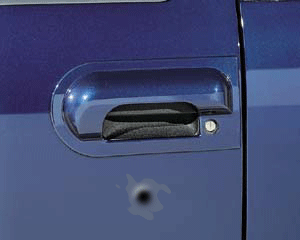
How to draw a bullet spot on the car


This example has a technique to draw a bullet spot on the object, If you follow all the steps that has been mentioned here, I am sure will can allow make it.
Picture: First take a picture to modify, I have taken here a car picture.

Circle: Draw a circle with "5d6780" color by the Ellipse tool (U key) as given here.

Ripple: Go to Filter menu > Distort > Apply Ripple.

You will get it.

A little circle: Now draw a little circle inside the rippled shape with black color.

Layer style: Go to Layer menu > Layer style > Bevel and Emboss.

Blur: Go to Filter menu > Blur > Gaussian blur.

Levels: Go to Image menu > Adjustment > Apply Levels.

This is the bullet holed picture.