maven jetty plugin
In this section, you will learn about implementing jetty plugin of maven inside web applications.
Jetty offers javax.servlet container , an HTTP server and HTTP client. You can use these elements for commercial usage and distribution as these elements are open source.
The apache-maven-2.2.1 versions is used in the below example.
First, you need to create web application using maven using following command :
C:\project_maven>mvn archetype:generate -DgroupId=net.roseindia -DartifactId=roseindia-webapp -DarchetypeArtifactId=maven-archetype-webapp |
For complete example(web application structure creation using maven) click here.
Edit the pom.xml and add the plugin configuration under <plugin> tag as follows :
<project xmlns="http://maven.apache.org/POM/4.0.0" xmlns:xsi="http://www.w3.org/2001/XMLSchema-instance"
xsi:schemaLocation="http://maven.apache.org/POM/4.0.0 http://maven.apache.org/maven-v4_0_0.xsd">
<modelVersion>4.0.0</modelVersion>
<groupId>net.roseindia</groupId>
<artifactId>roseindia-webapp</artifactId>
<packaging>war</packaging>
<version>1.0</version>
<name>roseindia-webapp Maven Webapp</name>
<url>http://maven.apache.org</url>
<dependencies>
<dependency>
<groupId>junit</groupId>
<artifactId>junit</artifactId>
<version>3.8.1</version>
<scope>test</scope>
</dependency>
</dependencies>
<build>
<finalName>roseindia-webapp</finalName>
<plugins>
<plugin>
<groupId>org.mortbay.jetty</groupId>
<artifactId>maven-jetty-plugin</artifactId>
<version>6.1.10</version>


<configuration>
<scanIntervalSeconds>10</scanIntervalSeconds>
<webAppConfig>
<contextPath>/</contextPath>

</webAppConfig>

<connectors>
<connector implementation="org.mortbay.jetty.nio.SelectChannelConnector">
<port>9090</port>
<maxIdleTime>60000</maxIdleTime>
</connector>
</connectors>
</configuration>
</plugin>

</plugins>
</build>
</project>
Run the following command after adding configuration for jetty plugin :
| C:\project_maven\roseindia-webapp>mvn install [INFO] Scanning for projects... [INFO] ------------------------------------------------------------------------ [INFO] Building roseindia-webapp Maven Webapp [INFO] task-segment: [install] [INFO] ------------------------------------------------------------------------ [INFO] [resources:resources {execution: default-resources}] [WARNING] Using platform encoding (Cp1252 actually) to copy filtered resources, i.e. build is platform dependent! [INFO] Copying 0 resource [INFO] [compiler:compile {execution: default-compile}] [INFO] No sources to compile [INFO] [resources:testResources {execution: default-testResources}] [WARNING] Using platform encoding (Cp1252 actually) to copy filtered resources, i.e. build is platform dependent! [INFO] skip non existing resourceDirectory C:\project_maven\roseindia-webapp\src \test\resources [INFO] [compiler:testCompile {execution: default-testCompile}] [INFO] No sources to compile [INFO] [surefire:test {execution: default-test}] [INFO] No tests to run. [INFO] [war:war {execution: default-war}] [INFO] Packaging webapp [INFO] Assembling webapp[roseindia-webapp] in [C:\project_maven\roseindia-webapp \target\roseindia-webapp] [INFO] Processing war project [INFO] Copying webapp resources[C:\project_maven\roseindia-webapp\src\main\webapp] [INFO] Webapp assembled in[62 msecs] [INFO] Building war: C:\project_maven\roseindia-webapp\target\roseindia-webapp.war [INFO] [install:install {execution: default-install}] [INFO] Installing C:\project_maven\roseindia-webapp\target\roseindia-webapp.war to C:\Documents and Settings\satya\.m2\repository\net\roseindia\roseindia-webapp \1.0\roseindia-webapp-1.0.war [INFO] ------------------------------------------------------------------------ [INFO] BUILD SUCCESSFUL [INFO] ------------------------------------------------------------------------ [INFO] Total time: 1 second [INFO] Finished at: Mon Jul 09 18:01:35 GMT+05:30 2012 [INFO] Final Memory: 10M/24M [INFO] ------------------------------------------------------------------------ |
Now using jetty server, you can run your web application using mvn jetty: run command as follows :
| C:\project_maven\roseindia-webapp>mvn
jetty:run [INFO] Scanning for projects... [INFO] ------------------------------------------------------------------------ [INFO] Building roseindia-webapp Maven Webapp [INFO] task-segment: [jetty:run] [INFO] ------------------------------------------------------------------------ [INFO] Preparing jetty:run [INFO] [resources:resources {execution: default-resources}] [WARNING] Using platform encoding (Cp1252 actually) to copy filtered resources, i.e. build is platform dependent! [INFO] Copying 0 resource [INFO] [compiler:compile {execution: default-compile}] [INFO] No sources to compile [INFO] [resources:testResources {execution: default-testResources}] [WARNING] Using platform encoding (Cp1252 actually) to copy filtered resources, i.e. build is platform dependent! [INFO] skip non existing resourceDirectory C:\project_maven\roseindia-webapp\sr \test\resources [INFO] [compiler:testCompile {execution: default-testCompile}] [INFO] No sources to compile [INFO] [jetty:run {execution: default-cli}] [INFO] Configuring Jetty for project: roseindia-webapp Maven Webapp [INFO] Webapp source directory = C:\project_maven\roseindia-webapp\src\main\web pp [INFO] web.xml file = C:\project_maven\roseindia-webapp\src\main\webapp\WEB-INF web.xml [INFO] Classes = C:\project_maven\roseindia-webapp\target\classes 2012-07-09 18:10:42.148::INFO: Logging to STDERR via org.mortbay.log.StdErrLog [INFO] Context path = / [INFO] Tmp directory = determined at runtime [INFO] Web defaults = org/mortbay/jetty/webapp/webdefault.xml [INFO] Web overrides = none [INFO] Webapp directory = C:\project_maven\roseindia-webapp\src\main\webapp [INFO] Starting jetty 6.1.10 ... 2012-07-09 18:10:42.163::INFO: jetty-6.1.10 2012-07-09 18:10:42.241::INFO: No Transaction manager found - if your webapp r quires one, please configure one. 2012-07-09 18:10:43.366::INFO: Started [email protected]:9090 [INFO] Started Jetty Server [INFO] Starting scanner at interval of 10 seconds. |
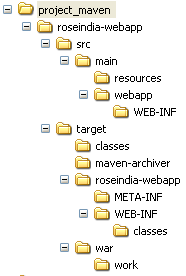
Inside project_maven directory, you can see the change in the structure (target folder, which also held the compile classes) :
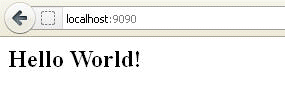
Call the following URL in browser(http://localhost:9090 ) , you will get the following output :