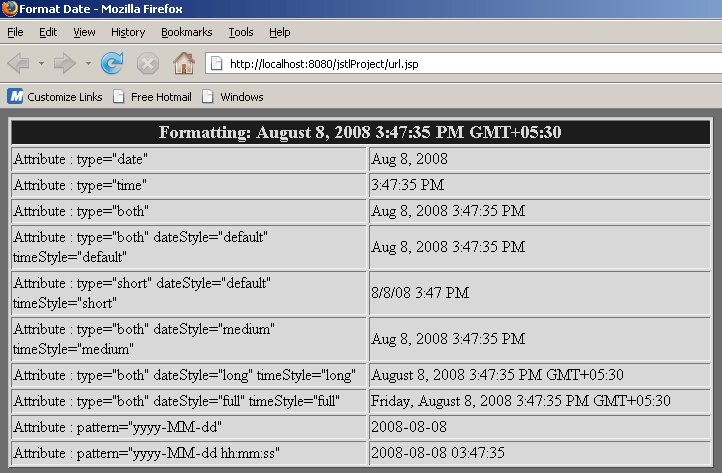
Format date/time using <fmt:formatDate> tag of jstl


Here in this section we will explain how to format date/time as per user requirment by using <fmt:formatDate> tag of JSTL.
| <fmt:formatDate> : This tag is used to format date and time according to the user supplied style and format. | ||||||||||||||||
Attributes of
the tag <fmt:formatDate>
|
dateFormat_JstlFmtTag.jsp
<%@ page import="java.util.*"%>
<%@ taglib uri="http://java.sun.com/jstl/core" prefix="c"%>
<%@ taglib uri="http://java.sun.com/jstl/fmt" prefix="fmt"%>
<html>
<head>
<meta http-equiv="refresh" content="3">
<title>Format Date</title>
</head>
<body bgcolor="#6E6E6E">
<%Date date = new java.util.Date();
pageContext.setAttribute("date", date);%>
<c:set var="date" value="${date}" />
<table bgcolor="#D8D8D8" border="1" width="70%">
<tr>
<td width="100%" colspan="2" bgcolor="#1C1C1C">
<p align="center"><b> <font color="#D8D8D8" size="4">Formatting:
<fmt:formatDate value="${date}" type="both" timeStyle="long"
dateStyle="long" />
</font>
</b></p>
</td>
</tr>
<tr>
<td width="51%">Attribute : type="date"</td>
<td width="49%"><fmt:formatDate type="date" value="${date}" /></td>
</tr>
<tr>
<td width="51%">Attribute : type="time"</td>
<td width="49%"><fmt:formatDate type="time" value="${date}" /></td>
</tr>
<tr>
<td width="51%">Attribute : type="both"</td>
<td width="49%"><fmt:formatDate type="both" value="${date}" /></td>
</tr>
<tr>
<td width="51%">Attribute : type="both" dateStyle="default"
timeStyle="default"</td>
<td width="49%"><fmt:formatDate type="both" dateStyle="default"
timeStyle="default" value="${date}" /></td>
</tr>
<tr>
<td width="51%">Attribute : type="short" dateStyle="default"
timeStyle="short"</td>
<td width="49%"><fmt:formatDate type="both" dateStyle="short"
timeStyle="short" value="${date}" /></td>
</tr>
<tr>
<td width="51%">Attribute : type="both" dateStyle="medium"
timeStyle="medium"</td>
<td width="49%"><fmt:formatDate type="both" dateStyle="medium"
timeStyle="medium" value="${date}" /></td>
</tr>
<tr>
<td width="51%">Attribute : type="both" dateStyle="long"
timeStyle="long"</td>
<td width="49%"><fmt:formatDate type="both" dateStyle="long"
timeStyle="long" value="${date}" /></td>
</tr>
<tr>
<td width="51%">Attribute : type="both" dateStyle="full"
timeStyle="full"</td>
<td width="49%"><fmt:formatDate type="both" dateStyle="full"
timeStyle="full" value="${date}" /></td>
</tr>
<tr>
<td width="51%">Attribute : pattern="yyyy-MM-dd"</td>
<td width="49%"><fmt:formatDate pattern="yyyy-MM-dd" value="${date}" />
</td>
</tr>
<tr>
<td width="51%">Attribute : pattern="yyyy-MM-dd hh:mm:ss"</td>
<td width="49%"><fmt:formatDate pattern="yyyy-MM-dd hh:mm:ss"
value="${date}" /></td>
</tr>
</table>
</body>
</html>
In this code we have used "<meta http-equiv="refresh" content="3">" in the sixth line, that provide auto refresh to this web page after every three seconds.
Steps to run this example :
1: Download the zip file of code and unzip this
file, you will get a folder named 'dateFormat_JstlFmtTag'.
2: Paste this folder in 'Apache Tomcat 6.0.16-->webapps' or generally
in directory 'C:\apache-tomcat-6.0.16\webapps'.
3: Start tomcat server by click on startup.bat file in
'C:\apache-tomcat-6.0.16\bin'.
4: Open browser and type url 'http://localhost:8080/formatDate_JstlFmtTag/dateFormat_JstlFmtTag.jsp'
or click on this link.
Output of the program :