
setting out line

In this program we are going to create a sheet then create out line for rows and columns.

setting out line

--Ads--

setting out line


In this program we are going to create a sheet  then create out line for rows and columns. 

Code description
The package we need to import is java.io.*,java.util.* ,org.apache.poi.hssf.usermodel.HSSFSheet, and org.apache.poi.hssf.usermodel. HSSFWorkbook.
The method used in this example shift row

grouprow
( startIndex, endIndex):
This is used to create outline for rows startIndex and endIndex shows the starting point and end points for the outline.

groupColumn(startIndex, endIndex):
This is used to create outline for column.

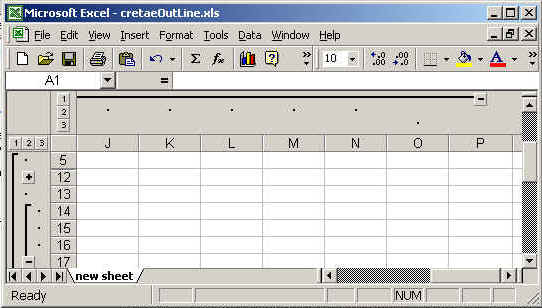
You can create the out line for both rows and columns. The out line is shown in output between + and - linked with state line .

 The code of the program is given below:

<%@ page import="org.apache.poi.hssf.usermodel.HSSFSheet"%>
<%@ page import="org.apache.poi.hssf.usermodel.HSSFWorkbook"%>
<%@ page contentType="application/vnd.ms-excel" %>
<%@ page import="java.io.*" %>
<%@ page import="java.util.*" %>
<%
try{
  HSSFWorkbook hwb = new HSSFWorkbook();
  HSSFSheet sheet = hwb.createSheet("new sheet");
  sheet.groupRow( 4, 10 );
  sheet.groupRow( 5, 16);
  sheet.groupRow( 13, 15 );
  sheet.groupColumn( (short)4, (short)6 );
  sheet.groupColumn( (short)5, (short)14 );
  sheet.groupColumn( (short)14, (short)14 );
  FileOutputStream fileOut = new FileOutputStream
(
"c://excel//cretaeOutLine.xls");
  hwb.write(fileOut);
  
fileOut.close();
  out.println("Your excel file has been generated");  
  } catch ( Exception ex ) {
  
  }
%>

The output of the program is given below:
Download this example.