Insert data in Excel File from Database using JSP

In this section, we have developed a application to insert data in excel file from database in JSP. We created file SearchUser.jsp, excelData.jsp.

Insert data in Excel File from Database using JSP

--Ads--

Insert data in Excel File from Database  using JSP 


In this section, we have developed a application to insert data  in excel file from database in JSP. We created  file SearchUser.jsp, excelData.jsp. 

Brief description of the flow of the application: 

  • User opens SearchUser.jsp on the browser and enter the data to be search and click on the "Search" button. 
  • After click "Search  button, application will retrieve the data from database, create an excel file and data insert into newly generated excel file.
  • Steps to create an excel file :
  1. Download the POI.jar from Apache Jakarta Project .
  2. Extract it and then copy  poi-2.5.1-final-20040804.jar, poi-contrib-2.5.1-final-20040804.jar and poi-scratchpad-2.5.1-final-20040804.jar into C:\apache-tomcat-5.5.23\common\lib directory .
  3. Then download source code and paste into C:\apache-tomcat-5.5.23\webapps\excel.
  4. Start the web server.
  5. Create folder into C drive with the name 'excel' .  
  6. The excel file will generate into directory C:\excel
  • After create an excel file open it and view the search data in the excel file.

Step 1: Create a web page ("SearchUser.jsp") to SearchForm.

<html>
<head>

</head>
<body>
<br><br><br><br>
<form name="searchForm" method="post" action="excelData.jsp">
<table align="center" bgcolor="LIGHTBLUE">
<tr>
<td colspan=3 align="center"><b>
<span style="font-size:20px;">Create a Excel file with Search Table</span></b></td>
</tr>
<tr>
<td colspan=3>&nbsp;</td>
</tr>
<tr>
<td><b>Search</b></td>
<td><input type="text" name="searchtxt" value=""></td>
<td><input type="submit" name="Submit" value="Search"></td>
</tr>
<tr>
<td colspan=3>&nbsp;</td>
</tr>
</table>
</form>
</body>
</html>


 Step 3:Create a webpage  "excelData.jsp" to  retrieve the data from database  and  create excel file and insert the data into excel file.

<%@ page import="org.apache.poi.hssf.usermodel.HSSFSheet"%>
<%@ page import="org.apache.poi.hssf.usermodel.HSSFWorkbook"%>
<%@ page import="org.apache.poi.hssf.usermodel.HSSFRow"%>
<%@ page import="org.apache.poi.hssf.usermodel.HSSFCell"%>
<%@ page import="java.io.*" %>
<%@ page import="java.util.*" %>
<%@ page import="java.sql.*" %>

<%! 
Connection conn = null;
String url = "jdbc:mysql://localhost:3306/";
String dbName = "user_register";
String driver = "com.mysql.jdbc.Driver";
String username = "root"; 
String userPassword = "root";

%>
<br><br>
<%

java.util.Date date = new java.util.Date();

String filename = "c:\\excel\\f"+date.getTime() +".xls" ;

String searchText="";
if(request.getParameter("searchtxt")!=null)
{
searchText= request.getParameter("searchtxt").toString();
}

try{

Class.forName(driver).newInstance();
conn = DriverManager.getConnection(url+dbName,username,userPassword);

Statement stmt = conn.createStatement();
String strQuery = "select * from register where firstname like '%"+searchText+"%' or lastname like '%"+searchText+"%'";


ResultSet rs = stmt.executeQuery(strQuery);

HSSFWorkbook hwb = new HSSFWorkbook();
HSSFSheet sheet = hwb.createSheet("new sheet");

HSSFRow rowhead = sheet.createRow((short)2);
rowhead.createCell((short) 0).setCellValue("SNo");
rowhead.createCell((short) 1).setCellValue("First Name");
rowhead.createCell((short) 2).setCellValue("Last Name");
rowhead.createCell((short) 3).setCellValue("Username");
rowhead.createCell((short) 4).setCellValue("E-mail");
rowhead.createCell((short) 5).setCellValue("Country");

int index=3;
int sno=0;
String name="";
while(rs.next()) 
{
sno++;

HSSFRow row = sheet.createRow((short)index);
row.createCell((short) 0).setCellValue(sno);
row.createCell((short) 1).setCellValue(rs.getString(4));
row.createCell((short) 2).setCellValue(rs.getString(5));
row.createCell((short) 3).setCellValue(rs.getString(2));
row.createCell((short) 4).setCellValue(rs.getString(6));
row.createCell((short) 5).setCellValue(rs.getString(9));
index++;
}
FileOutputStream fileOut = new FileOutputStream(filename);
hwb.write(fileOut);
fileOut.close();
out.println("<b>Your excel file has been generated</b>");

} catch ( Exception ex ) {


%>

Successful Output of the program:


To click on "Search" Button to Search data and insert this data into excel file. 
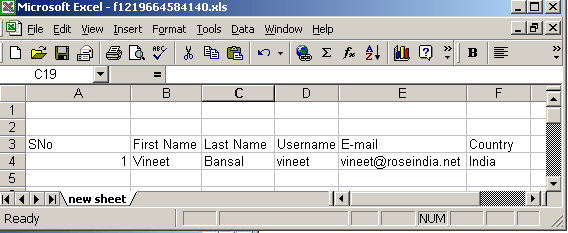


The Output  is Display on the Browser : 



Download the full web application shows here.

Download the application