
Writing Simple Java Script Program
|
|
In this article you learn the basics of JavaScript and create your first JavaScript program.
Creating your first JavaScript Program
In the last lesson you learned how to create simple java script program. To run the program open the html file in any browser and click on the "Run Java Script First Program". The will display the message box. Here is the screen shot of the browser.
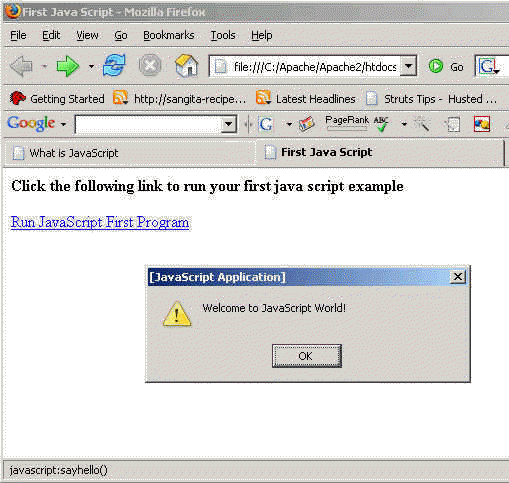
Test JavaScript program from here.
Here is the code of JavaScript program:
| <html> <head> <title>First Java Script</title> <script language="JavaScript"> function sayhello(){ alert("Welcome to JavaScript World!"); } </script> </head> <body> <p><b>Click the following link to run your first java script example</b></p> <p><a href="javascript:sayhello()">Run JavaScript First Program</a></p> </body> |
Following is the JavaScript program that will show the message:
<script language="JavaScript">
function sayhello(){
alert("Welcome to JavaScript World!");
}
</script>
The alert() function of the java script displays message.


Tutorials
- Java 26 (JDK 26) Features with examples
- Top 10 Reasons to Learn Java in 2026
- JDK 26 Tutorial
- Java Certification Roadmap 2026: Which Oracle Certs Matter
- Install JDK 26: A Complete Beginner's Guide (2026)
- What Is Java? A Complete, Up-to-Date Guide for 2026
- Java 26 HTTP3 tutorial - HTTP 3 support in JDK 26 - How to use HTTP/3 in Java 26 application?
- JDK 28 Preview: Value Objects, Shenandoah GC & JSON API
- Java Tutorials