
JavaScript Remove Element
|
|
In this section, you will learn how to remove HTML element using JavaScript.
JavaScript provides several methods which allow the user to remove particular HTML element. Here we are going to remove a div element. For this purpose, we have created a div element. The method document.getElementById() grabs the element of specified id. Assign this element in the variable 'el'. Now in order to remove this element, we have used the variable 'el' with the JavaScript property parentNode that will returns a reference to the node's parent node and then refer to the JavaScript method removeChild() that will remove the specified element.
Here is the code:
| <html> <h2>Remove Element</h2> <script> function removeElement(){ var el = document.getElementById('id'); var remElement = (el.parentNode).removeChild(el); } </script> <input type="button" value="Remove Div" onclick="removeElement();" /><br><br> <div id="id" style="background-color:lightBlue;width:90;height:20;border:1px solid black">Hello World</div> </html> |
Output will be displayed as:
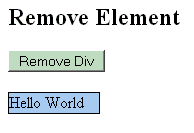
On clicking the button, the div element will get removed:


Tutorials
- Java 26 (JDK 26) Features with examples
- Top 10 Reasons to Learn Java in 2026
- JDK 26 Tutorial
- Java Certification Roadmap 2026: Which Oracle Certs Matter
- Install JDK 26: A Complete Beginner's Guide (2026)
- What Is Java? A Complete, Up-to-Date Guide for 2026
- Java 26 HTTP3 tutorial - HTTP 3 support in JDK 26 - How to use HTTP/3 in Java 26 application?
- JDK 28 Preview: Value Objects, Shenandoah GC & JSON API
- Java Tutorials