
JavaScript add row to table


This section illustrates you how to add a new row to the existing table using JavaScript.
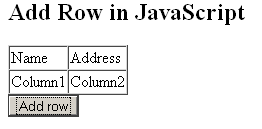
You can see in the given example, we have created a table whose id is grabbed by the method document.getElementById(id) and stored it into the variable 'tbody'. The method createElement() creates the row element 'tr' and 'td'. As you already know that 'td' contains the table data and 'tr 'defines a row that contains the 'td' element. Now, the method appendChild(document.createTextNode()) adds the text node to the 'td' element as the table data. Then we have added the 'td' data to the row element 'tr'. When you load the page, you will get the table containing the columns Name and Address and a button 'Add row'. On clicking the button, a new row will be added to the table.
Here is the code:
|
<html> |
Output will be displayed as:

On clicking the button, a new row is added to the table:
Tutorials
- Java 26 (JDK 26) Features with examples
- Top 10 Reasons to Learn Java in 2026
- JDK 26 Tutorial
- Java Certification Roadmap 2026: Which Oracle Certs Matter
- Install JDK 26: A Complete Beginner's Guide (2026)
- What Is Java? A Complete, Up-to-Date Guide for 2026
- Java 26 HTTP3 tutorial - HTTP 3 support in JDK 26 - How to use HTTP/3 in Java 26 application?
- JDK 28 Preview: Value Objects, Shenandoah GC & JSON API
- Java Tutorials