
Java provides several ways to convert values from one data type to another. This guide covers primitive type conversion, wrapper conversions, String conversions, number conversions, character conversions, arrays, collections, dates, JSON, and other commonly required Java conversions.
Java Type Conversion: Complete Guide to Type Conversion in Java
In this section we are going to learn about the type conversion in Java. The term Type Conversion is Java is used for the coding process where one data type is converted into another data type. For example in the web application we can type product quantity in a text field and then data is sent to the server in the String format. After retrieving the data into a String variable we can only use this in number format after the conversion of String into number.
Data conversion is a necessary process in programming because one data format is different from another format. For example, number 10 is String and can't be compared with number 10 in an Integer variable. So, in this section we are going to give you many Java Conversion examples with explanations.
Java type conversion is an important topic in Java and it refers to the process of converting a value from one type to another. In Java there are built-in rules for converting primitive values, reference types, wrapper classes, string, characters, arrays, collections, dates, and other objects. In this article we are going to provide you with many examples of type conversion in Java. You should learn well and master the type conversion in Java.
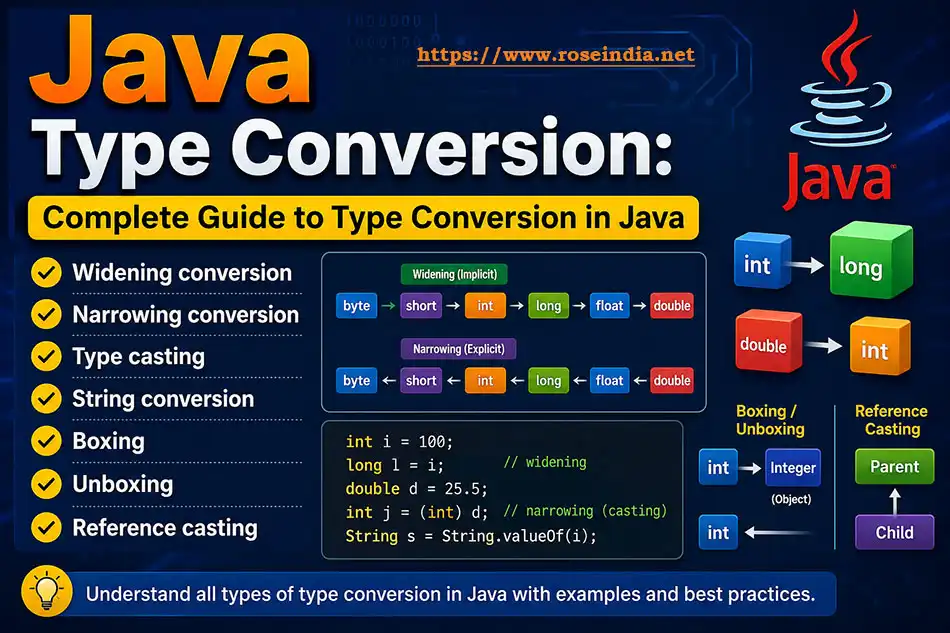
In Java as per your business requirements you can convert an int to a long, a double to an int, a String to an integer, an integer to a String, a char to a String, or a primitive value to its corresponding wrapper class. Learning and mastering type conversion is very important for the programmer as Java is a strongly typed programming language and you need to explicitly convert data types yourself. In Java the compiler applies specific conversion rules for type conversion of data.
Java language supports several categories of conversion, including identity conversion, widening and narrowing primitive conversion, widening and narrowing reference conversion, boxing, unboxing, unchecked conversion, capture conversion, and string conversion.
Table of Contents
- What Is Type Conversion in Java?
- Why Is Java Type Conversion Important?
- Java Type Conversion vs Type Casting
- Types of Conversion in Java
- Widening Primitive Conversion
- Narrowing Primitive Conversion
- Widening vs Narrowing Conversion
- Java Type Casting
- Primitive Type Conversion Table
- byte Conversion in Java
- short Conversion in Java
- int Conversion in Java
- long Conversion in Java
- float Conversion in Java
- double Conversion in Java
- char Conversion in Java
- boolean Conversion in Java
- String to int
- int to String
- String to long
- long to String
- String to double
- double to String
- String to float
- float to String
- String to short
- String to byte
- String to boolean
- String to char
- char to String
- char to int
- int to char
- String to char[]
- char[] to String
- String to byte[]
- byte[] to String
- Boxing in Java
- Unboxing in Java
- Autoboxing and Auto-unboxing
- Wrapper Class Conversion
- Widening Reference Conversion
- Narrowing Reference Conversion
- Upcasting and Downcasting
- Object to String
- String to Object
- Array to List
- List to Array
- List to Set
- Set to List
- Map Conversion
- Date and Time Conversion
- String to LocalDate
- LocalDate to String
- String to LocalDateTime
- LocalDateTime to String
- Numeric Promotion in Java
- char Arithmetic and Numeric Promotion
- Conversion During Method Invocation
- Conversion During Assignment
- Conversion During String Concatenation
- Java Conversion and Data Loss
- Common Java Conversion Errors
- Best Practices
- Java Conversion Cheat Sheet
- Java Conversion Examples
- Frequently Asked Questions
- Java Conversion Interview Questions
- Conclusion
Now lets get stated with the type conversion tutorial in Java Programming language.
1. What Is Type Conversion in Java?
Type conversion in Java means changing a value from one data type into another compatible data type. During the type conversion process we are converting the object of one type into another type keeping the value same, in some cases the value is also changed for example if you convert double into int the value will decrease as it removes the fraction values.
For example:
package net.roseindia.jdk26;

public class Main {
	public static void main(String[] args) {
		int number = 100;
		long value = number;
		System.out.println(value);
	}
}
Here, the int value is converted to long.
Java performs this conversion automatically because long can represent the int value.
Another example is:
package net.roseindia.jdk26;

public class Main {
	public static void main(String[] args) {
		double price = 99.99;
		int value = (int) price;
		System.out.println(value);
	}
}
The output is:
99
Here is the output of the program:
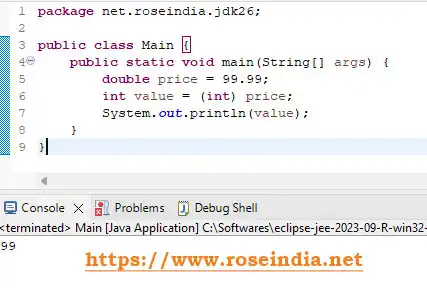
Above example shows the conversion of double to int and there is data loss in this conversion. In this case, an explicit cast is required because converting a double to an int can lose information. During this cast the value loss occurs, so as a developer you should understand all these while performing the type conversion.
2. Why Is Java Type Conversion Important?
It is very important to understand the use cases where type conversion is required. Type conversion is used throughout Java applications. We will see a few scenarios where type conversion is required.
You may need conversion when:
- Reading user input
- Processing command-line arguments
- Reading configuration files
- Processing HTTP request parameters
- Working with databases
- Parsing JSON
- Processing CSV files
- Performing mathematical calculations
- Calling methods with different parameter types
- Working with collections
- Converting dates and times
- Working with APIs
- Converting primitive values to objects
- Converting objects to primitive values
For example, data received from an HTTP request is commonly represented as text:
String ageText = "25";But an application may need an integer:
int age = Integer.parseInt(ageText);This is one of the most common real-world Java conversions.
3. Java Type Conversion vs Type Casting
The terms type conversion and type casting are often used interchangeably, but they are not exactly the same. As a developer you should understand the differences and know the use cases where to use type conversion or type casting.
Type Conversion
Type conversion is the broader concept of converting a value from one type to another.
For example:
int number = 100;
long value = number;
Java performs the conversion automatically.
Type Casting
Type casting generally refers to explicitly telling Java to treat a value as another compatible type.
For example:
double number = 99.99;
int value = (int) number;
The syntax is:
(targetType) expression
0Example:
int value = (int) 99.99;
4. Types of Conversion in Java
Java's conversion system is broader than the traditional two-category explanation. Now we will see categories of type conversion in Java. Important categories include:
- Identity conversion
- Widening primitive conversion
- Narrowing primitive conversion
- Widening reference conversion
- Narrowing reference conversion
- Boxing conversion
- Unboxing conversion
- Unchecked conversion
- Capture conversion
- String conversion
These categories are defined by the Java Language Specification and it is not required to learn all these. For beginners, however, the most important concepts to learn first are:
1- Widening conversion
- Narrowing conversion
- Type casting
- String conversion
- Boxing
- Unboxing
- Reference casting
5. Widening Primitive Conversion in Java
Widening conversion converts a primitive value to another compatible primitive type that can represent a broader range or representation. Widening primitive conversion is a type of conversion in Java where a smaller primitive data type is converted to a larger compatible data type size and here no explicit casting is required.
For example:
int number = 100;
long value = number;
No explicit cast is required.
2Another example:
int number = 100;
double value = number;
System.out.println(value);
Output:
100.0
3The Java Language Specification identifies specific widening primitive conversions, including byte to short, int, long, float, and double; short to int, long, float, and double; char to int, long, float, and double; and other permitted widening conversions. A simplified numeric progression commonly used when learning Java is:
byte → short → int → long → float → double
However, char has its own place in the Java conversion rules and should not simply be treated as another signed integer type.
4Example of Widening Conversion
package net.roseindia.jdk26;

public class Main {
	public static void main(String[] args) {
		int number = 100;
		long longValue = number;
		float floatValue = number;
		double doubleValue = number;
		System.out.println(longValue);
		System.out.println(floatValue);
		System.out.println(doubleValue);
	}
}
Output:
100
100.0
5100.0
Here is screenshot of the output and code in Eclipse IDE:
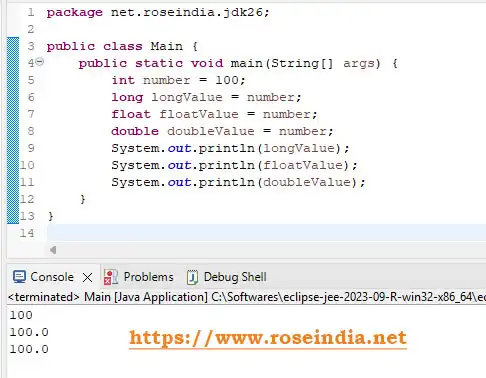
No explicit casting is required.
6. Narrowing Primitive Conversion in Java
Narrowing conversion converts a primitive value to another type where the conversion may lose information. This type conversion involves the process of converting a large primitive data type into a smaller primitive data type, which often involves an explicit casting resulting in loss of magnitude, precision, or range.
For example:
7
double number = 99.99;
int value = (int) number;
System.out.println(value);
Output:
99
In this case the fractional part is discarded and there is loss data in this casting operation. The explicit cast is: (int). The Java Language Specification specifically documents narrowing primitive conversions and notes that some can lose information.
8Example of Narrowing Conversion
package net.roseindia.jdk26;

public class Main {
	public static void main(String[] args) {
		double number = 123.99;
		int value = (int) number;
		System.out.println(value);
	}
}
Output:
123
This is different from mathematical rounding. For rounding, use an appropriate API such as:
9
long value = Math.round(123.99);
7. Widening vs Narrowing Conversion
Following table compares widening conversion with narrowing conversion
| Feature | Widening | Narrowing |
| Direction | Smaller/compatible type to broader type | Broader type to narrower type |
| Explicit cast | Usually not required | Usually required |
| Data loss | Often avoided, but not every widening conversion preserves exact precision | Possible |
| Example | int → long | double → int |
| Syntax | long x = intValue; | int x = (int) doubleValue; |
One important detail: "widening" does not mean every possible value is represented exactly in every destination type. For example, Java permits long to float, but a float does not have enough precision to represent every long value exactly. The JLS distinguishes preservation of magnitude from exact preservation of value.
Magnitude vs. Value
0- Preservation of Magnitude: The converted number stays in the correct general range and size. A huge long becomes a huge float, not a tiny number or zero.
- Preservation of Value: Every single digit of the original number stays exact. Widening conversion does not guarantee this if the target type lacks enough bits.
8. Java Type Casting
Type casting allows you to explicitly convert a value to another compatible type. Here is the Syntax:
(targetType) value
Here is example of type casting in Java:
1
double number = 10.75;
int result = (int) number;
System.out.println(result);
Output:
10
Casting is especially important for narrowing primitive conversions and reference-type downcasting. In this case often data loss is involved and developers should decide carefully to use such type casting.
29. Primitive Type Conversion Table
The following table provides a practical overview.
| Source | Destination | Conversion |
| byte | short | Widening |
| byte | int | Widening |
| byte | long | Widening |
| byte | float | Widening |
| byte | double | Widening |
| short | int | Widening |
| short | long | Widening |
| short | float | Widening |
| short | double | Widening |
| char | int | Widening |
| char | long | Widening |
| char | float | Widening |
| char | double | Widening |
| int | long | Widening |
| int | float | Widening |
| int | double | Widening |
| long | float | Widening |
| long | double | Widening |
| float | double | Widening |
| double | int | Narrowing |
| long | int | Narrowing |
| int | short | Narrowing |
| short | byte | Narrowing |
10. byte Conversion in Java
A byte can be widened automatically to several numeric types. In case of byte conversion in Java, we are changing a primitive byte (8-bit signed integer ranging from -128 to 127) or a byte[] array to and from other common data types.
byte number = 10;
int value = number;
long longValue = number;
double doubleValue = number;
For narrowing:
3
int number = 100;
byte value = (byte) number;
Be careful with values outside the range representable by byte.
11. short Conversion in Java
Example:
short number = 100;
int value = number;
Narrowing:
4
int number = 100;
short value = (short) number;
12. int Conversion in Java
The int type is one of the most commonly used numeric types.
int to long
int number = 100;
long value = number;
int to double
int number = 100;
double value = number;
int to String
int number = 100;
String text = String.valueOf(number);
int to byte
int number = 100;
byte value = (byte) number;
The last conversion is narrowing and must be used carefully.
13. long Conversion in Java
long to int
long number = 100;
int value = (int) number;
This may lose information if the long value cannot be represented by int.
5long to String
long number = 100000L;
String text = String.valueOf(number);
String to long
String text = "100000";
long number = Long.parseLong(text);
14. float Conversion in Java
float to double
float value = 10.5f;
double result = value;
float to int
float value = 10.5f;
int result = (int) value;
The fractional portion is discarded.
float to String
float value = 10.5f;
String text = String.valueOf(value);
15. double Conversion in Java
double to int
double value = 10.99;
int result = (int) value;
Result:
10
6double to long
double value = 100.99;
long result = (long) value;
double to String
double value = 99.99;
String text = String.valueOf(value);
16. char Conversion in Java
Java's char type represents a UTF-16 code unit.
A char can participate in numeric promotion.
For example:
7
char ch = 'A';
int value = ch;
System.out.println(value);
Output:
65
The conversion from char to int is a widening primitive conversion.
817. boolean Conversion in Java
Unlike numeric primitive types, boolean is not converted to an integer.
This is invalid:
boolean status = true;
int value = (int) status;
Here is the screenshot:
9
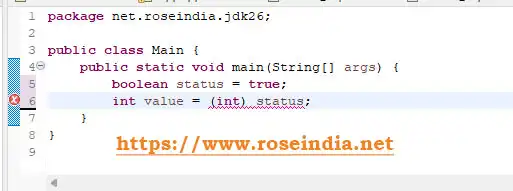
Java does not provide a primitive conversion between boolean and numeric types.
You must explicitly define what your application means.
0For example:
boolean status = true;
int value = status ? 1 : 0;
This is not a Java type conversion between boolean and int; it is conditional logic that produces an integer.
18. String to int in Java
One of the most searched and frequently used Java conversions is String to int.
1Use:
String text = "123";
int number = Integer.parseInt(text);
System.out.println(number);
Output:
123
2Integer.parseInt(String) converts a string representation of an integer into a primitive int. Java's current API documentation recommends parseInt for a primitive int and valueOf when an Integer object is required.
String to Integer
String text = "123";
Integer number = Integer.valueOf(text);
The difference is:
parseInt() → int
3valueOf() → Integer
Handling NumberFormatException
This is an important part of real-world String conversion.
The following code can fail:
4
String text = "abc";
int number = Integer.parseInt(text);
Java throws:
NumberFormatException
A safer example is:
5package net.roseindia.jdk26;
public class Main {
public static void main(String[] args) {
String text = "123";
try {
int number = Integer.parseInt(text);
System.out.println("Number = " + number);
} catch (NumberFormatException e) {
System.out.println("Invalid integer: " + text);
}
}
}
When processing external data, conversion errors should be handled according to the application's requirements rather than silently replacing invalid input with an arbitrary value.
19. int to String in Java
The simplest general-purpose approach is:
int number = 123;
String text = String.valueOf(number);
You can also use:
6String text = Integer.toString(number);
Both produce:
"123"
7For concatenation:
String text = "" + number;
also produces a String, but String.valueOf(number) or Integer.toString(number) communicates the conversion intent more clearly.
820. String to long in Java
Use:
String text = "123456";
long number = Long.parseLong(text);
System.out.println(number);
For a Long object:
Long number = Long.valueOf(text);21. long to String in Java
long number = 123456L;
9String text = String.valueOf(number);
or:
String text = Long.toString(number);
022. String to double in Java
Use:
String text = "123.45";
double number = Double.parseDouble(text);
System.out.println(number);
For a wrapper:
Double number = Double.valueOf(text);
123. double to String in Java
double number = 123.45;
String text = String.valueOf(number);
or:
String text = Double.toString(number);
If you need a specific display format, use formatting rather than relying on the default representation.
For example:
2package net.roseindia.jdk26;
public class Main {
public static void main(String[] args) {
double price = 123.4567;
String text = String.format("%.2f", price);
System.out.println(text);
}
}
Output:
123.46
24. String to float in Java
String text = "10.5";
float number = Float.parseFloat(text);
System.out.println(number);
Remember the f suffix when writing a float literal:
3float number = 10.5f;
25. float to String in Java
float number = 10.5f;
String text = String.valueOf(number);
426. String to short in Java
String text = "100";
short number = Short.parseShort(text);
System.out.println(number);
27. String to byte in Java
package net.roseindia.jdk26;

public class Main {
	public static void main(String[] args) {
		String text = "100";
		byte number = Byte.parseByte(text);
		System.out.println(number);
	}
}
The input must represent a value that can be represented by byte.
28. String to boolean in Java
package net.roseindia.jdk26;

public class Main {
	public static void main(String[] args) {
		String text = "true";
		boolean value = Boolean.parseBoolean(text);
		System.out.println(value);
	}
}
For an object:
Boolean value = Boolean.valueOf(text);
5Do not assume arbitrary strings such as "yes" automatically mean true. If your application accepts values such as "yes" and "no", define and validate that application-specific mapping explicitly.
29. String to char in Java
A String can contain zero, one, or many characters, so Java does not provide a general "String-to-char" conversion without choosing which character is wanted.
For the first character:
6package net.roseindia.jdk26;
public class Main {
public static void main(String[] args) {
String text = "Java";
char ch = text.charAt(0);
System.out.println(ch);
}
}
Output:
J
Check that the String is not empty before calling charAt() when the input may be empty.
730. char to String in Java
Use:
char ch = 'A';
String text = String.valueOf(ch);
Output:
A
8Another option is:
String text = Character.toString(ch);31. char to int in Java
char ch = 'A';
int value = ch;
System.out.println(value);
Output:
965
This works because char can be widened to int.
32. int to char in Java
Use an explicit cast:
0
int value = 65;
char ch = (char) value;
System.out.println(ch);
Output:
A
1Use this technique only when the numeric value is intended to represent the desired character code unit.
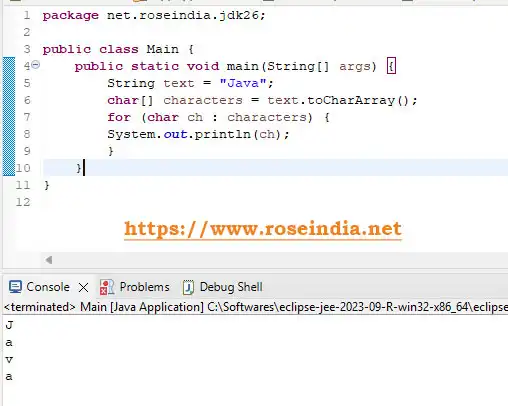
33. String to char[] in Java
Use toCharArray():
package net.roseindia.jdk26;

public class Main {
	public static void main(String[] args) {
		String text = "Java";
		char[] characters = text.toCharArray();
		for (char ch : characters) {
		System.out.println(ch);
		}
	}
}
Output:
2J
a
v
3a
Here is the screenshot of the program execution in Eclipse:
34. char[] to String in Java
Use:
char[] characters = {'J', 'a', 'v', 'a'};
String text = String.valueOf(characters);
System.out.println(text);
Output:
Java
535. String to byte[] in Java
When converting text to bytes, explicitly specify the character encoding when the data crosses system boundaries.
import java.nio.charset.StandardCharsets;
String text = "Hello Java";
byte[] bytes = text.getBytes(StandardCharsets.UTF_8);
UTF-8 is commonly used for interoperability.
636. byte[] to String in Java
Use the same intended charset when converting the bytes back to text:
package net.roseindia.jdk26;
import java.nio.charset.StandardCharsets;

public class Main {
	public static void main(String[] args) {
		byte[] bytes = {72, 101, 108, 108, 111};
		String text = new String(bytes, StandardCharsets.UTF_8);
		System.out.println(text);
	}
}
Output:
Hello
7Using different encodings for the two operations can produce corrupted text.
37. Boxing in Java
Boxing converts a primitive value into its corresponding wrapper type.
For example:
8int number = 100;
Integer value = number;
Java automatically boxes the primitive int into an Integer.
9The Java Language Specification defines boxing conversions for primitive types such as boolean, byte, short, char, int, long, float, and double to their corresponding wrapper classes.
38. Unboxing in Java
Unboxing converts a wrapper object into its corresponding primitive value.
Integer value = 100;
0int number = value;
Java automatically performs unboxing.
Conceptually:
1int number = value.intValue();
39. Autoboxing and Auto-unboxing
Consider:
List <Integer> numbers = new ArrayList<>();
numbers.add(10);
numbers.add(20);
numbers.add(30);
The add() method requires an Integer, but Java automatically boxes the primitive literals.
2Similarly:
Integer number = 100;
int value = number;
3The wrapper object is automatically unboxed.
40. Wrapper Class Conversion
Common primitive-wrapper pairs are:
| Primitive | Wrapper |
| byte | Byte |
| short | Short |
| int | Integer |
| long | Long |
| float | Float |
| double | Double |
| char | Character |
| boolean | Boolean |
Example:
4int number = 100;
Integer object = Integer.valueOf(number);
And:
5Integer object = 100;
int number = object.intValue();
In modern Java code, you generally do not need to explicitly call these methods when autoboxing or unboxing already makes the intent clear.
641. Widening Reference Conversion
Reference conversion applies to objects and class hierarchies.
Suppose:
class Animal {
}
class Dog extends Animal {
}
You can write:
7Dog dog = new Dog();
Animal animal = dog;
This is a widening reference conversion.
8The Java Language Specification defines widening reference conversion as a conversion from a subtype to a compatible supertype. Such a conversion does not require a runtime cast check.
42. Narrowing Reference Conversion
The reverse direction may require an explicit cast.
Animal animal = new Dog();
9Dog dog = (Dog) animal;
This is a narrowing reference conversion.
The runtime object must actually be compatible with the target type.
0For example:
Animal animal = new Animal();
Dog dog = (Dog) animal;
1This can result in:
ClassCastException
43. Upcasting and Downcasting
Upcasting
Dog dog = new Dog();
2Animal animal = dog;
This is safe because every Dog is an Animal.
Downcasting
Animal animal = new Dog();
3Dog dog = (Dog) animal;
The cast is required because not every Animal is a Dog.
A safer approach is to check:
4
if (animal instanceof Dog dog) {
dog.someDogMethod();
}
This pattern combines type testing with a pattern variable and avoids a separate cast after the check.
44. Object to String Conversion
Use:
Object value = 100;
5String text = String.valueOf(value);
For a known non-null object, you can also call:
String text = value.toString();
6However, calling toString() on a null reference causes a NullPointerException.
For potentially null values:
String text = String.valueOf(value);
7is often safer.
45. String to Object Conversion
A String is already an object because String is a Java class.
If by "String to Object" you simply mean assigning a String to an Object reference:
8String text = "Java";
Object value = text;
This is widening reference conversion.
9If you mean converting a serialized String such as JSON into a domain object, that is a different operation called deserialization and generally requires a JSON library such as Jackson or Gson.
46. Array to List Conversion
For an object array:
package net.roseindia.jdk26;

import java.util.Arrays;
import java.util.List;

public class Main {
	public static void main(String[] args) {
		String[] names = { "John", "David", "Robert" };
		List<String> list = Arrays.asList(names);
		System.out.println(list);
	}
}
Output:
0[John, David, Robert]
Note that Arrays.asList() returns a fixed-size list backed by the array.
If you need a separately modifiable list:
1List<String> list =
new ArrayList<>(Arrays.asList(names));
47. List to Array Conversion
Use toArray():
2List<String> names =
List.of("John", "David", "Robert");
String[] array = names.toArray(new String[0]);
3System.out.println(Arrays.toString(array));
Output:
[John, David, Robert]
448. List to Set Conversion
A Set is useful when duplicate values should not be retained.
List<String> names =
List.of("John", "David", "John", "Robert");
5Set<String> set = new HashSet<>(names);
System.out.println(set);
The duplicate "John" is removed.
6If ordering matters, choose an appropriate Set implementation such as LinkedHashSet or TreeSet.
49. Set to List Conversion
Set<String> names =
Set.of("John", "David", "Robert");
7List<String> list = new ArrayList<>(names);
System.out.println(list);
The resulting list's order depends on the Set implementation.
850. Map Conversion in Java
Maps can also be transformed into other collection structures.
For example, convert Map keys to a List:
package net.roseindia.jdk26;

import java.util.ArrayList;
import java.util.HashMap;
import java.util.Map;
import java.util.List;

public class Main {
	public static void main(String[] args) {
		Map<Integer, String> users = new HashMap<>();
		users.put(1, "John");
		users.put(2, "David");
		List<Integer> ids =	new ArrayList<>(users.keySet());
		System.out.println(ids);
	}
}
Convert Map values to a List:
9List<String> names =
new ArrayList<>(users.values());
This type of conversion is frequently useful when processing database results, APIs, configuration data, and application state.
051. Date and Time Conversion in Java
Modern Java applications should use the java.time API for new date and time code.
Important classes include:
- LocalDate
- LocalTime
- LocalDateTime
- Instant
- ZonedDateTime
- OffsetDateTime
- DateTimeFormatter
52. String to LocalDate
Suppose the input is:
115-08-2026
Use:
package net.roseindia.jdk26;

import java.time.LocalDate;
import java.time.format.DateTimeFormatter;

public class Main {
	public static void main(String[] args) {
		String text = "15-08-2026";
		DateTimeFormatter formatter =
		DateTimeFormatter.ofPattern("dd-MM-yyyy");
		LocalDate date =
		LocalDate.parse(text, formatter);
		System.out.println(date);
	}
}
Output:
22026-08-15
53. LocalDate to String
package net.roseindia.jdk26;

import java.time.LocalDate;
import java.time.format.DateTimeFormatter;

public class Main {
	public static void main(String[] args) {
		LocalDate date = LocalDate.of(2026, 8, 15);
		DateTimeFormatter formatter =
		DateTimeFormatter.ofPattern("dd-MM-yyyy");
		String text = date.format(formatter);
		System.out.println(text);
	}
}
Output:
15-08-2026
354. String to LocalDateTime
package net.roseindia.jdk26;

import java.time.LocalDateTime;
import java.time.format.DateTimeFormatter;

public class Main {
	public static void main(String[] args) {
		String text = "15-08-2026 10:30:00";
		DateTimeFormatter formatter =
		DateTimeFormatter.ofPattern("dd-MM-yyyy HH:mm:ss");
		LocalDateTime dateTime =
		LocalDateTime.parse(text, formatter);
		System.out.println(dateTime);
	}
}
55. LocalDateTime to String
package net.roseindia.jdk26;

import java.time.LocalDateTime;
import java.time.format.DateTimeFormatter;

public class Main {
	public static void main(String[] args) {
		LocalDateTime dateTime = LocalDateTime.now();
		DateTimeFormatter formatter =
		DateTimeFormatter.ofPattern("dd-MM-yyyy HH:mm:ss");
		String text = dateTime.format(formatter);
		System.out.println(text);
	}
}
56. Numeric Promotion in Java
Java also performs numeric promotion during expressions.
For example:
byte a = 10;
byte b = 20;
int result = a + b;
The result of:
4a + b
is an int, not a byte.
This is an important rule for Java beginners.
557. Why Does char + char Produce int?
Consider:
char a = 'A';
char b = 'B';
int result = a + b;
System.out.println(result);
The characters participate in numeric promotion.
Conceptually:
6'A' → numeric value
'B' → numeric value
addition → int
7Therefore, code such as:
char result = a + b;
does not compile because the arithmetic expression has type int.
8If you deliberately need a char, you must perform an explicit conversion and ensure the result is appropriate:
char result = (char) (a + b);
58. Conversion During Method Invocation
Suppose:
9public static void printNumber(long number) {
System.out.println(number);
}
00You can call:
int value = 100;
printNumber(value);
01Java can widen the int to long when matching the method argument.
However, Java will not automatically perform arbitrary narrowing conversions just because a method parameter requires a smaller type.
59. Conversion During Assignment
Java performs certain conversions when assigning an expression to a variable.
02For example:
int number = 100;
long value = number;
03This works because the conversion from int to long is permitted.
But:
long number = 100;
04int value = number;
does not compile without an explicit cast.
You need:
05int value = (int) number;
Assignment conversion is one of the contexts described by the Java Language Specification.
60. Conversion During String Concatenation
Consider:
06int number = 100;
String result = "Number = " + number;
Java converts the value into a string representation as part of the string concatenation context.
07The Java Language Specification explicitly defines string conversion as one of Java's conversion categories.
61. Java Conversion and Data Loss
One of the most important concepts in type conversion is data loss.
Consider:
08
double value = 123.456;
int number = (int) value;
The result is:
123
The fractional information is lost.
09Another example:
long value = 300;
byte number = (byte) value;
10A narrowing conversion can produce a value that does not equal the original value because the destination type cannot represent it.
Therefore, before using a narrowing cast, ask:
- Can the destination type represent the source value?
- Can precision be lost?
- Is truncation acceptable?
- Could overflow or wraparound occur?
- Does the application need rounding instead of truncation?
Casting Does Not Mean Rounding
This is a common misconception.
11Consider:
double number = 10.9;
int value = (int) number;
12The result is:
10
It does not become:
1311
If rounding is required:
long value = Math.round(number);
1462. Common Java Conversion Errors
NumberFormatException
Occurs when parsing a String that cannot be represented by the requested numeric type.
Example:
int value = Integer.parseInt("hello");
15ClassCastException
Can occur during an invalid runtime reference cast.
Example:
Object value = "Java";
16Integer number = (Integer) value;
The runtime object is a String, not an Integer.
ArrayStoreException
Can occur when storing an incompatible object into an array whose runtime component type is more specific.
17NullPointerException During Unboxing
Consider:
Integer number = null;
int value = number;
18Auto-unboxing requires obtaining the primitive value from the wrapper, so a null wrapper can cause a NullPointerException.
Check for null when a wrapper may be null.
Common Java Conversion Mistakes
Mistake 1: Treating a String as a number
This does not work:
19String value = "100";
int result = value + 10;
The String is not automatically parsed into an integer.
20Use:
int result = Integer.parseInt(value) + 10;
Mistake 2: Assuming double-to-int rounds
It does not.
21int result = (int) 10.99;
Result:
10
22Mistake 3: Ignoring invalid input
Avoid assuming:
Integer.parseInt(input)
will always succeed if the input comes from an external source.
23Mistake 4: Using default character encoding
Avoid:
byte[] bytes = text.getBytes();when the encoding matters across systems.
Prefer:
24byte[] bytes = text.getBytes(StandardCharsets.UTF_8);Mistake 5: Casting unrelated reference types
This can fail:
Object value = "Java";
Integer number = (Integer) value;
A cast does not magically convert an object into an unrelated class.
63. Java Conversion Best Practices
1. Prefer explicit conversions when they communicate intent
Instead of relying on obscure implicit behavior, make important conversions obvious.
252. Validate external input
Strings received from users, APIs, files, and configuration systems may not contain valid numeric values.
3. Handle NumberFormatException
Use appropriate error handling when parsing external numeric data.
4. Be careful with narrowing conversions
Check whether the target type can represent the source value.
265. Use explicit character encodings
For byte/text conversion, specify the charset when interoperability matters.
6. Prefer java.time for new date/time code
Use LocalDate, LocalDateTime, Instant, and related APIs for modern applications.
7. Understand boxing and unboxing
Wrapper types are essential when working with generic collections, but unnecessary boxing can add complexity and nullability concerns.
278. Don't confuse conversion with formatting
For example:
String.valueOf(123.45)converts a number to a String.
Formatting a number to exactly two decimal places is a different requirement:
28String.format("%.2f", 123.45);64. Java Conversion Cheat Sheet
Here is Java conversion cheat sheet for your fast reference.
| Conversion | Java Example |
| String → int | Integer.parseInt("100") |
| String → Integer | Integer.valueOf("100") |
| int → String | String.valueOf(100) |
| String → long | Long.parseLong("100") |
| long → String | String.valueOf(100L) |
| String → double | Double.parseDouble("10.5") |
| double → String | String.valueOf(10.5) |
| String → float | Float.parseFloat("10.5") |
| float → String | String.valueOf(10.5f) |
| String → short | Short.parseShort("10") |
| String → byte | Byte.parseByte("10") |
| String → boolean | Boolean.parseBoolean("true") |
| String → char | "Java".charAt(0) |
| char → String | String.valueOf('A') |
| char → int | (int) 'A' |
| int → char | (char) 65 |
| String → char[] | "Java".toCharArray() |
| char[] → String | String.valueOf(chars) |
| int → long | longValue = intValue |
| int → double | doubleValue = intValue |
| double → int | (int) doubleValue |
| long → int | (int) longValue |
| int → Integer | Integer.valueOf(intValue) |
| Integer → int | integerValue.intValue() |
| Array → List | Arrays.asList(array) |
| List → Array | list.toArray(new String[0]) |
| List → Set | new HashSet<>(list) |
| Set → List | new ArrayList<>(set) |
65. Complete Java Conversion Example
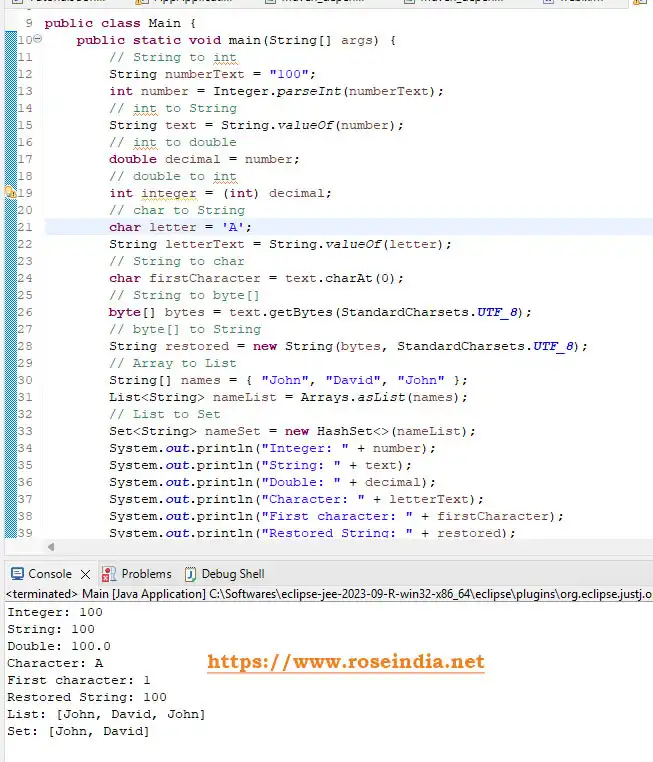
The following program demonstrates several common conversions in one example:
package net.roseindia.jdk26;

import java.util.Arrays;
import java.util.List;
import java.util.Set;
import java.util.HashSet;
import java.nio.charset.StandardCharsets;

public class Main {
	public static void main(String[] args) {
		// String to int
		String numberText = "100";
		int number = Integer.parseInt(numberText);
		// int to String
		String text = String.valueOf(number);
		// int to double
		double decimal = number;
		// double to int
		int integer = (int) decimal;
		// char to String
		char letter = 'A';
		String letterText = String.valueOf(letter);
		// String to char
		char firstCharacter = text.charAt(0);
		// String to byte[]
		byte[] bytes = text.getBytes(StandardCharsets.UTF_8);
		// byte[] to String
		String restored = new String(bytes, StandardCharsets.UTF_8);
		// Array to List
		String[] names = { "John", "David", "John" };
		List <String> nameList = Arrays.asList(names);
		// List to Set
		Set <String>  nameSet = new HashSet<>(nameList);
		System.out.println("Integer: " + number);
		System.out.println("String: " + text);
		System.out.println("Double: " + decimal);
		System.out.println("Character: " + letterText);
		System.out.println("First character: " + firstCharacter);
		System.out.println("Restored String: " + restored);
		System.out.println("List: " + nameList);
		System.out.println("Set: " + nameSet);
	}
}
This example demonstrates how Java conversion appears in practical application code rather than only isolated textbook examples. Here is the output of the program:
29
Java Conversion for User Input
A very common use case is converting data received through Scanner.
For example:
30package net.roseindia.jdk26;
import java.util.Scanner;
public class InputConversion {
public static void main(String[] args) {
Scanner scanner = new Scanner(System.in);
System.out.print("Enter your age: ");
String input = scanner.nextLine();
try {
int age = Integer.parseInt(input);
System.out.println("Your age is: " + age);
} catch (NumberFormatException e) {
System.out.println("Please enter a valid number.");
}
scanner.close();
}
}
This pattern is useful when input arrives as text and the application needs a numeric value.
Java Conversion When Reading Database Data
Database applications frequently require conversion.
For example, a database value may be returned as a particular SQL type while the application expects a Java type.
31Modern Java database applications often use JDBC APIs or frameworks such as Spring Data to perform these mappings.
The key principle remains the same:
External representation
32↓
Java representation
↓
33Application processing
Examples include:
VARCHAR → String
34INTEGER → int / Integer
BIGINT → long / Long
DECIMAL → BigDecimal
35DATE → LocalDate
TIMESTAMP → LocalDateTime / Instant
For monetary values, prefer BigDecimal instead of converting financial data to double merely because it is convenient.
36Java Conversion When Processing JSON
JSON data commonly arrives as text:
{
"id": 100,
37"name": "John"
}
The application may deserialize it into a Java class.
38For example, conceptually:
JSON String
↓
39JSON parser
↓
Java object
40This is different from simply casting a String to an object.
A JSON library such as Jackson performs parsing and object mapping.
For example:
41ObjectMapper mapper = new ObjectMapper();
User user =
mapper.readValue(json, User.class);
42The exact configuration depends on the Java application's JSON model and library version.
Java Conversion: Casting vs Parsing vs Formatting
These three operations should not be confused.
| Operation | Purpose | Example |
| Casting | Treat/convert a compatible value as another type | (int) 10.5 |
| Parsing | Convert text into a value | Integer.parseInt("10") |
| Formatting | Produce text in a desired representation | String.format("%.2f", 10.5) |
Understanding this distinction makes Java code easier to read and debug.
4366. Frequently Asked Questions About Java Conversion
What is Java type conversion?
Java type conversion is the process of converting a value from one data type to another according to Java's type conversion rules.
What are the main types of conversion in Java?
Important categories include widening and narrowing primitive conversion, widening and narrowing reference conversion, boxing, unboxing, and string conversion. The Java Language Specification defines additional conversion categories as well.
What is implicit conversion in Java?
Implicit conversion is a conversion that Java can perform automatically in a context where the language permits it.
44Example:
int x = 10;
long y = x;
45What is explicit conversion in Java?
Explicit conversion requires the programmer to specify a cast.
double x = 10.5;
int y = (int) x;
46How do you convert String to int in Java?
Use:
int value = Integer.parseInt("100");
How do you convert int to String in Java?
Use:
47String value = String.valueOf(100);
How do you convert String to double?
Use:
double value = Double.parseDouble("100.50");
48How do you convert double to int?
Use:
int value = (int) 100.50;
Be aware that the fractional part is discarded.
49How do you convert char to String?
Use:
String value = String.valueOf('A');
How do you convert String to char?
Use:
50char value = "Java".charAt(0);
How do you convert an array to a List?
For an object array:
List<String> list = Arrays.asList(array);
51How do you convert a List to an array?
Use:
String[] array = list.toArray(new String[0]);
Can Java automatically convert String to int?
No. You normally need a parsing operation such as:
52Integer.parseInt(text);
Can Java convert boolean to int?
Not through a Java primitive conversion. If an application needs true → 1 and false → 0, implement that mapping explicitly.
67. Java Conversion Interview Questions
What is type conversion in Java?
Type conversion is changing a value from one data type to another compatible type according to Java's conversion rules.
53What is widening conversion?
Widening conversion converts a primitive value to a compatible wider numeric type without requiring an explicit cast.
Example:
int x = 10;
54long y = x;
What is narrowing conversion?
Narrowing conversion converts a value to a type that may not represent the original value completely.
Example:
55double x = 10.5;
int y = (int) x;
Is String to int casting?
No. A String is not a numeric primitive. You normally parse it:
56int value = Integer.parseInt("100");
What is autoboxing?
Autoboxing automatically converts a primitive value to its corresponding wrapper object.
Integer value = 10;
57What is unboxing?
Unboxing converts a wrapper object into its corresponding primitive value.
Integer value = 10;
int number = value;
Can boolean be converted to int?
Java does not provide a primitive conversion from boolean to int.
58Can int be converted to String automatically?
In a string concatenation context Java can perform string conversion, for example:
System.out.println("Value: " + 100);
For an explicit conversion, prefer:
59String text = String.valueOf(100);
What happens when double is converted to int?
The fractional portion is discarded:
int value = (int) 10.99;
60Result:
10
What is the difference between Integer.parseInt() and Integer.valueOf()?
Integer.parseInt() returns a primitive int.
61Integer.valueOf() returns an Integer object.
The current Java API documentation specifically recommends parseInt(String) for converting a String to a primitive int and valueOf(String) for converting a String to an Integer.
Java Conversion Quick Reference
For quick access, remember these commonly used methods:
62// String → int
Integer.parseInt("100");
// String → long
63Long.parseLong("100");
// String → double
Double.parseDouble("100.50");
64// String → float
Float.parseFloat("100.50");
// String → boolean
65Boolean.parseBoolean("true");
// int → String
String.valueOf(100);
66// long → String
String.valueOf(100L);
// double → String
67String.valueOf(100.50);
// char → String
String.valueOf('A');
68// String → char
"Java".charAt(0);
// String → char[]
69"Java".toCharArray();
// char[] → String
String.valueOf(chars);
70// double → int
(int) 100.50;
// int → long
71(long) 100;
// int → double
(double) 100;
7268. Conclusion
Java type conversion is a fundamental concept that every Java developer should understand.
The simplest examples are:
int number = 100;
73long value = number;
for widening conversion, and:
double price = 99.99;
74int value = (int) price;
for narrowing conversion.
But Java conversion goes far beyond primitive casting. Modern Java applications routinely convert:
75- String to int
- int to String
- String to long
- String to double
- double to int
- char to String
- String to char
- String to byte[]
- byte[] to String
- Arrays to Lists
- Lists to Arrays
- Lists to Sets
- Primitive values to wrapper objects
- Wrapper objects to primitives
- Subclasses to parent classes
- Parent references to subclasses
- Strings to LocalDate
- LocalDate to Strings
- JSON to Java objects