Bar Chart Example using JFreeChart

In this code we have extended class ApplicationFrame to create a frame and also pass a string value to the constructor of ApplicationFrame class by using super keyword that will be name of the created frame.

Bar Chart Example using JFreeChart

--Ads--

Bar Chart Example using JFreeChart


This Example shows you how to create a bar chart using JFreeChart.
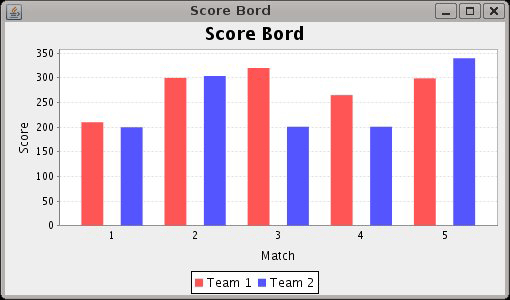
Code given below creates a bar chart of scores of two teams in matches. 

Description of the code:
In this code we have extended class ApplicationFrame to create a frame and also pass a string value to the constructor of ApplicationFrame class by using super keyword that will be name of the created frame.

Some methods that are used in this code :
pack(): This method invokes the layout manager.

centerFrameOnScreen():  This method is used for the position of the frame in the middle of the screen.

setVisible(): This method is used for display frame on the screen.

createCategoryDataset(): This method is used to create the instance of CategoryDataset Interface and that contains a copy of the data in an array.

createBarChart():  This method is used to create bar chart for given values. It  takestitle, category axis label, value axis label, dataset, PlotOrientation, legend, tool tips and urls as parameters.

BarChartDemo1.java:

import 
org.jfree.chart.ChartFactory;
import org.jfree.chart.ChartPanel;
import org.jfree.chart.JFreeChart;

import org.jfree.chart.plot.PlotOrientation;
import org.jfree.data.category.CategoryDataset;
import org.jfree.data.general.DatasetUtilities;
import org.jfree.ui.ApplicationFrame;
import org.jfree.ui.RefineryUtilities;

public class BarChartDemo1 extends ApplicationFrame {

  public BarChartDemo1(String title) {
  super(title);

  final CategoryDataset dataset = createDataset();
  final JFreeChart chart = createChart(dataset);

  final ChartPanel chartPanel = new ChartPanel(chart);
  chartPanel.setPreferredSize(new java.awt.Dimension(500270));
  setContentPane(chartPanel);
  }

  private CategoryDataset createDataset() { 
  final double[][] data = new double[][] {
  {210,300,320,265,299},
  {200,304,201,201,340},
  };
 return DatasetUtilities.createCategoryDataset("Team "
  
"Match ", data);
  }

  private JFreeChart createChart(final CategoryDataset dataset) {

  final JFreeChart chart = ChartFactory.createBarChart(
  "Bar Chart Demo""Category""Score", dataset,
  PlotOrientation.VERTICAL, true, true, false);
  return chart;
  }

  public static void main(final String[] args) {
 BarChartDemo1 chart = new BarChartDemo1("Vertical Bar Chart Demo");
  chart.pack();
  RefineryUtilities.centerFrameOnScreen(chart);
  chart.setVisible(true);
  }
}

Output:


Download code