
jQuery to validate Email Address


In this jQuery tutorial we will develop a program that validate the email address from server and displays on the user browser. In this example we will be calling a server side PHP script to get the "result". You can easily replace PHP with JSP, or ASP program.
Steps to develop the program for Email Address Validation
Step 1:
Create php file to that prints the current server data. Here is the code of PHP script (emailValidation.php).
| <? $email = $_GET['email']; function isValidEmail($email){ return eregi("^[_a-z0-9-]+(\.[_a-z0-9-]+)*@[a-z0-9-]+(\.[a-z0-9-]+)*(\.[a-z]{2,3})$", $email); } if($email=="") { $errormsg="error1"; } if(!isValidEmail($email) && $email!="") { $errormsg="error2"; } echo $errormsg; ?> |
Step 2:
Write HTML page to call the emailValidation.php. Create a new file (emailvalidation.html) and add the following code into it:
<!DOCTYPE html PUBLIC "-//W3C//DTD XHTML 1.1//EN"
"http://www.w3.org/TR/xhtml11/DTD/xhtml11.dtd">
<html xmlns="http://www.w3.org/1999/xhtml" xml:lang="en">
<head>
<style>
.error{
color:red;
}
</style>
<title>E-Mail Validation</title>
<script type="text/javascript" src="jquery-1.2.6.js">
</script>
<script type="text/javascript">
function emailValidate()
{
email = document.getElementById("email").value;
$.ajax({
url : "emailvalidation.php?email="+email,
success : function (data) {
if(data=="error1") {
document.getElementById("erroremail")
.innerHTML="Please enter email.";
}
else if(data=="error2")
{
document.getElementById("erroremail")
.innerHTML="Please enter valid email.";
}
}
});
}
</script>
</head>
<form name="emailvalidate" action="" method="post" >
<div><input type="hidden" name="query" value="" />
</div>
<table>
<tr><td colspan=2> <div id="errormsg">
</div></td></tr>
<tr>
<th align="left"><label for="email">Email</label>
</th>
<td>
<input type="text" id="email" name="email" size="20" />
</td>
<td id="erroremail" class="error">
</td>
</tr>
<tr>
<td></td>
<td><input type="button" name="Submit"
value="Submit" onClick="emailValidate();"/></td>
</tr>
</table>
</form>
</html>
Program explanation:
The following code includes the jQuery JavaScript library file:
<script type="text/javascript" src="jquery-1.2.6.js"></script>
On Click on the Button emailValidate() funcation is called:
<input type="button" name="Submit" value="Submit" onClick="emailValidate();"/>
The code
$.ajax({
url : emailValidation.php
...
makes ajax call to emailValidation.php file get the Text parameter "email".
This file call the ValidEmail($email) this match with regular expression return error messages ;
Following code intercepts the ajax call success and then sets the data into "erroremail" div:
success : function (data) {
if data equals to "error1" It means You
not entered the E-mail Address;
if data equals to "error2" It means You
not entered the valid E-mail Address;
}
});
When you run the program in browser it will look like following screen shot:
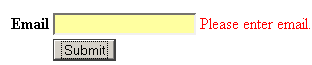

Check online demo of the application
Learn from experts! Attend jQuery Training classes.