
PyCharm: Configure PySpark in PyCharm on Ubuntu
PyCharm is a powerful IDE for application development in the Python programming language. Apache Spark is a powerful in-memory data processing engine at scale for developing Data Engineering pipeline for Big Data. In this section we will show you to use PyCharm for PySpark application development by configuring Spark in the PyCharm IDE. After configuring PyCharm IDE with Apache Spark you will be able to write and run PySpark code from the PyCharm IDE.
PyCharm is a powerful feature rich Python IDE, which is being used by the developers around the world to develop Python programs. It is very easy to write code and debug. PyCharm IDE is a very flexible IDE for Python developers with many features.
In this tutorial we will learn how to set up Apache Spark in PyCharm on the Ubuntu 22.04 Operating system and then run simple PySpark code. This tutorial will help you if you are facing a problem in setting up PySpark in PyCharm IDE. So, let's get started.
Step 1: Setup JAVE_HOME
You should install the latest Java version and then configure the path and JAVA_HOME variable in your Ubuntu Operating System. If Java is not installed on your Ubuntu desktop then first install. Check this tutorial: HHow to install JDK 10 in Ubuntu 18.04?
Step 2: Install Python on Ubuntu operating system
The next step is to install Python on the Ubuntu Desktop and configure it.
Step 3: Install Apache Spark
The next step is to install Apache Spark. Download latest version of apache spark:
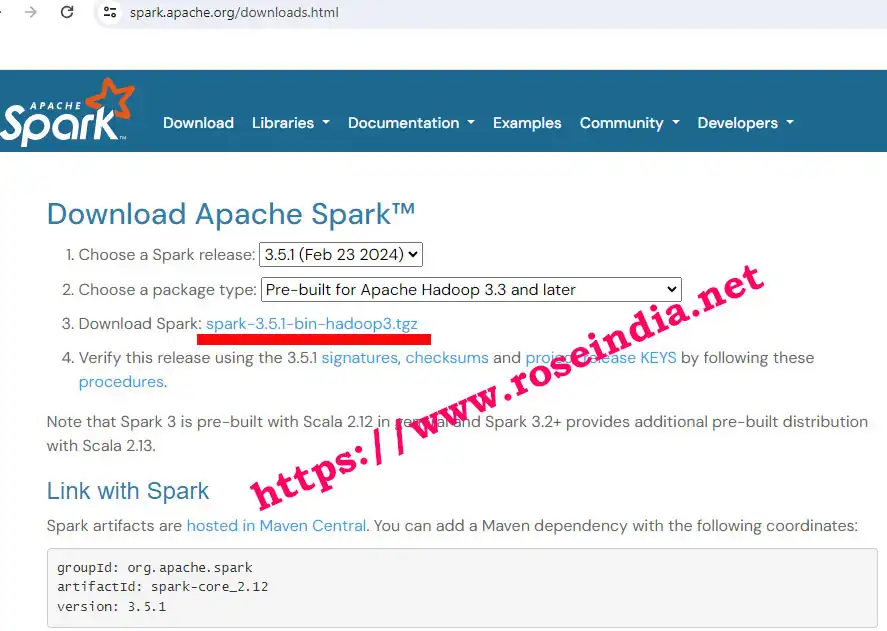
Extract the file in a directory on your Ubuntu desktop. In my case I have extracted it in the directory: "/home/user/spark-3.5.1-bin-hadoop3".
Step 4: Setup SPARK_HOME environment variable and add bin directory in path
To use the Spark from PyCharm you have to setup the SPARK_HOME variable and also add $SPARK_HOME\bin in the PATH variable. You can open ~/.bashrc with following command:
vim ~/.ashrc
and add following at the end of file:
export JAVA_HOME=/usr/lib/jvm/java-17-openjdk-amd64
export SPARK_HOME=/home/user/spark-3.5.1-bin-hadoop3

export PATH=$PATH:$SPARK_HOME/bin
Make sure to adjust JAVA_HOME and SPARK_HOME directory path correctly. Save your file and exit.
Now run:
source ~/.bashrc
aand above command will setup variable correctly. You can even restart your computer.
Step 5: Adding py4j-x-x.zip and pyspark.zip in 'Content Root' of 'Project Structure' of PyCharm Project
The next step is to add py4j-x-x.zip and pyspark.zip in 'Content Root' of 'Project Structure' of your PyCharm Project.
Open PyCharm and open your PySpark project, then go to Settings -> Project Structure as shown below
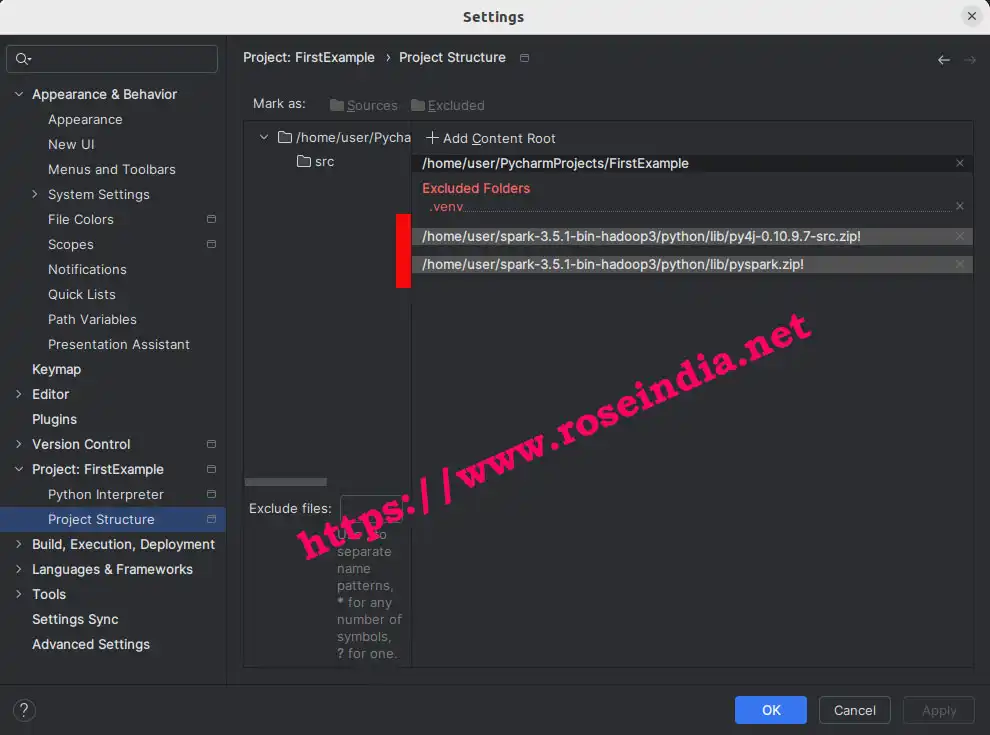
Then click on the "strong>Add Content Root" and browse these two files from the Apache Spark directory:
- /home/user/spark-3.5.1-bin-hadoop3/python/lib/py4j-0.10.9.7-src.zip
- /home/user/spark-3.5.1-bin-hadoop3/python/lib/pyspark.zip
AAfter this you should be able to run PySpark code from PyCharm IDE.
Step 6: Test PySpark code from PyCharm IDE
Create "hello.py" in PyCharm and add following code to test:
from operator import add
from pyspark import SparkContext
sc = SparkContext("local", "First App")


data = sc.parallelize(list("Hello World"))
counts = data.map(lambda x:
                  (x, 1)).reduceByKey(add).sortBy(lambda x: x[1],
                                                  ascending=False).collect()

for (word, count) in counts:
    print("{}: {}".format(word, count))
RuRun the above python code from your PyCharm IDE and it should display following output:

So, we have learned how to configure PySpark in PyCharm and run simple PySpark program. In case your PyCharm is not able to find SPARK_HOME then you should do following settings in your PyCharm.
Resolving SPARK_HOME not found error in PyCharm
If your PyCharm is reporting that its not able to find SPARK_HOME then you have to configure the PARK_HOME variable in PyCharm.
To configure PARK_HOME in PyCharm go to "Three vertical dots" as shown below:
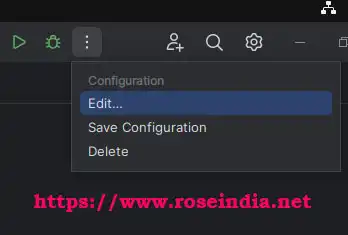
And then click on "Edit" link and following screen will appear:

Add the SPARK_HOME = /home/user/spark-3.5.1-bin-hadoop3 under the "Environment variables".
After adding above environment variable you will be able to run PySpark programs from PyCharm IDE in Ubuntu 22.04, 24.04 and other Ubuntu versions.
More Tutorials:
0