--Ads--
Radio Tag (Form Tag) Example


In this section, we are going to describe the radio tag. The radio tag is a UI tag that renders a radio button input field.
Add the following code snippet into the struts.xml file.
struts.xml
<action name="radioTag" class="net.roseindia.checkboxlistTag">
<result>/pages/uiTags/radioTag.jsp</result>
</action> |
Create an action class with two lists as shown below:
checkboxlistTag.java
package net.roseindia;

import com.opensymphony.xwork2.ActionSupport;

import java.util.*;


public class checkboxlistTag extends ActionSupport{


  private List fruits;

  private List animals;

  public String execute()throws Exception{

  fruits = new ArrayList();

  fruits.add("Apple");

  fruits.add("Mango");

  fruits.add("Orange");

  fruits.add("Pine Apple");


  animals = new ArrayList();

  animals.add("Dog");

  animals.add("Elephant");

  animals.add("Ox");

  animals.add("Fox");

  return SUCCESS;


  }


  public List getFruits(){

  return fruits;

  }


  public List getAnimals(){

  return animals;

  }

}
|
Create a jsp using the tag
<s:radio>.It renders
a radio button input field.
radioTag.jsp
<%@ taglib prefix="s" uri="/struts-tags" %>

<html>

  <head>

  <title>Radio Tag Example!</title>

 <link href="<s:url value="/css/main.css"/>"

	rel="stylesheet"
	type="text/css"/>

  </head>

  <body>

	<h1><span style="background-color: #FFFFcc">Radio Tag Example!

		</span></h1>

	<s:form>

	 <s:radio label="Fruits" name="fruitsname" list="fruits"/>

 <s:radio label="Animals" name="animalsname" list="animals"/>

 </s:form>

 </body>

</html>
|
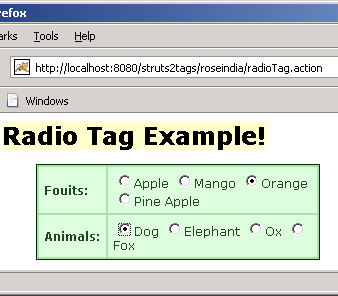
Output of the radioTag.jsp: