Databases| SQL| MySQL| Questions? | Software Development
 

MySQL rank

Many times there is a need to rank the records according to some specific field values but there is not any specific method provided in the MySQL to rank the records.

MySQL rank


Many times there is a need to rank the records according to some specific field values but there is not any specific method provided in the MySQL to rank the records. We can achieve ranking of the records by the combination of SQL query. 

Here in the following example we will describe how you can get the ranking of the results according to your requirement. First of all we require a database table, therefore we have created a table with the name "mca". 


Query CREATE TABLE `mca` (
`id` bigint(11) NOT NULL auto_increment,
`name` varchar(255) default NULL,
`subject` varchar(255) default NULL,
PRIMARY KEY (`id`)
) ENGINE=InnoDB AUTO_INCREMENT=6 DEFAULT CHARSET=latin1;

/*Data for the table `mca` */

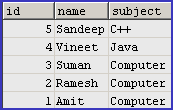
insert into `mca`(`id`,`name`,`subject`) values (1,'Amit','Computer '),(2,'Ramesh','Computer '),(3,'Suman','Computer '),(4,'Vineet','Java'),(5,'Sandeep','C++');
 

Output


If we use the following query 

Query SELECT * FROM mca ORDER BY id DESC;
 

Output


This is what we have queried that means it can results either in the descending order or in the ascending order but if we want to provide them ranking then we have to write the query as given below:

Query SET @rank=0;

SELECT @rank:=@rank+1 AS rank, id, name, subject FROM mca ORDER BY id DESC;


Output


So as you can see in the output that it has resulted one more field "rank".


» View all related tutorials
Related Tags: sql mysql c database string git data type char port locale byte set support length symbols character tab local define

Leave your comment:

Name:

Email:

URL:

Title:

Comments:


Enter Code:

Audio Version
Reload Image
 

Note: Emails will not be visible or used in any way, and are not required. Please keep comments relevant. Any content deemed inappropriate or offensive may be edited and/or deleted.

No HTML code is allowed. Line breaks will be converted automatically. URLs will be auto-linked. Please use BBCode to format your text.

Add This Tutorial To:
  Del.icio.us   Digg   Google   Spurl   Blink   Furl   Simpy   Y! MyWeb 
 
Tell A Friend
Your Friend Name

 
Recently Viewed
Software Solutions
Search Tutorials


Home | JSP | EJB | JDBC | Java Servlets | WAP  | Free JSP Hosting  | Search Engine | News Archive | Jboss 3.0 tutorial | Free Linux CD's | Forum | Blogs

About Us | Advertising On RoseIndia.net  | Site Map | Privacy Policy

India News

Send your comments, Suggestions or Queries regarding this site at roseindia_net@yahoo.com.

Copyright © 2008. All rights reserved.