--Ads--
Create XML File using Servlet


In this section, you will learn how to create xml file
using Servlet We have created file XmlServlet.java. It
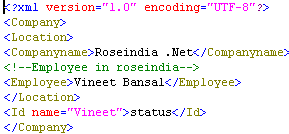
creates XML file with its version and encoding and display a message 'Xml
File Created Successfully'.
JAXP (Java API for XML Processing) is a Java interface
that provides a standard approach to Parsing XML documents. With JAXP, we will
use the Document BuilderFactory to create DocumentBuilder class.
The class DocumentBuilderFactory is responsible
for creating new DOM .
DocumentBuilderFactory builderFactory = DocumentBuilderFactory.newInstance();
DocumentBuilder docBuilder = builderFactory .newDocumentBuilder();
The instance of the class DocumentBuilder is
used to create a blank document.
Document doc = docBuilder.newDocument();
Step 1: Create a Servlet "XmlServlet.java"
import java.io.*;

import javax.servlet.*;

import javax.servlet.http.*;


import java.io.*;

import org.w3c.dom.*;

import javax.xml.parsers.*;

import javax.xml.transform.*;

import javax.xml.transform.dom.*;

import javax.xml.transform.stream.*;


public class XmlServlet extends HttpServlet{

  public void doGet(HttpServletRequest request,

   HttpServletResponse response)

   throws ServletException,IOException{

  response.setContentType("text/html");

  PrintWriter pw = response.getWriter();

  try

  {

  DocumentBuilderFactory builderFactory =

  DocumentBuilderFactory.newInstance();

  DocumentBuilder docBuilder = builderFactory.newDocumentBuilder();

  //creating a new instance of a DOM to build a DOM tree.

  Document doc = docBuilder.newDocument();

  new XmlServlet().createXmlTree(doc);


  pw.println("<b>Xml File Created Successfully</b>");

  }

  catch(Exception e)

  {

  System.out.println(e);

  }


   }


  public void createXmlTree(Document doc) throws Exception {

  //This method creates an element node

  Element root = doc.createElement("Company");

  //adding a node after the last child node of the specified node.

  doc.appendChild(root);


  Element child = doc.createElement("Location");

  root.appendChild(child);


  Element child1 = doc.createElement("Companyname");

  child.appendChild(child1);


  Text text = doc.createTextNode("Roseindia .Net");

  child1.appendChild(text);


  Comment comment = doc.createComment("Employee in roseindia");

  child.appendChild(comment);


  Element element = doc.createElement("Employee");

  child.appendChild(element);


  Text text1 = doc.createTextNode("Vineet Bansal");

  element.appendChild(text1);


  Element chilE = doc.createElement("Id");

  chilE.setAttribute("name", "Vineet");

  root.appendChild(chilE);


  Text text12 = doc.createTextNode("status");

  chilE.appendChild(text12);


 //TransformerFactory instance is used to create Transformer objects.

  TransformerFactory factory = TransformerFactory.newInstance();

  Transformer transformer = factory.newTransformer();


  transformer.setOutputProperty(OutputKeys.INDENT, "yes");


  // create string from xml tree

  StringWriter sw = new StringWriter();

  StreamResult result = new StreamResult(sw);

  DOMSource source = new DOMSource(doc);

  transformer.transform(source, result);

  String xmlString = sw.toString();


  File file = new File("c:/newxml.xml");

  BufferedWriter bw = new BufferedWriter

	  (new OutputStreamWriter(new FileOutputStream(file)));

  bw.write(xmlString);

  bw.flush();

  bw.close();


  }

}
|
Step 2:Create a
"Web.xml" for mapping the Servlet "XmlServlet.java".
<?xml version="1.0" encoding="ISO-8859-1"?>
<web-app xmlns="http://java.sun.com/xml/ns/javaee"
xmlns:xsi="http://www.w3.org/2001/XMLSchema-instance"
xsi:schemaLocation=
"http://java.sun.com/xml/ns/javaee
http://java.sun.com/xml/ns/javaee/web-app_2_5.xsd"
version="2.5">
<display-name>Welcome to Tomcat</display-name>
<description>
Welcome to Tomcat
</description>
<servlet>
<servlet-name>xmlservlet</servlet-name>
<servlet-class>XmlServlet</servlet-class>
</servlet>
<servlet-mapping>
<servlet-name>xmlservlet</servlet-name>
<url-pattern>/xmlServlet</url-pattern>
</servlet-mapping>
</web-app>
|
Output :

"newxml.xml"
Download the full source
code