
Core Java| JSP| Servlets| XML| EJB| JEE5| Web Services| J2ME| Glossary| Questions?


Search Tutorials

Latest Questions
Comments
 
Servlet Error Message based on user input 
 

In this example user is presented with a screen to enter the name.


Servlet Error Message based on user input


In this example user is presented with a screen to enter the name. If the entered name exists in the database its displays the sucess message otherwise it displays the error message. So, you can use Servlet to check the user input against database and display the message to the user.

This example illustrate how to ensure that user input is correct by validating against the database. In this example any error on the user end is checked by the servlet. If user submits his data then servlet checks user existence in database by connecting to the database, if data is found correct then servlet sends a message to the user for successfully entering the correct data but if data is not correct then sends a message to user for wrong entry of data.

This example illustrates how to show error message on the page when user enters wrong entry for any specific field on the page. For this create a page "test.jsp" which renders an input field to enter the name of the user.

Here is the code for test.jsp:

<%@page language="java" session="true" contentType="text/html;charset=ISO-8859-1" %> 
<font color="blue">Please Enter Your Name To check the error massege</font><br><br>
<form name="frm" method="post" action="../ErrorMessage">
    <table border = "0">
        <tr align="left" valign="top">
            <td>Name:</td>
            <td><input type="text" name ="name" /></td>
        </tr>
        <tr align="left" valign="top">
            <td></td>
            <td><input type="submit" name="submit" value="submit"/></td>
        </tr>
    </table>
</form>

The above code displays the page as below:
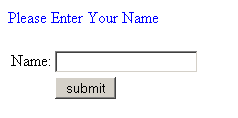
Now, we will create a servlet to check whether the user has entered the name as "sandeep" in the input field of the page. This servlet checks the name in the database and if it finds the name in the database then displays the greeting text indicating that the user has entered successfully, otherwise it displays the error message on the page showing the wrong entry.

Here is the code for servlet "ErrorMessage.java"

import java.io.*;
import java.util.*;
import javax.sql.*;
import javax.servlet.*;
import javax.servlet.http.*;
import java.sql.Connection;
import java.sql.DriverManager;
import java.sql.ResultSet;
import java.sql.SQLException;
import java.sql.Statement;

public class ErrorMessage extends HttpServlet {
  public void service(HttpServletRequest request,HttpServletResponse response)
         throws 
IOException, ServletException{
    response.setContentType("text/html");
    PrintWriter out = response.getWriter();    
    Connection con = null;    
    Statement stmt = null;
    ResultSet rs = null;
    String jspname = request.getParameter("name");
    String name= new String("");
    try {
      Class.forName("com.mysql.jdbc.Driver");
      con =DriverManager.getConnection ("jdbc:mysql
://192.168.10.59:3306/example"
"root""root");
      stmt = con.createStatement();
      rs = stmt.executeQuery("SELECT * 
FROM servlet where name='"
+jspname+"'");
      while(rs.next()){
        name=rs.getString("name");
      }
      rs.close();
      stmt.close();
    }catch(Exception e){
      System.out.println(e);
    }
    Boolean isResponseCorrect = Boolean.FALSE;
    if(jspname.equals(name)){
      isResponseCorrect=true;
      out.println("<b><font color='green'>You are 
successfully enter the valid name!</font></b>"
);
    }
    else{
      isResponseCorrect=false;
      out.println("<b><font color='red'>This 
name is Not A Valid Name. Try Again!</font></b>"
);
    }
  }
}

If the user enters the name "piyush"( not "sandeep" or "vineet" or "amit" or "anusmita" which is in database)

then it displays the error message like in the picture below.

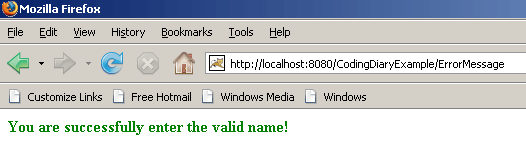
If user enters correct name i.e. "sandeep".

then a successful message is displayed.
Download Source Code


» View all related tutorials
Related Tags: c database error data input servlet user screen display name this message ai tab check if example with exists to

Leave your comment:

Name:

Email:

URL:

Title:

Comments:


Enter Code:

Audio Version
Reload Image
 

Note: Emails will not be visible or used in any way, and are not required. Please keep comments relevant. Any content deemed inappropriate or offensive may be edited and/or deleted.

No HTML code is allowed. Line breaks will be converted automatically. URLs will be auto-linked. Please use BBCode to format your text.

Add This Tutorial To:
  Del.icio.us   Digg   Google   Spurl   Blink   Furl   Simpy   Y! MyWeb 
Training Courses
Tell A Friend
Your Friend Name
Software Solutions
Least Viewed
Most Rated
Recently Viewed
Search Tutorials


Home | JSP | EJB | JDBC | Java Servlets | WAP  | Free JSP Hosting  | Search Engine | News Archive | Jboss 3.0 tutorial | Free Linux CD's | Forum | Blogs

About Us | Advertising On RoseIndia.net  | Site Map

India News

Indian Software Development Company | iPhone Development Company in India | Flex Development Company in India | Java Training Delhi | Java Training at Noida |

Send your comments, Suggestions or Queries regarding this site at roseindia_net@yahoo.com.

Copyright © 2008. All rights reserved.