Core Java| JSP| Servlets| XML| EJB| JEE5| Web Services| J2ME| Glossary| Questions?


Search Tutorials

Latest Questions
Comments
 
Show Parameter In Servlet 
 

In this section, you will learn how to send and put all parameter names into the table. The following program uses two methods, which is described below.


Show Parameter In Servlet


In this section, you will learn how to send and put all parameter names into the table. The  following program uses two methods, which is described below.

Code Description:

Here, in this example, you will also see the use of getParameterNames() method and getParameterValues() method. The logic of the program will be written inside the doGet() method which takes two arguments, first is HttpServletRequest interface and the second one is the HttpServletResponse interface and this method can throw ServletException.  First, it looks up all the parameter names via the getParameterNames() method of HttpServletRequest. This returns an Enumeration. Next, it loops down the Enumeration in the standard manner, using hasMoreElements() method to determine when to stop and using nextElement to get each entry. Since nextElement returns an Object, it casts the result to a String and passes that to getParameterValues, yielding an array of Strings. If that array is one entry long and contains only an empty string, then the parameter had no values, and the servlet generates an italicized "No Value" entry. The array takes more then one entry long, then the parameter had multiple values and they are displayed in a table list. Otherwise the one main value is just placed into the table. 

getParameterNames():  getParameterNames() is a method. This is the method that returns the parameter names for the request as an enumeration of string .

 getParameterValues: getParameterValues() is a method. This is the method that returns the values of the specified parameter for the request as an array of strings or null if the named parameter does not exit.

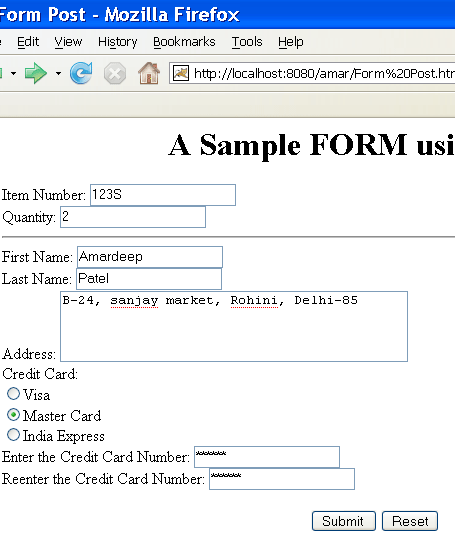
Html file for this program:

<html>
<head>
  <title>Form Post</title>
</head>

<body bgcolor="#FFFFFF">
<h1 align="center">A Sample FORM using POST</h1>

<form action="/amar/ShowParameterServlet" method="GET">
  Item Number:
  <input type="text" name="ItemNum"><br>
  Quantity:     
  <input type="text" name="Quantity"><br>
  <hr>
  First Name:
  <input type="text" name="FirstName"><br>

  Last Name:
  <input type="text" name="LastName"><br>
  Address:
  <textarea NAME="address" ROWS=COLS=40></textarea><br>
  Credit Card:<br>
    <input type="RADIO" name="CardType" value="Visa">Visa<br>
                
    <input type="RADIO" name="CardType" value="Master Card">Master Card<br>
                                        
    <input type="RADIO" name="CardType" value="India Express">India Express<br>
                                        
  Enter the Credit Card Number:
  <input type="password" name="CardNum"><br>
  Reenter the Credit Card Number:
  <input type="password" name="CardNum"><BR><BR>
  <center>
    <input type="submit" VALUE="Submit ">
  <input type ="reset" value= "Reset">
  </center>
</form>
</body>
</html>

Here is the code of this program:

import java.io.*;
import java.util.*;
import javax.servlet.*;
import javax.servlet.http.*;

public class ShowParameterServlet extends HttpServlet{
  public void doGet(HttpServletRequest request, HttpServletResponse response
                                             throws ServletException, IOException{
    response.setContentType("text/html");
        PrintWriter pw = response.getWriter();
    String title ="Reading all request parameter";
    pw.println("<html><head><title>" +
                "<body bgcolor=\"#FFFFFF\">\n" +
                "<H1 align=center>" + title + "</H1>\n" +
                "<table border=1 align=center>\n" +
                "<TR bgcolor=\"#8AEAF4\">\n" +
                "<td>Parameter Name</td><td>Parameter Value(s)</td>\n");
        Enumeration Names = request.getParameterNames();
    while(Names.hasMoreElements()) {
      String str = (String)Names.nextElement();
      pw.println("<tr><td>" + str + "</td><td>");
      String[] Values = request.getParameterValues(str);
      if (Values.length == 1) {
        String paramValue = Values[0];
        if (paramValue.length() == 0)
          pw.print("<I>No Value</I>");
        else
          pw.print(paramValue);
      }
      else {
        pw.println("<UL>");
        for(int i=0; i<Values.length; i++) {
          pw.println("<LI>" + Values[i]);
        }
        pw.println("</UL>");
      }
    }
    pw.println("</td></tr></table>\n</body></html>");
  }
}

Download of this program:

xml file for this program:

<?xml version="1.0" encoding="ISO-8859-1"?>
<!--<!DOCTYPE web-app
PUBLIC "-//Sun Microsystems, Inc.//DTD Web Application 2.3//EN"
"http://java.sun.com/dtd/web-app_2_3.dtd"> -->

<web-app>
<servlet>
<servlet-name>amar</servlet-name>
<servlet-class>ShowParameterServlet</servlet-class>
</servlet>
<servlet-mapping>
<servlet-name>amar</servlet-name>
<url-pattern>/ShowParameterServlet</url-pattern>
</servlet-mapping>
</web-app>

Output of this program.


» View all related tutorials
Related Tags: c database error data input servlet user screen display name this message ai tab check if example with exists to

Leave your comment:

Name:

Email:

URL:

Title:

Comments:


Enter Code:

Audio Version
Reload Image
 

Note: Emails will not be visible or used in any way, and are not required. Please keep comments relevant. Any content deemed inappropriate or offensive may be edited and/or deleted.

No HTML code is allowed. Line breaks will be converted automatically. URLs will be auto-linked. Please use BBCode to format your text.

Add This Tutorial To:
  Del.icio.us   Digg   Google   Spurl   Blink   Furl   Simpy   Y! MyWeb 
Training Courses
Tell A Friend
Your Friend Name
Software Solutions
Least Viewed
Most Rated
Recently Viewed
Search Tutorials


Home | JSP | EJB | JDBC | Java Servlets | WAP  | Free JSP Hosting  | Search Engine | News Archive | Jboss 3.0 tutorial | Free Linux CD's | Forum | Blogs

About Us | Advertising On RoseIndia.net  | Site Map

India News

Indian Software Development Company | iPhone Development Company in India | Flex Development Company in India | Java Training Delhi | Java Training at Noida |

Send your comments, Suggestions or Queries regarding this site at roseindia_net@yahoo.com.

Copyright © 2008. All rights reserved.