Home | Ajax | BioInformatics | Dojo | EAI | EJB | Hibernate | J2ME | Java | Java Glossary | Java Servlets | JavaScript | Jboss | JDBC | JDO | Jmeter | JSF | JSP | JUnit | Maven | MySQL | Spring Framework | SQL | Struts | Technology | WAP | Web Services | XML
 
 
Search All Tutorials

 
Programming Tutorials: Ajax | Articles | JSP | Bioinformatics | Database | Free Books | Hibernate | J2EE | J2ME | Java | JavaScript | JDBC | JMS | Linux | MS Technology | PHP | RMI | Web-Services | Servlets | Struts | UML
 
Java Servlets
  JDO Tutorials
  EAI Articles
  Struts Tutorials
  Java Tutorials
  Java Certification
  Java Applet
Questions
Comments

Introduction to Java Servlets


Java Servlets are server side Java programs that require either a Web Server or an Application Server for execution. Examples for Web Servers include Apache’s Tomcat Server and Macromedia’s JRun. Web Servers include IBM’s Weblogic and BEA’s Websphere server. Examples for other Server programs include Java Server Pages (JSPs) and Enterprise Java Beans (EJBs). In the forthcoming sections, we will get acquainted with Servlet fundamentals and other associated information required for creating and executing Java Servlets.

  1. Basic Servlet Structure
            

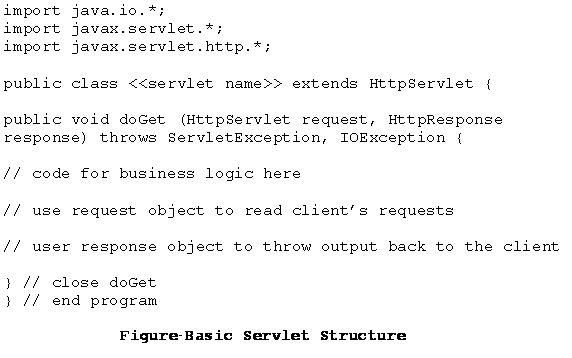
    As seen earlier, Java servlets are server side programs or to be more specific; web applications that run on servers that comply HTTP protocol. The javax.servlet and javax.servlet.http packages provide the necessary interfaces and classes to work with servlets. Servlets generally extend the HttpServlet class and override the doGet or the doPost methods. In addition, other methods such as init, service and destroy also called as life cycle methods might be used which will be discussed in the following section. The skeleton of a servlet is given in Figure


  1. A Servlet’s Life Cycle
    The first time a servlet is invoked, it is the init method which is called. And remember that this is called only once during the lifetime of a servlet. So, you can put all your initialization code here. This method next calls the service method. The service method in turn calls the doGet or doPost methods (whichever the user has overridden). Finally, the servlet calls the destroy method. It is in a sense equivalent to the finally method. You can reset or close references / connections done earlier in the servlet’s methods (e.g. init, service or doGet /doPost). After this method is called, the servlet ceases to exist for all practical purposes. However, please note that it is not mandatory to override all these methods. More often than not, it is the doGet or doPost method used with one or more of the other life cycle methods.


  2. A Servlet Program


    Output Screens

    To appreciate the execution of the servlet life cycle methods, keep refreshing the browser (F5 in Windows). In the background, what actually happens is – with each refresh, the doGet method is called which increments i’s value and displays the current value. Find below the screen shots (Figures 5 through 7) captured at random intervals. The procedure to run the servlets using a Web Server will be demonstrated in the next section (1.3.). 


Facing Programming Problem?
Add This Tutorial To:
  Del.icio.us   Digg   Google   Spurl   Blink   Furl   Simpy   Y! MyWeb 

Current Comments

4 comments so far (post your own) View All Comments Latest 10 Comments:

good material

Posted by rosy on Saturday, 04.19.08 @ 12:57pm | #57134

Hiiiiiiii,U r tutorials r simply superb and very help for java developers.
I completed J2EE course and also hav done some projects in dis.I want to know abt Web Hosting.Pls Help me


Regards
Meher

Posted by meher on Thursday, 01.31.08 @ 15:45pm | #46723

Hi in this page at the top you have mentioned "Web Servers include IBM’s Weblogic and BEA’s Websphere server. " is wrong..
It should be "Web Servers include IBM’s Websphere server and BEA’s Weblogic." instead.

Posted by sunil on Thursday, 01.24.08 @ 15:25pm | #46008

plz change the first picture of the code because the parameters of the doGet() method is wrong.

Chandan Kumar Verma

Posted by Chandan Kumar Verma on Thursday, 12.20.07 @ 17:41pm | #43117

Leave your comment:

Name:

Email:

URL:

Title:

Comments:


Enter Code:


Note: Emails will not be visible or used in any way, and are not required. Please keep comments relevant. Any content deemed inappropriate or offensive may be edited and/or deleted.

No HTML code is allowed. Line breaks will be converted automatically. URLs will be auto-linked. Please use BBCode to format your text.

Hot Web Programming Job

Java String toLowerCase Example
Java String toCharArray Example
Java String substring Example
Java String indexOf Example
Java String startsWith Example
Java String hashCode Example
Java String matches Example
Java String length Example
Java String lastIndexOf Example
Java String isEmpty Example
Java String equalsIgnoreCase Example
Java String equals Example
Java String endsWith Example
Java String copyValueOf Example
Java String contentEquals Example
  EAI Articles
  Java Certification
Tell A Friend
Your Friend Name
Search Tutorials


Browse all Java Tutorials
Java JSP Struts Servlets Hibernate XML
Ajax JDBC EJB MySQL JavaScript JSF
Maven2 Tutorial JEE5 Tutorial Java Threading Tutorial Photoshop Tutorials Linux Technology
Technology Revolutions Eclipse Spring Tutorial Bioinformatics Tutorials Tools SQL
 

Home | JSP | EJB | JDBC | Java Servlets | WAP  | Free JSP Hosting  | Search Engine | News Archive | Jboss 3.0 tutorial | Free Linux CD's | Forum | Blogs

About Us | Advertising On RoseIndia.net  | Site Map

India News

Send your comments, Suggestions or Queries regarding this site at roseindia_net@yahoo.com.

Copyright © 2007. All rights reserved.