
Retrieving Data from the table using PreparedStatement


In this program we are going to fetch the data from the database in the table from our java program using PreparedStatement.
To accomplish our goal we first have to make a class named as ServletFetchingDataFromDatabase which must extends the abstract HttpServlet class, the name of the class should be such that the other person can understand what this program is going to perform. The logic of the program will be written inside the doGet() method which takes two arguments, first is HttpServletRequest interface and the second one is the HttpServletResponse interface and this method can throw ServletException.
Inside this method call the getWriter() method of the PrintWriter class. We can retrieve the data from the database only and only if there is a connectivity between our database and the java program. To establish the connection between our database and the java program we firstly need to call the method forName() which is static in nature of the class ClassLoader. It takes one argument which tells about the database driver we are going to use. Now use the static method getConnection() of the DriverManager class. This method takes three arguments and returns the Connection object. SQL statements are executed and results are returned within the context of a connection. Now your connection has been established. Now use the method prepareStatement() of the Connection object which will return the PreparedStatement object and takes a query as its parameter. In this query we will write the task we want to perform. The Resultset object will be retrieved by using the executeQuery() method of the PreparedStatement object. Now the data will be retrieved by using the getString() method of the ResultSet object.
The code of the program is given below:
import java.io.*;
|
The output of the program is given below:
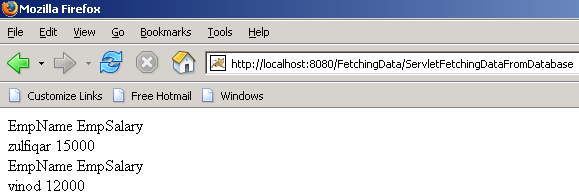 |
Table in the database:
| mysql> select * from emp_sal; +----------+--------+ | EmpName | salary | +----------+--------+ | zulfiqar | 15000 | | vinod | 12000 | +----------+--------+ 2 rows in set (0.00 sec) |