
Deploying Hello World Application on Apache Geronimo Application Server


In this section we will develop Hello World JSP application and test on the Apache Geronimo Application Server.
Please follow the following steps to easily develop and deploy the application on the server.
Step 1:
Create the following directory structure in a directory to place the application artifacts correctly
| Directory Structure of Web Component | |
| /hello/ | |
| HelloWorld.jsp | |
 WEB-ING
 |
|
| web.xml | |
| geronimo-web.xml | |
|
classes |
|
| servlet classes | |
|
lib |
|
| jar files | |
Here is the screen shot of directories that you need to create:

Alternately you can download the code and directory structure from following url:

Step 2:
Create jsp file under hello directory and add the following code:
|
Step 3:
Create geronimo-web.xml file into /hello/WEB-INF/ directory and copy the following code:
<?xml version="1.0" encoding="UTF-8"?>
|
Step 4:
Finally we have to create the web.xml file into /hello/WEB-INF/ directory with the following content:
<?xml version="1.0" encoding="UTF-8"?>
|
Step 5:
To create the deployable war file use the following command:
jar -cvf ../hello.war *
Here the output
| C:\gerionimo\HelloWorldJsp\hello>jar -cvf ../hello.war * added manifest adding: HelloWorld.jsp(in = 222) (out= 166)(deflated 25%) adding: WEB-INF/(in = 0) (out= 0)(stored 0%) adding: WEB-INF/classes/(in = 0) (out= 0)(stored 0%) adding: WEB-INF/geronimo-web.xml(in = 430) (out= 228)(deflated 46%) adding: WEB-INF/lib/(in = 0) (out= 0)(stored 0%) adding: WEB-INF/web.xml(in = 430) (out= 223)(deflated 48%) C:\gerionimo\HelloWorldJsp\hello> |
Step 6:
Now we are ready to deploy the application. To deploy the application copy hello.war into deploy directory of the Apache Geronimo application server (into directory C:\geronimo-tomcat6-javaee5-2.1\deploy).
Application server will auto deploy the application.
Step 7:
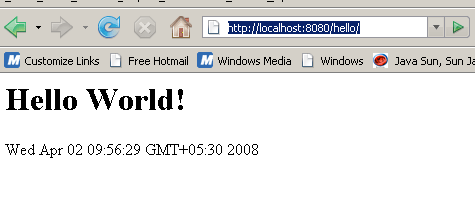
Open the browser and type http://localhost:8080/hello/. Your browser should show the Hello World message with the current date as shown below:
Download the source code of the application
In the next section we will deploy Servlet on the Apache Geronimo Application server.
