Home Photoshop Tutorials How to make a closed lips by the zip


How to make a closed lips by the zip
Posted on: July 20, 2011 at 12:00 AM
In this example we have tried to close lips by the zip, It has easy technique to learn easily so follow now.

How to make a closed lips by the zip

In this example we have tried to close lips by the zip, It has easy technique to learn easily so follow now.

Take a picture: Capture any lips picture to modify as here.

Take a zip image.

Merge: Make copy (Ctr +C) of your zip and past (Ctr + V) on the lips picture.

Adjustment: Select you zip layer and press Ctr + T, now right click and choose "Warp" option to modify the zip shape as here.

You will have this picture.
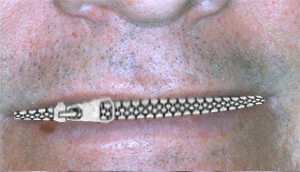
Final Result

Related Tags for How to make a closed lips by the zip:


More Tutorials from this section

Ask Questions?    Discuss: How to make a closed lips by the zip  

Post your Comment


Your Name (*) :
Your Email :
Subject (*):
Your Comment (*):
  Reload Image


Ask Questions?

If you are facing any programming issue, such as compilation errors or not able to find the code you are looking for.

Ask your questions, our development team will try to give answers to your questions.