
How to make a diamond necklace


This tutorial will give you instruction to make draw a diamond necklace, so follow all the steps to make similar.
New file: First take a new file with black background file as here.

Draw a shape: Choose Pen tool (P key) with this "eefdfb" color as looking below.

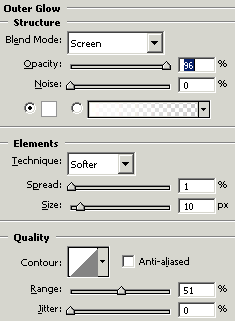
Layer style: Go to Layer menu > Layer style > Bevel and Emboss, Outer glow and make same settings.

You will get it.

Now with same layer style draw a circle.

Make many circle shape with same steps and set them as I have done here.
This is your final result.
