Core Java| JSP| Servlets| XML| EJB| JEE5| Web Services| J2ME| Glossary| Questions?


Search Tutorials

Latest Questions
Comments
 
Retrieve data from database by using sql tag of JSTL SQL library 
 

Here in this section we will see how retrieve data from database using sql query given by user.


Retrieve data from database by using sql tag of JSTL SQL library


Here in this section we will see how retrieve data from database using sql query given by user. To execute query first create a data source and then execute sql query for that data source.


<sql:setDataSource> : This tag is used to create data source for specified driver, user name and password of database, url etc. 
Attributes of the tag <sql:setDataSource> 
dataSource Optional attribute for explicitly specifying their connection factory, it may be a instance           javax.sql.DataSource interface.
driver  driver class name that is use to create connection.
url  url associated with given database.
user  It specifies user name of the database.
password  It specifies password of the database.
var  var is a variable that is used to store created data source.
Scope  Define the scope for declared variable like page or request or session or application.

After creating connection to database, now we are explaining how to execute sql query. To execute sql query we have used a sql tag <sql:query>, it executes sql and stores result in specified variable.

<sql:query> : This tag is used to create data source for specified driver, user name and password of database, url etc. 
Attributes of the tag <sql:setDataSource> 
dataSource  It specifies that for which data source you want to execute given query.
sql  It specifies sql query statement.
startRow  The returned Result object includes the rows starting at the specified index.
maxRows specifies max number of rows in the query result.
var  var is a variable that is used to store result after execution of given sql query.
Scope  Define the scope for declared variable like page or request or session or application.

Before run this code first create a database named 'mahendra' and table named 'employee_master' in same database by the sql query given below:

Query to create table:
CREATE TABLE `employee_master` (             
          `emp_id` int(10) NOT NULL auto_increment,
          `firstName` varchar(20) default NULL,      
          `lastname` varchar(20) default NULL,       
          `salary` double default NULL,              
          `tonus` double default NULL,               
            PRIMARY KEY  (`emp_id`)                    
         ) 


Structure of the table:


retrieve_database_SqlJstlTag.jsp

<%@ taglib uri="http://java.sun.com/jstl/core" prefix="c"%>
<%@ taglib uri="http://java.sun.com/jstl/sql" prefix="sql"%>
<sql:setDataSource var="dataSource" driver="com.mysql.jdbc.Driver"
	url="jdbc:mysql://localhost:3306/mahendra" user="root" password="root" />
<html>
<head>
<title>Query Example</title>
</head>
<body>
<sql:query var="users" dataSource="${dataSource}">
select* from employee_master;
</sql:query>
<table border=1>
	<c:forEach var="row" items="${users.rows}">
		<tr>
			<td><c:out value="${row.emp_id}" /></td>
			<td><c:out value="${row.firstName}" /></td>
			<td><c:out value="${row.lastname}" /></td>
			<td><c:out value="${row.salary}" /></td>
			<td><c:out value="${row.bonus}" /></td>
		</tr>
	</c:forEach>
</table>
</body>
</html>

Steps to run this example :

1:  Download the zip file of code and unzip this file, you will get a folder named  'retrieve_database_SqlJstlTag'.
2:  Paste this folder in 'Apache Tomcat 6.0.16-->webapps' or generally in directory 'C:\apache-tomcat-6.0.16\webapps'.
3:  Start tomcat server by click on startup.bat file in 'C:\apache-tomcat-6.0.16\bin'.
4: Open browser and type url 'http://localhost:8080/retrieve_database_SqlJstlTag/retrieve_database_SqlJstlTag.jsp'
or click on this link.

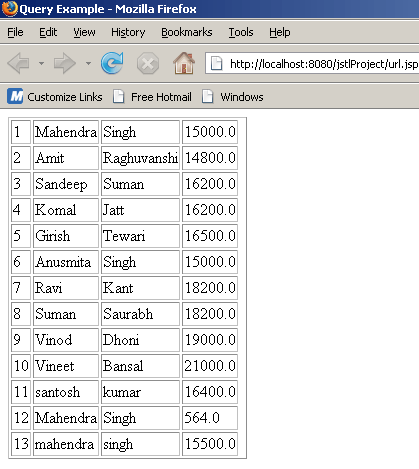
Output of the program
Download Source Code


» View all related tutorials
Related Tags: c xml library file files stl orm ant form io user sed jstl tag parameter transform this js for add

Leave your comment:

Name:

Email:

URL:

Title:

Comments:


Enter Code:

Audio Version
Reload Image
 

Note: Emails will not be visible or used in any way, and are not required. Please keep comments relevant. Any content deemed inappropriate or offensive may be edited and/or deleted.

No HTML code is allowed. Line breaks will be converted automatically. URLs will be auto-linked. Please use BBCode to format your text.

Add This Tutorial To:
  Del.icio.us   Digg   Google   Spurl   Blink   Furl   Simpy   Y! MyWeb 

Current Comments

1 comments so far (
post your own) View All Comments Latest 10 Comments:

i can load all record as you show,but if i want to load just one column as input for a combobox.there's no the same inside.so how can i do that?can you show me ^_^

Posted by cafe_java on Tuesday, 08.12.08 @ 12:14pm | #72466

Training Courses
Tell A Friend
Your Friend Name
Software Solutions
Least Viewed
Most Rated
Recently Viewed
Search Tutorials


Home | JSP | EJB | JDBC | Java Servlets | WAP  | Free JSP Hosting  | Search Engine | News Archive | Jboss 3.0 tutorial | Free Linux CD's | Forum | Blogs

About Us | Advertising On RoseIndia.net  | Site Map

India News

Indian Software Development Company | iPhone Development Company in India | Flex Development Company in India | Java Training Delhi | Java Training at Noida |

Send your comments, Suggestions or Queries regarding this site at roseindia_net@yahoo.com.

Copyright © 2008. All rights reserved.