Core Java| JSP| Servlets| XML| EJB| JEE5| Web Services| J2ME| Glossary| Questions?


Search Tutorials:
 

Software Solutions and Services


  JDO Tutorials
  EAI Articles
  Struts Tutorials
  Java Tutorials
  Java Certification
  Java Applet
Questions
Comments
 
Retrieve Data from CSV file in JSP 
 

CSV file : A CSV file is commonly known as a Comma Delimited File or a Character Separated File.


Retrieve Data from CSV file in JSP


CSV file : A CSV file is commonly known as a Comma Delimited File or a Character Separated File. It is a text file that has a specific format which allows saving of text in organized manner. This format known as a flat table, is very simple. Each row contains one record of information. The character used to distinguish each piece of data within each record is most commonly used a comma ",".

"myfile.csv" in the c:\csv folder


Create a Page ("ReadCsvFile.jsp") to retrieve the data from CSV file "
myfile.csv"

<%@ page import="java.io.*"%>
<html>
<body>
<% 
     String fName = "c:\\csv\\myfile.csv";
     String thisLine; 
      int count=0; 
      FileInputStream fis = new FileInputStream(fName);
      DataInputStream myInput = new DataInputStream(fis);
      int i=0; 
%>
<table>
<%
while ((thisLine = myInput.readLine()) != null)
{
String strar[] = thisLine.split(",");
for(int j=0;j<strar.length;j++)
{
if(i!=0)
{
out.print(" " +strar[j]+ " ");
}
else
{
out.print(" <b>" +strar[j]+ "</b> ");
}
}
out.println("<br>");
i++;

%>
</table>
</body>
</html>


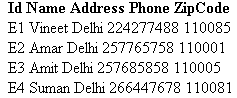
Output


Download full source code


» View all related tutorials
Related Tags: java c string jsp ide class strings script object io objects method get char ip using sequence id declaration length

Leave your comment:

Name:

Email:

URL:

Title:

Comments:


Enter Code:

Audio Version
Reload Image
 

Note: Emails will not be visible or used in any way, and are not required. Please keep comments relevant. Any content deemed inappropriate or offensive may be edited and/or deleted.

No HTML code is allowed. Line breaks will be converted automatically. URLs will be auto-linked. Please use BBCode to format your text.

Add This Tutorial To:
  Del.icio.us   Digg   Google   Spurl   Blink   Furl   Simpy   Y! MyWeb 

Current Comments

1 comments so far (
post your own) View All Comments Latest 10 Comments:

hi, i need to read the fields in csv file and assign to var array in html for use . example a field in the csv name file ,need to <a href="file"> click to view</a> .how to assign ?

Posted by tan on Tuesday, 12.9.08 @ 03:41am | #82547

Training Courses
Tell A Friend
Your Friend Name
Website Designing Services
 
Web Designing Packages From $150!
 
Website Designing Company Web Hosting
 
Website Designing Quotation
 
Search Tutorials:


Home | JSP | EJB | JDBC | Java Servlets | WAP  | Free JSP Hosting  | Search Engine | News Archive | Jboss 3.0 tutorial | Free Linux CD's | Forum | Blogs

About Us | Advertising On RoseIndia.net  | Site Map

India News

Indian Software Development Company | iPhone Development Company in India | Flex Development Company in India | Java Training Delhi | Java Training at Noida |

Send your comments, Suggestions or Queries regarding this site at roseindia_net@yahoo.com.

Copyright © 2008. All rights reserved.