
Tomahawk popup tag


This tag is used to create the popup window when user takes the mouse on the element. This popup is created on the mouse event. It has many attributes that can give it extra functionalities. It has attributes to display the popup window at a certain place i.e. we can set its horizontal distance and vertical distance from the triggering element. We can also set when to close this window either when triggering element is left or the popup window is left.
Code Description :
<%@ taglib uri="http://java.sun.com/jsf/html" prefix="h"%>
<%@ taglib uri="http://java.sun.com/jsf/core" prefix="f"%>
<%@ taglib uri="http://myfaces.apache.org/tomahawk" prefix="t"%>

<f:view>
<html>
<head>
<meta http-equiv="Content-Type" content="text/html; charset=iso-8859-1">
<title>t:popup example</title>
<style type="text/css">
<!--
.popClass{
background-color:#F1F1F1;
}
-->
</style>
</head>
<body >
<h:form>
<t:popup styleClass="popClass"
closePopupOnExitingElement="true"
closePopupOnExitingPopup="true"
displayAtDistanceX="0"
displayAtDistanceY="0">
<h:outputText value="JSF tutorials and examples."
style="font-weight:bold;"/>
<f:facet name="popup">
<h:panelGrid columns="1" >
<h:commandLink value="http://roseindia.net/jsf" />
<h:commandLink value="http://myfaces.apache.org" />
</h:panelGrid>
</f:facet>
</t:popup>
</h:form>
</body>
</html>
</f:view>
Rendered Output :
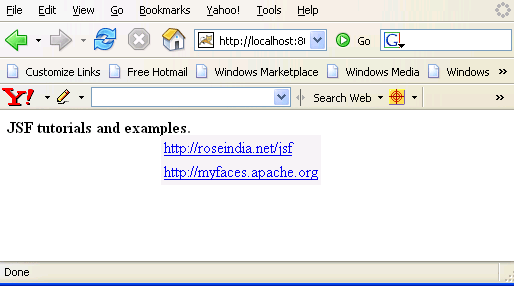
Html Source Code :
<html>
<head>
<script type="text/javascript" src="/tomahawk_tags/faces/
myFacesExtensionResource/org.apache.myfaces.renderkit.html
.util.MyFacesResourceLoader/11857982/popup.HtmlPopupRenderer/JSPopup.js">
<!--
//--></script>
<meta http-equiv="Content-Type" content="text/html; charset=iso-8859-1">
<title>t:popup example</title>
<style type="text/css">
<!--
.popClass{
background-color:#F1F1F1;
}
-->
</style>
</head>
<body >
<form id="_idJsp0" name="_idJsp0" method="post"
action="/tomahawk_tags/pages/popup.jsf"
enctype="application/x-www-form-urlencoded">
<script type="text/javascript"><!--
var _5FidJsp0_3A_5FidJsp1Popup=
new orgApacheMyfacesPopup('_idJsp0:_idJsp1',0,0);
//--></script><span onmouseover="/* generated code */_5FidJsp0_3A_
5FidJsp1Popup.display(event);" onmouseout="/* generated code */_5
FidJsp0_3A_5FidJsp1Popup.hide(event);" style="font-weight:bold;">J
SF tutorials and examples.</span>
<div style="position:absolute;display:none;"
class="popClass" id="_idJsp0:_idJsp1"
onmouseover="_5FidJsp0_3A_5FidJsp1Popup.redisplay();"
onmouseout="_5FidJsp0_3A_5FidJsp1Popup.hide();">
<table><tbody><tr><td><script type="text/javascript"><!--


function oamSetHiddenInput(formname, name, value)
{
var form = document.forms[formname];
if(typeof form.elements[name]=='undefined')
{
var newInput = document.createElement('input');
newInput.setAttribute('type','hidden');
newInput.setAttribute('name',name);
newInput.setAttribute('value',value);
form.appendChild(newInput);
}
else
{
form.elements[name].value=value;
}

}


function oamClearHiddenInput(formname, name, value)
{
var form = document.forms[formname];
if(typeof form.elements[name]!='undefined')
{
form.elements[name].value=null;
}

}

function oamSubmitForm(formName, linkId, target, params)
{

var clearFn = 'clearFormHiddenParams_'+
formName.replace(/-/g, '\$:').replace(/:/g,'_');
if(typeof eval('window.'+clearFn)!='undefined')
{
eval('window.'+clearFn+'(formName)');
}

var oldTarget = '';
if((typeof target!='undefined') && target != null)
{
oldTarget=document.forms[formName].target;
document.forms[formName].target=target;
}
if((typeof params!='undefined') && params != null)
{
for(var i=0; i<params.length; i++)
{
oamSetHiddenInput(formName,params[i][0],
params[i][1]);
}

}

oamSetHiddenInput(formName,formName +':'+'_idcl',linkId);

if(document.forms[formName].onsubmit)
{
var result=document.forms[formName].onsubmit();
if((typeof result=='undefined')||result)
{
document.forms[formName].submit();
}

}
else
{
document.forms[formName].submit();
}
if(oldTarget==null) oldTarget='';
document.forms[formName].target=oldTarget;
if((typeof params!='undefined') && params != null)
{
for(var i=0; i<params.length; i++)
{
oamClearHiddenInput(formName,params[i][0],
params[i][1]);
}

}

oamClearHiddenInput(formName,formName +':'+'
_idcl',linkId);return false;
}


//--></script>
<a href="#" onclick="return oamSubmitForm
('_idJsp0','_idJsp0:_idJsp4');" id="_idJsp0:_idJsp4">
http://roseindia.net/jsf</a></td></tr>
<tr><td><a href="#" onclick="return oamSubmitForm
('_idJsp0','_idJsp0:_idJsp5');" id="_idJsp0:_idJsp5">
http://myfaces.apache.org</a></td></tr>
</tbody></table></div>
<input type="hidden" name="_idJsp0_SUBMIT" value="1" />
<input type="hidden" name="_idJsp0:_link_hidden_" />
<input type="hidden" name="_idJsp0:_idcl" />
<script type="text/javascript"><!--

function clear__5FidJsp0()
{
clearFormHiddenParams__idJsp0('_idJsp0');
}

function clearFormHiddenParams__idJsp0(currFormName)
{
var f = document.forms['_idJsp0'];
f.elements['_idJsp0:_link_hidden_'].value='';
f.elements['_idJsp0:_idcl'].value='';
f.target='';
}

clearFormHiddenParams__idJsp0();
//--></script><input type="hidden" name="javax.faces.ViewState"
id="javax.faces.ViewState" value="rO0ABXVyABNbTGphdmEubGFuZy5PY
mplY3Q7kM5YnxBzKWwCAAB4cAAAAANzcgBHb3JnLmFwYWNoZS5teWZhY2VzLmFwc
GxpY2F0aW9uLlRyZWVTdHJ1Y3R1cmVNYW5hZ2VyJFRyZWVTdHJ1Y3RDb21wb25lb
nRGWRfYnEr2zwIABFsACV9jaGlsZHJlbnQASltMb3JnL2FwYWNoZS9teWZhY2VzL
2FwcGxpY2F0aW9uL1RyZWVTdHJ1Y3R1cmVNYW5hZ2VyJFRyZWVTdHJ1Y3RDb21wb
............
............" />
</form>
<!-- MYFACES JAVASCRIPT -->
</body>
</html>
This tag contains attributes given below :
- displayAtDistanceX : The horizontal distance in pixels of the popup from the mouse.
- displayAtDistanceY : The vertical distance in pixels of the popup from the mouse.
- closePopupOnExitingElement : This is a boolean attribute that if set to true then it closes the popup when mouse exits from the triggering element.
- closePopupOnExitingPopup : This is a boolean attribute that if set to true then it closes the popup when mouse exits from the popup.
- id : This is the value which is used to uniquely identify the component within the closest container like form or subview. The main thing to remember is that its value must be a static value.
- binding : This attribute is used to specify the property of the backing bean with which this component instance is to be bound.
- rendered : Its default value is true. If this attribute is set to true then this component is presented in the page to the user. If false, then this component is not rendered.
- dir : It is used to set the direction of the text to be displayed. It can take two values LTR(left to right) and RTL (right to left).
- lang : It is used to set the base language of the component when displayed.
- style : It is used to set the CSS style definition for the component.
- title : It is the standard html attribute. It is used to set the tooltip text for this component.
- styleClass : It is used to set the CSS class for the component. It is same as html class attribute.
- onclick : Script to be invoked when the element is clicked.
- ondblclick : It is used for Java Script code to be invoked when the element is double-clicked.
- onmousedown : It is used for Java Script code to be invoked when the pointing device is pressed over this element.
- onmouseup : It is used for Java Script code to be invoked when the pointing device is released over this element.
- onmouseover : It is used for Java Script code to be invoked when the pointing device is moved into this element.
- onmousemove : It is used for Java Script code to be invoked when the pointing device is moved while it is in this element.
- onmouseout : It is used for Java Script code to be invoked when the pointing device is moved out of this element.
- onkeypress : It is used for Java Script code to be invoked when a key is pressed over this element.
- onkeydown : It is used for Java Script code to be invoked when a key is pressed down over this element.
- onkeyup : It is used for Java Script code to be invoked when a key is released over this element.
- enabledOnUserRole : If the current user has one of the roles listed in the enabledOnUserRole attribute then enabling or disabling of the component is decided on the base of "disabled" attribute. If disabled attribute is set to true then component is disabled otherwise enabled. If the user is not in the above list then the component is rendered disabled.
- visibleOnUserRole : If the current user has one of the roles listed in the visibleOnUserRole attribute then processing of the component is decided on the base of "rendered" attribute. If the rendered attribute is set to true then component is not rendered otherwise displayed on the page. On the other hand if the current user is not in the above list then the component is not processed.