
Integrating Login And Registration Application In JSF


This tutorial explains integration of login and registration modules into one application. In this application, if the user is valid then it enters successfully otherwise the user is asked to get registered. The user is asked to fill some information. Some of these information are mandatory to be filled and some are required to be filled in proper format. These fields displays error messages if not filled properly. After successful submission of the form, all information are displayed again to make the user confirm. If the user wants to edit some information then it can be done by an "Modify" button. This button will bring the user to the same form which he/she has filled before but now there is no need to fill all the information. All the entered values will be displayed again and can be changed again.
Code for all the pages have been given below :
login.jsp :
| <%@ taglib uri="http://java.sun.com/jsf/html" prefix="h"%> <%@ taglib uri="http://java.sun.com/jsf/core" prefix="f"%> <f:view> <html> <meta http-equiv="Content-Type" content="text/html; charset=iso-8859-1"> <head> <title>Login and Registration</title> </head> <body leftmargin="0" rightmargin="0" topmargin="40" bottommargin="0"> <center><h:form> <h:panelGrid width="375px" bgcolor="#e6edfd" columns="2" border="0"> <f:facet name="header"> <h:outputText value="User Login"/> </f:facet> <h:outputText value="Enter Login ID:"/> <h:inputText id="loginname" value="#{SimpleLogin.loginname}" /> <h:outputText value="Enter Password: "/> <h:inputSecret id="password" value="#{SimpleLogin.password}" /> <h:outputText value=" "/> <h:commandButton value="Login" action="#{SimpleLogin.CheckValidUser}" /> <h:outputText value="New User?"/> <h:commandLink value="Register Here" action="newuser" /> </h:panelGrid> </h:form> </center> </body> </html> </f:view> |
resultforsuccess.jsp :
| <%@ taglib uri="http://java.sun.com/jsf/html" prefix="h"%> <%@ taglib uri="http://java.sun.com/jsf/core" prefix="f"%> <f:view> <html> <meta http-equiv="Content-Type" content="text/html; charset=iso-8859-1"> <head> <title>login success</title> </head> <body leftmargin="0" rightmargin="0" topmargin="40" bottommargin="0"> <center><h:form> <h:panelGrid width="375px" bgcolor="#e6edfd" columns="2" border="0"> <f:facet name="header"> <h:outputText value="Welcome.....You entered successfully"/> </f:facet> </h:panelGrid> </h:form></center> </body> </html> </f:view> |
resultforfail.jsp :
| <%@ taglib uri="http://java.sun.com/jsf/html" prefix="h"%> <%@ taglib uri="http://java.sun.com/jsf/core" prefix="f"%> <f:view> <html> <meta http-equiv="Content-Type" content="text/html; charset=iso-8859-1"> <head> <title>Login failed.</title> </head> <body leftmargin="0" rightmargin="0" topmargin="40" bottommargin="0"> <center><h:form> <h:panelGrid width="375px" bgcolor="#e6edfd" columns="2" border="0"> <f:facet name="header"> <h:outputText value="Sorry...You are not registered with us."/> </f:facet> <h:commandLink value="Click to Register" action="newuser" /> <h:commandLink value="Click to Go Back" action="back" /> </h:panelGrid> </h:form> </center> </body> </html> </f:view> |
result.jsp :
| <%@ page contentType="text/html" %> <%@ taglib uri="http://java.sun.com/jsf/html" prefix="h" %> <%@ taglib uri="http://java.sun.com/jsf/core" prefix="f" %> <f:view> <html> <head><title>Complete Person Information</title></head> <body leftmargin="0" rightmargin="0" topmargin="40" bottommargin="0"> <center><h:form> <h:panelGrid width="375px" bgcolor="#e6edfd" columns="2" border="0"> <f:facet name="header"> <h:outputText value="You have entered information :"/> </f:facet> <h:outputText value="Name: " /> <h:outputText value="#{persondetails.name}" /> <h:outputText value="Father's Name: " /> <h:outputText value="#{persondetails.fname}" /> <h:outputText value="Mother's Name: " /> <h:outputText value="#{persondetails.mname}" /> <h:outputText value="Current Address: " /> <h:outputText value="#{persondetails.caddress}" /> <h:outputText value="Parmanent Address: " /> <h:outputText value="#{persondetails.paddress}" /> <h:outputText value="Sex: " /> <h:outputText value="#{persondetails.sex}" /> <h:outputText value="Date Of Birth: " /> <h:outputText value="#{persondetails.dob}"> <f:convertDateTime pattern="dd-MM-yyyy"/> </h:outputText></td> <h:outputText value="Phone No.: " /> <h:outputText value="#{persondetails.phoneno}" /> <h:outputText value="Mobile No.: " /> <h:outputText value="#{persondetails.mobileno}" /> <h:outputText value=" " /> <h:commandButton value="Modify" action="details" /> </h:panelGrid> </h:form></center> </body> </html> </f:view> |
SimpleLogin.java (JavaBean) :
Here getter method getLoginname() returns instance of type HtmlInputText
because loginname property is associated to the instance of
component of this type i.e. "HtmlInputText". In the
same way setter method setLoginname() takes parameter of HtmlInputText
type because of the same reason explained above. These steps are
necessary for each component using component instance binding.
package roseindia;
|
persondetails.java (JavaBean) :
package roseindia;
|
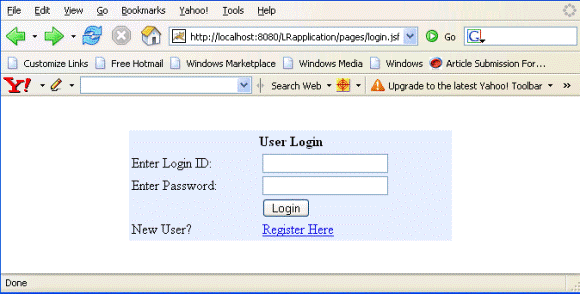
Rendered Output : This is the first page for the user.
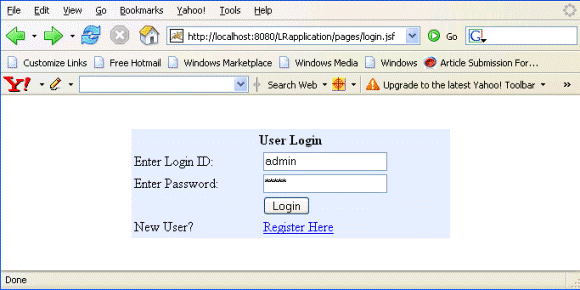
If the user fills Login ID as "admin" and Password as "admin", then user enters successfully. If the user is not provided ID and Password then there is a link "Register Here" for such a new user to register itself.
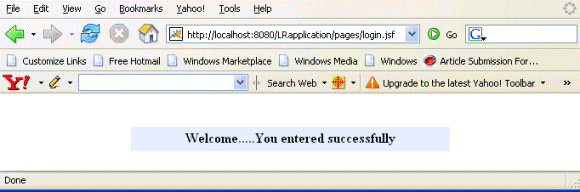
This is the screen displayed when the user enters successfully.
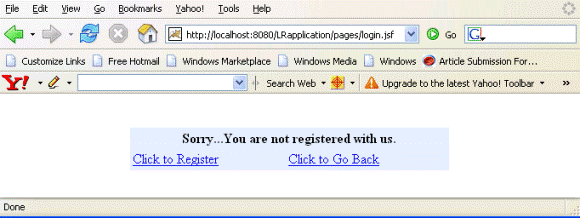
This page appears when the user is not permitted to login successfully. There are options to go back or register.
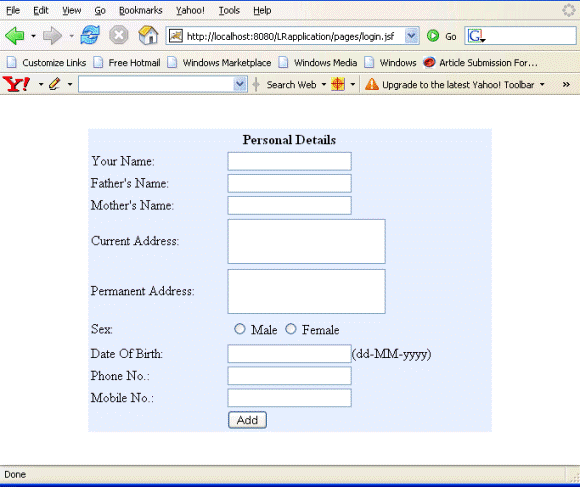
If the user is not registered and want to get registered then this page is filled by the user. If user fills values in incorrect format then error messages appears to the user indicating the errors.

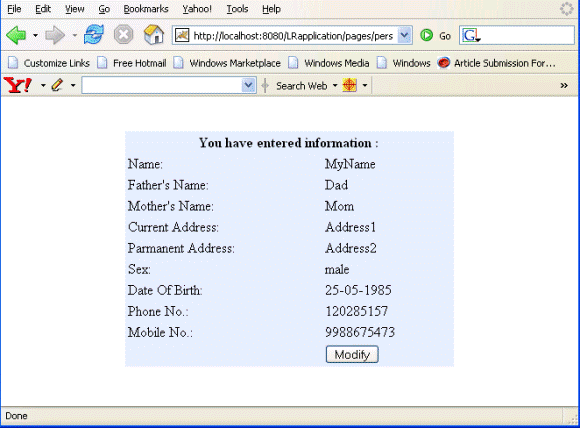
If the user fills correct entry then all the information are displayed. User can modify these information by clicking "Modify" button.
faces-config.xml :
| <?xml version="1.0"?> <!DOCTYPE faces-config PUBLIC "-//Sun Microsystems, Inc.//DTD JavaServer Faces Config 1.1//EN" "http://java.sun.com/dtd/web-facesconfig_1_1.dtd"> <faces-config> <managed-bean> <managed-bean-name>SimpleLogin</managed-bean-name> <managed-bean-class>roseindia.SimpleLogin</managed-bean-class> <managed-bean-scope>request</managed-bean-scope> </managed-bean> <navigation-rule> <from-view-id>/pages/login.jsp</from-view-id> <navigation-case> <from-action>#{SimpleLogin.CheckValidUser}</from-action> <from-outcome>success</from-outcome> <to-view-id>/pages/resultforsuccess.jsp</to-view-id> </navigation-case> <navigation-case> <from-action>#{SimpleLogin.CheckValidUser}</from-action> <from-outcome>fail</from-outcome> <to-view-id>/pages/resultforfail.jsp</to-view-id> </navigation-case> <navigation-case> <from-outcome>newuser</from-outcome> <to-view-id>/pages/persondetails.jsp</to-view-id> </navigation-case> </navigation-rule> <navigation-rule> <from-view-id>/pages/resultforfail.jsp</from-view-id> <navigation-case> <from-outcome>newuser</from-outcome> <to-view-id>/pages/persondetails.jsp</to-view-id> </navigation-case> <navigation-case> <from-outcome>back</from-outcome> <to-view-id>/pages/login.jsp</to-view-id> </navigation-case> </navigation-rule> <managed-bean> <managed-bean-name>persondetails</managed-bean-name> <managed-bean-class>roseindia.persondetails</managed-bean-class> <managed-bean-scope>session</managed-bean-scope> </managed-bean> <navigation-rule> <from-view-id>/pages/persondetails.jsp</from-view-id> <navigation-case> <from-outcome>result</from-outcome> <to-view-id>/pages/result.jsp</to-view-id> </navigation-case> </navigation-rule> <navigation-rule> <from-view-id>/pages/result.jsp</from-view-id> <navigation-case> <from-outcome>details</from-outcome> <to-view-id>/pages/persondetails.jsp</to-view-id> </navigation-case> </navigation-rule> </faces-config> |