JavaScript method eval()


This section illustrates you the use of JavaScript method eval(). This function evaluates the string passed into the method and executes it.
Its syntax is:
| eval(codestring) |
The codestring argument is a String object that contains valid JavaScript code. JavaScript parser parses and executes the string. In case if there is no argument, eval() method returns "undefined". In the given example, we defined different JavaScript statements and expressions to use the method eval().
Here is the code:
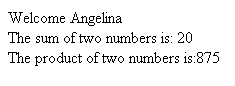
| <html> <script type="text/javascript"> var x=15; var name = 'Angelina'; document.write(eval('"Welcome " + name;')); document.write("<br />"); document.write("The sum of two numbers is: "+eval(x+5)); document.write("<br />"); eval("x=25;y=35;document.write('The product of two numbers is:'+ x*y)"); document.write("<br />"); </script> </html> |
Output will be displayed as: