In this program we are setting data format in excel file using Java.
Set Data Format in Excel Using POI 3.0


In this program we are setting data format in excel file using Java.
POI version 3.0 provides a new feature for manipulating various file formats based upon Microsoft's OLE 2 Compound Document format using Java. POI version 3.0 APIs provides user defined formatting facility and also provides a list of build-in data format (for String, Integer etc. values).
The org.apache.poi.hssf.usermodel.HSSFDataFormat class extends java.lang.Object class. This class provides utility to identify built-in formats. There is facility in POI 3.0 to define the user define formats.
The following is a list of built-in formats provided is POI 3.0:
|
S/No. |
Format |
Vlaue | S/No |
Format |
Value |
| 1 | General | 0 | 12 | h:mm AM/PM | 0x12 |
| 2 | 0 | 1 | 13 | h:mm:ss AM/PM | 0x13 |
| 3 | 0.00 | 2 | 14 | h:mm | 0x14 |
| 4 | #,##0 | 3 | 15 | h:mm:ss | 0x15 |
| 5 | #,##0.00 | 4 | 16 | m/d/yy h:mm | 0x16 |
| 6 | ($#,##0_);($#,##0) | 5 | 17 | (#,##0_);[Red](#,##0) | 0x26 |
| 7 | ($#,##0_);[Red]($#,##0) | 6 | 18 | (#,##0.00_);(#,##0.00) | 0x27 |
| 8 | ($#,##0.00);($#,##0.00) | 7 | 19 | (#,##0.00_);[Red](#,##0.00) | 0x28 |
| 9 | ($#,##0.00_);[Red]($#,##0.00) | 8 | 20 | _(*#,##0_);_(*(#,##0);_(* \"-\"_);_(@_) | 0x29 |
| 10 | 0% | 9 | 21 | _($*#,##0_);_($*(#,##0);_($* \"-\"_);_(@_) | 0x2a |
| 11 | 0.00% | 0xa | 22 | _(*#,##0.00_);_(*(#,##0.00);_(*\"-\"??_);_(@_) | 0x2b |
| 12 | 0.00E+00 | 0xb | 23 | _($*#,##0.00_);_($*(#,##0.00);_($*\"-\"??_);_(@_) | 0x2c |
| 13 | # ?/? | 0xc | 24 | mm:ss | 0x2d |
| 14 | # ??/?? | 0xd | 25 | [h]:mm:ss | 0x2e |
| 15 | m/d/yy | 0xe | 26 | mm:ss.0 | 0x2f |
| 16 | d-mmm-yy | 0xf | 27 | ##0.0E+0 | 0x30 |
| 17 | d-mmm | 0x10 | 28 | @-This is text format. | 0x31 |
| 18 | mmm-yy | 0x11 | 29 | text-Alias for "@" | 0x31 |
Note:-The values from 0x17 to 0x24 are reserved for international and undocumented
and 0x25 is for "(#,##0_);(#,##0)".
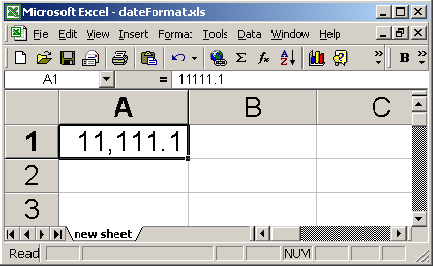
In this example we are going to set the format as "#,##0.0".We are passing value in cell and the output of this will be
11,111.1 .To set the data format we are using setDataFormat() method .In
this method we are creating the object of data format. After that we are setting
is into hssf cell style sheet.
The code of the program is given below:
import java.io.*;
|
The output of the program is given below: